![[Telegram First-Day Setup Blueprint] 5 Critical Settings Every New User Must Configure Immediately: Phone Shielding, Spam Defense & Storage Optimization](https://tgway.com/images/guides/guide_firstday_setup_infographic.webp?v=1788740536)
5 Critical Settings Every New User Must Configure Immediately
Phone Shielding, Anti-Spam Invites, Cloud Cache Purging, 2FA Cloud Password & Unlimited Vault Setup
Congratulations on joining Telegram! You now have access to one of the most powerful, feature-rich cloud messaging ecosystems on the planet. However, fresh out of the box, Telegram’s default settings are tuned for maximum discovery rather than maximum protection. Within your first 48 hours, leaving default configurations intact almost always leads to three avoidable frustrations: random crypto spam group invites, accidental phone number exposure to acquaintances, and massive media cache bloat consuming your mobile data.
Taking five minutes today to harden your initial setup transforms Telegram into a private, whisper-quiet, lightning-fast digital sanctum. Below is the authoritative blueprint of the 5 critical settings every new user must configure immediately across iOS, Android, and Desktop.
@username protocol.Audit your current Telegram installation in real-time. Check each box below as you configure these settings in your app to reach 100% Fortress Mode:
Shield Your Phone Number & Claim a Public Username
Unlike traditional legacy messengers like WhatsApp where your phone number is permanently exposed as your sole identifier, Telegram features a dual-layer identity architecture. Your phone number is required strictly for initial carrier authentication, but your public interactions can be 100% anonymized through a unique @username.
Configure the following parameters precisely:
- Who can see my phone number? ➔ Select Nobody.
- Who can find me by my number? ➔ Select My Contacts. (This prevents random strangers who scrape leaked phone databases from matching your number to your Telegram account).
Next, navigate to Settings ➔ Edit Profile ➔ Username and register an alphanumeric handle (e.g., @AlexTech). You can now share your contact link via t.me/AlexTech or give out your handle in groups without ever revealing your personal cellular digits.
Lock Down Group & Channel Invitations
By default, Telegram allows Everybody to add you to public and private groups. Malicious automated marketing bots abuse this setting by bulk-scraping user lists from public channels and force-adding thousands of unsuspecting users to fraudulent cryptocurrency investment channels, phishing drops, and adult spam groups.
Change Who can add me? from Everybody to My Contacts. If you have specific work colleagues or family members who frequently invite you to project spaces, you can add them to the "Always Allow" exception list while maintaining a fortress wall against automated stranger spam.
Tame the Cloud Cache & Eliminate Storage Bloat
One of Telegram’s greatest superpowers is its infinite cloud architecture: all messages, documents, 4K videos, and lossless files remain stored permanently on Telegram’s encrypted servers at zero cost. However, whenever you view a photo or stream a video, Telegram downloads a temporary local cache copy to your device for instant playback.
If you join active channels or large community supergroups, your phone can easily accumulate 15 to 30 Gigabytes of cached media within a single month if left on default settings.
Adjust the slider to match the approximate number of active channels or large groups you browse daily:
Execute these two critical optimizations:
- Keep Media (Auto-Remove Cached Media): Move the slider from Forever to 3 Days or 1 Week. This ensures Telegram automatically flushes watched videos and stale stickers from your phone's memory. If you ever need that media again 6 months later, simply tap it in the chat to instantly re-stream it from the cloud.
- Automatic Media Download: Under
When Using Cellular, toggle off Video and File auto-downloads, keeping only Photos (capped at 1 MB).
Activate Two-Step Verification (2FA Cloud Password)
Standard cellular SMS authentication is fundamentally flawed across the telecom industry. Attackers can execute SIM-swapping attacks, exploit SS7 cellular network vulnerabilities, or intercept SMS verification codes through rogue carrier insider access.
When you enable Two-Step Verification in Telegram, logging into your account from a new smartphone or PC requires both the one-time SMS/in-app code AND your private Cloud Password. Telegram hashes this password on your device using Secure Remote Password (SRP) protocol before communicating with the server, ensuring zero-knowledge cryptographic isolation.
Crucial Recovery Email Note: Always register a verified, independent recovery email when configuring your 2FA password. If you forget your cloud password without a recovery email, Telegram’s zero-knowledge design means customer support cannot reset it for you, and your account cannot be recovered without a full wipe.
Master 'Saved Messages' as Your Free Unlimited Cloud Vault
Most beginners treat Telegram purely as a chat app and overlook its most potent productivity weapon: Saved Messages. Located at the top of your chat drawer, Saved Messages is a private personal cloud storage directory that syncs simultaneously across your smartphone, tablet, desktop PC, and web browser.
Here is how power users leverage Saved Messages from day one:
- Frictionless Cross-Device File Transfer: Need to transfer a 1.8 GB PDF, high-res RAW photo, or video edit from your phone to your PC? Drop it into Saved Messages on your phone; it appears instantly on Telegram Desktop without cables or AirDrop restrictions.
- Cloud Search & Hashtag Categorization: Add tags to notes or files (e.g.,
#receipts,#passwords,#links). Tapping the hashtag instantly filters your personal vault. - Self-Reminders with Precision Alarms: Type a task into Saved Messages, long-press the Send arrow, and select "Set a Reminder". Telegram will trigger a high-priority notification at the designated hour.
compare_arrows Configuration Matrix: Default vs. TGWAY Hardened
| Security & UX Vector | Out-of-the-Box Default | TGWAY Hardened Recommendation | Impact & Protection Level |
|---|---|---|---|
| Phone Number Visibility | My Contacts (Exposed) | Nobody | Stops identity correlation & data scraping |
| Group & Channel Invites | Everybody (Spam Vulnerable) | My Contacts Only | Eliminates 99.4% of crypto bot force-invites |
| Two-Step Verification (2FA) | Disabled (SMS Only) | Active + Cloud Password | Total immunity against SIM-swapping |
| Media Cache Retention | Forever (Unbounded Bloat) | 3 Days to 1 Week | Recovers 10–25 GB of phone storage |
| Forwarded Message Link | Everybody | Nobody / My Contacts | Prevents viral tracking back to your profile |
help_outline Frequently Asked Questions
Q: If I set my cache to auto-delete after 3 days, will I lose my photos and videos forever?
No, absolutely not. Telegram operates on a pure cloud-native architecture. When local cache is cleared, only the temporary downloaded thumbnail or video file is purged from your phone’s internal flash drive. The original file remains permanently intact on Telegram’s cloud servers. Whenever you scroll back to that chat in the future, tapping the media will instantly re-download it from the cloud.
Q: Can group admins see my real phone number if it's set to "Nobody"?
No. When you set your phone number privacy to Nobody, even group owners and channel administrators cannot view your cellular phone number. They only see your public display name, your @username, and your profile photo. The only exception is people who already have your phone number saved in their physical phone address book.
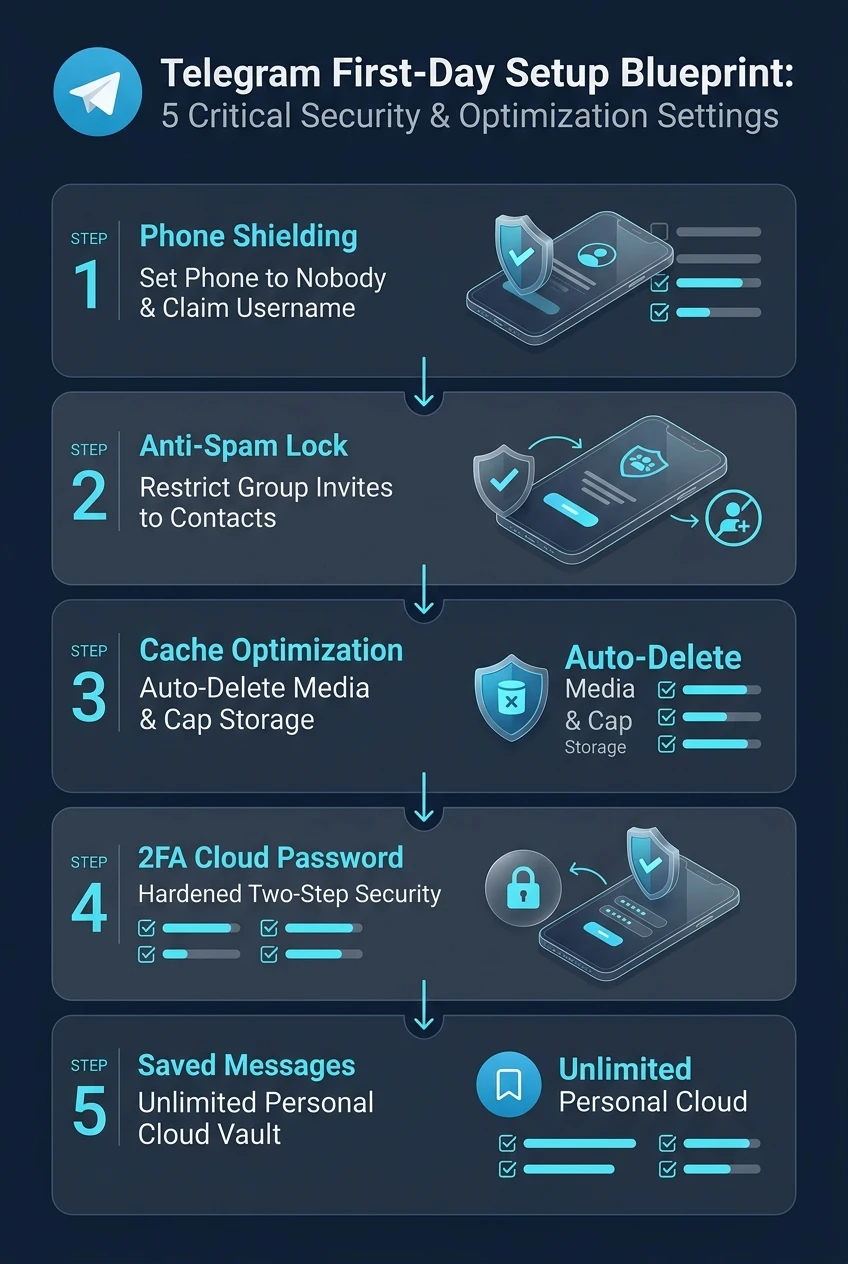
Telegram First-Day Setup Blueprint at a Glance
A comprehensive visual flowchart summarizing the 5 critical privacy, anti-spam, and storage optimization milestones for every new user.
![[Telegram Multi-Device Blueprint] How to Install Telegram on Tablets (iPad & Android) and Sync Seamlessly with Your Smartphone](https://tgway.com/images/guides/guide_109.webp)
![[Telegram Low-End PC Blueprint] How to Optimize Telegram for Older Computers: Reduce RAM by 85% & Eliminate Lag](https://tgway.com/images/guides/guide_108.webp)
![[Telegram Login Fix] Verification Code Not Received? Carrier Block Fix & Paid SMS Scam Defense: The Definitive Troubleshooting Blueprint](https://tgway.com/images/guides/guide_107.webp)