Executive Summary & Threat Model
In an era where Telegram is increasingly adopted for professional communication, your personal life and corporate persona frequently collide. Displaying casual vacation pictures, family portraits, or expressive avatars to company executives, supervisors, or prospective clients can compromise professional boundaries or expose you to unwarranted surveillance. Telegram provides an enterprise-grade Dual-Layer Access Control List (ACL) architecture. This blueprint demonstrates how to restrict your true photo to vetted friends, blacklist managers without raising suspicion, and deploy a convincing Public Decoy Avatar.
shield 1. Architectural Foundation: Telegram's Dual-Layer Photo Engine
Unlike traditional messaging platforms that offer binary privacy ("Show" vs "Hide"), Telegram's MTProto layer employs a dual-tiered attribute model:
Primary Private Avatar
Visible exclusively to authorized principals (e.g., Whitelisted Contacts). Can contain multiple carousel pictures, animated video avatars, and personal snapshots.
Decoy Public Photo
Served dynamically by Telegram's CDN to anyone who is either not in your contacts or explicitly barred via the "Never Allow" blacklist.
admin_panel_settings 2. Step-by-Step Defense Guide: Hiding Photos from Superiors
Execute this exact sequence across your Telegram mobile (iOS/Android) or Desktop client:
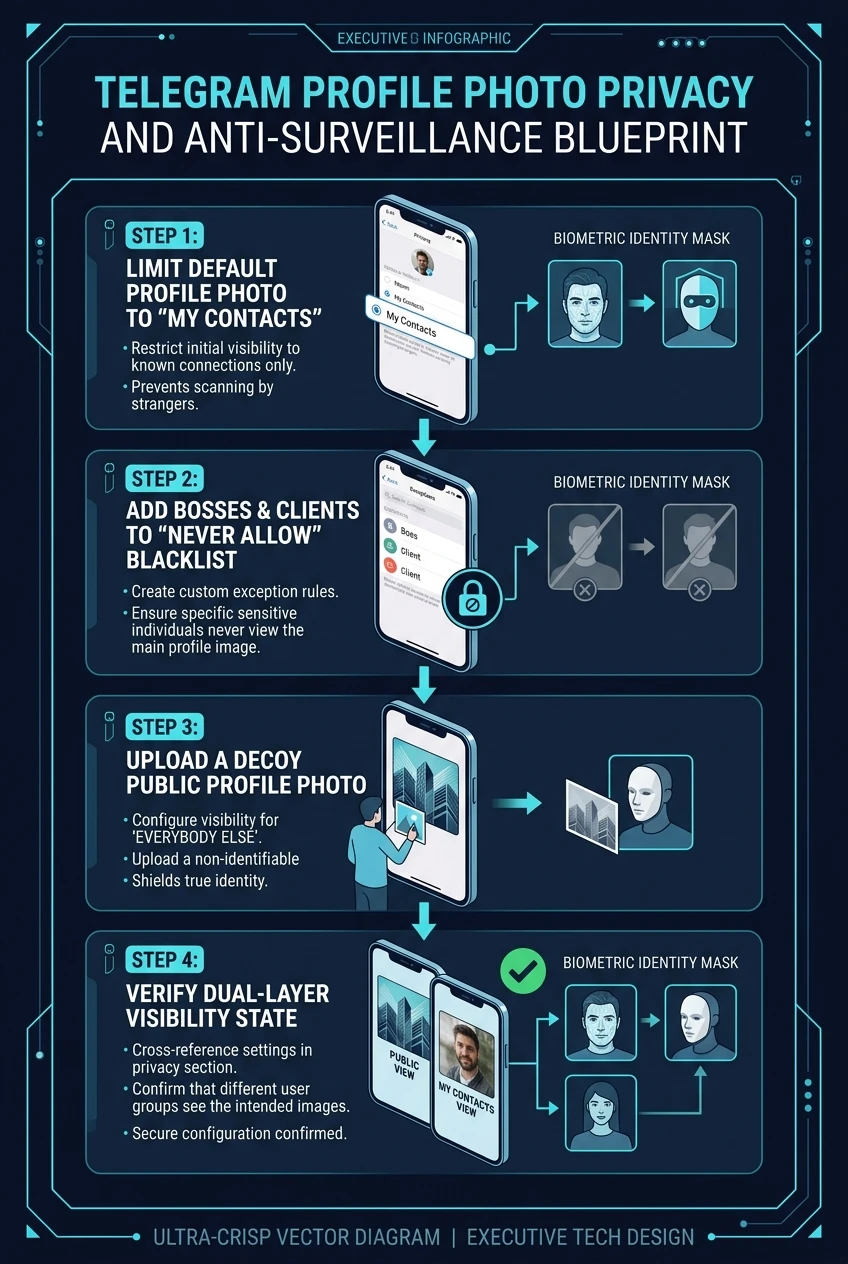
Restrict Default Scope to "My Contacts"
Immediately cut off global visibility so that random group members, channel subscribers, and unverified users cannot harvest your profile pictures.
Add Superiors & Colleagues to the "Never Allow" Blacklist
Because your boss is likely saved in your phone contacts, setting visibility to "My Contacts" still exposes your photo to them. You must add an explicit exception rule.
Upload a Professional "Public Photo" Decoy
If a blacklisted contact opens your profile and sees an empty letter circle, they may suspect you have blocked them or restricted your privacy. Uploading a formal headshot or neutral logo eliminates all suspicion.
Purge Past Historical Profile Photos
Crucial oversight: Telegram archives every profile photo you have ever uploaded in a public carousel. If you updated your photo recently, older personal photos may still be swipeable!
Profile Photo Perspective & Decoy Simulator
Select different viewer profiles to see exactly what image Telegram serves to their device under your custom privacy configuration.
Viewer: Company Executive / Department Head
Never Share With. Telegram server intercepts request and serves the Public Decoy Headshot. The boss perceives a standard professional photo, suspecting zero exclusion.
help_outline 3. Frequently Asked Privacy Questions
Q: Can my boss see that I have set custom privacy settings?
No. Telegram does not notify users when they are blacklisted or denied viewing rights. Because you provided a Public Decoy Photo, their client simply loads that image with no indicator of an exception rule.
Q: Can I set a custom profile photo for a specific contact?
Yes! In Telegram, open a contact's profile, tap "Edit", and tap Set Photo for [Name]. This sets an avatar visible only on your device, or you can suggest it to them via Suggest Photo for [Name].
Profile Photo Anti-Surveillance Blueprint at a Glance
A comprehensive visual flowchart illustrating how to establish dual-layer profile privacy, blacklist sensitive contacts, and deploy an uncompromised public decoy.