LIVE PORTAL Telegram v11.8 API Synchronized Free Animated Stickers
translate Translated
admin_panel_settings ADMIN CONTROLS Web3 Article #17134 • Telegram Stars
edit Edit Article edit_square Write Post list_alt Admin Board

In-App Digital Payments, Tipping Creators, and Unlocking Media

[What Are Telegram Stars and How to Use Them] In-App Digital Payments, Tipping Creators, and Unlocking Media

Have you seen golden glowing star icons appearing in your favorite Telegram channels or mini-apps and wondered what they are? Telegram Stars is Telegram's official virtual currency designed for easy, safe in-app purchases. Fully integrated with Apple App Store and Google Play In-App Purchases, Stars eliminate the hassle of entering credit card numbers or navigating sketchy external checkout pages. With Stars, you can tip your favorite content creators, unlock exclusive photos and eBooks, or buy items inside Telegram games with a single biometric FaceID tap. Here is everything you need to know about getting and using Telegram Stars.

1 star

1-Tap Safe Payments

Buy Stars using Apple Pay or Google Play with biometric Face ID; credit card details are never exposed to bot creators.

2 lock_open

Unlock Paid Media

Unlock exclusive videos, high-res digital art, tutorials, or comic chapters published by channel creators.

3 volunteer_activism

Direct Creator Tips

Send star reactions under great channel posts to directly reward independent writers, journalists, and artists.

4 sports_esports

Mini App Game Items

Purchase power-ups, cosmetic skins, or VIP passes inside viral Telegram web games without leaving the app.

1. Step-by-Step: How to Buy & Use Telegram Stars

1

Go to Settings → Telegram Stars

Open Telegram, tap Settings, and tap Telegram Stars. You will see your current Star balance along with your purchase history.

2

Select a Star Pack (50, 100, 500 Stars)

Tap Buy Stars and select an affordable starter pack (e.g. 50 Stars for ~$0.99). Confirm using your iPhone or Android standard app store payment.

3

Unlock Paid Posts with 1 Tap

When browsing a channel with locked media, simply tap the Unlock with Stars button. The content reveals immediately without reloading the page.

4

Sending Star Reactions to Tip Channels

On any channel post that has Star Reactions enabled, tap the star emoji to tip 1 to 100 stars. Your tip is added to the creator's earnings dashboard!

2. Interactive Comparison: Old Web Checkout vs. Telegram Stars

compare_arrows Checkout Experience Comparison

Buying Digital Goods: Before vs. After

Tap to compare how easy Telegram Stars makes in-app purchases.

1-Tap Instant In-App Unlock via Telegram Stars
Tap 'Unlock' → FaceID confirms → Media unlocks immediately in your chat stream. Your card number is 100% protected by Apple & Google, and you never leave Telegram!
SECURITY: 100% Apple & Google In-App Purchase Protected

3. What Can You Unlock with Telegram Stars?

Digital Good Typical Cost in Stars How It Is Delivered Refund Protection
Paid Photos & Videos 10 ~ 100 Stars (~$0.20 - $2.00) Unblurs immediately in chat Backed by Telegram Platform
Exclusive PDF / Tutorials 50 ~ 500 Stars (~$1.00 - $10.00) Instant file download link Permanently saved to chat
Mini-App Game Powerups 25 ~ 250 Stars Credited to game balance Apple / Google IAP policy
Creator Tipping Reactions 1 ~ 2,500 Stars (Custom) Animated golden reaction badge Direct voluntary support

4. Visual Guide: Telegram Stars In-App Economy Infographic
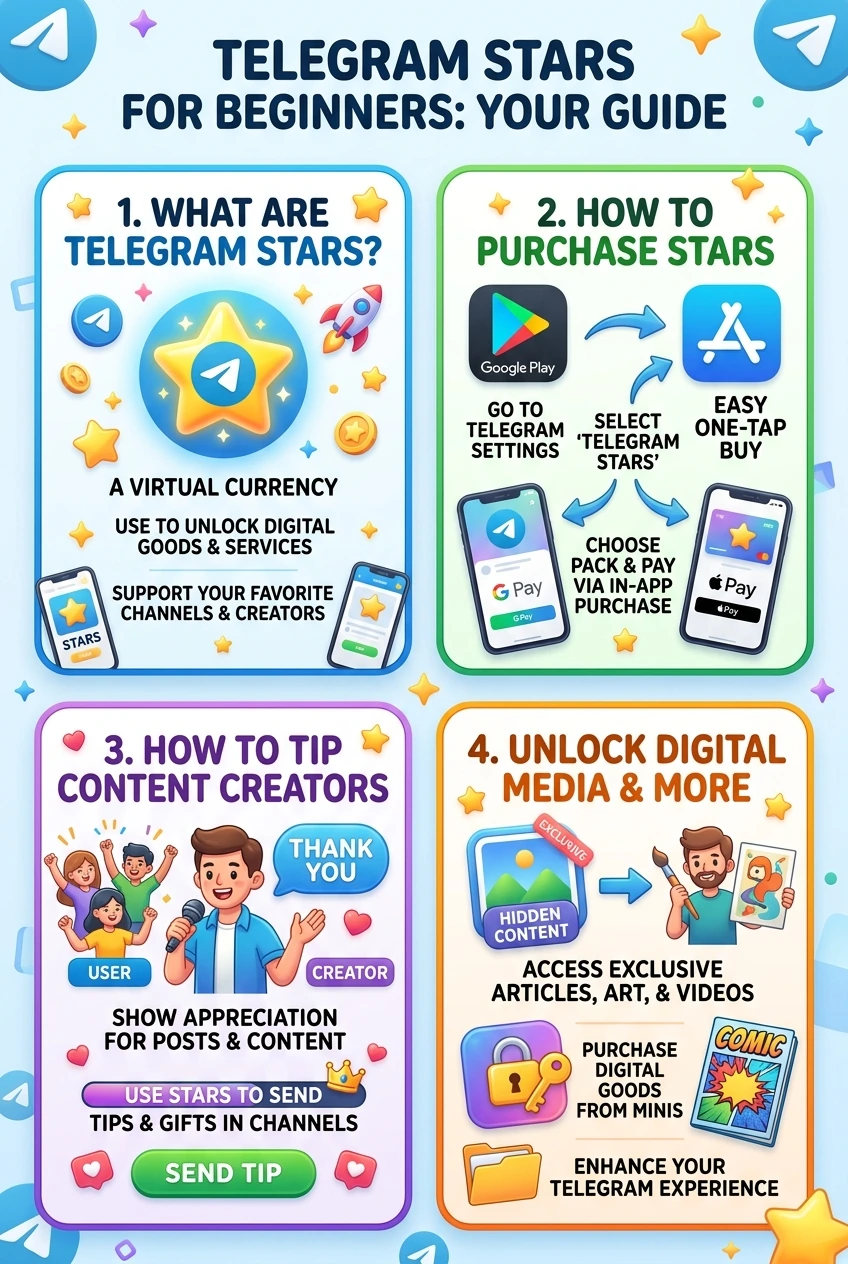
Telegram Stars Virtual Currency and Creator Economy Infographic
Figure 1: How Telegram Stars bridge App Store purchases to creator monetization effortlessly.

5. Frequently Asked Questions (FAQ)

Do purchased Telegram Stars expire?
No. Telegram Stars remain safely attached to your Telegram account and do not expire. You can use them whenever you want across different channels, bots, or mini-apps.
Can channel creators cash out the Stars they receive?
Yes! Channel owners and bot developers can convert accumulated Stars into Toncoin (TON) via the Fragment platform or use them to run subsidized advertisements for their channels on Telegram.
Can I gift Telegram Stars to a friend?
Yes! You can open a friend's profile → tap the three dots icon → select "Gift Stars". It sends an animated gift box right into your private conversation with them!

auto_stories Related Web3 Masterclasses

Telegram Stars

[Subscribing to VIP Channels With Telegram Stars] Safe, Anonymous In-App Access to Exclusive Communities With 1-Click Cancel

arrow_forward Read Guide
Telegram Stars

[Telegram Stars In-App Economy] Digital Goods Invoicing, Bot API Webhooks, and Developer Monetization Payouts

arrow_forward Read Guide
Telegram Stars

[Telegram Stars Recurring Channel Subscriptions & Auto-Expulsion Lifecycle] Web3 Monetization Architecture: In-App Billing APIs, Automated Membership Renewals & Fragment TON Yield Conversion

arrow_forward Read Guide
arrow_back Back to Web3 & Mini-Apps Directory
Enlarged Preview
Click anywhere outside or press ESC to close viewer