How to Inspect & Edit Profiles in Live Voice Chats: In-Call Bio Management & Moderator Identity Guide
Network effortlessly during live audio stages. Discover how Telegram allows you to view expanded participant avatars and bios with a single tap, customize your personal profile mid-call, and manage speaker audio levels without ever minimizing the conversation.
badge
Official demonstration: Tapping participants in an active voice chat to inspect bios and adjust individual volume sliders.
account_circle
Non-Intrusive Profile Sheets
Tap any speaker or listener to instantly view their bio, links, and expanded profile pictures without interrupting audio playback.
edit_note
Live Mid-Call Bio Editing
Update your bio or switch to a contextual profile picture directly from the call interface to display credentials relevant to the topic.
volume_up
Granular Volume Mixing
Boost quiet speakers up to 200% or attenuate loud participants individually right from their profile card.
spatial_audio
In-Call Identity Protocol: Seamless Networking on Massive Audio Stages
In traditional voice rooms, participants are merely audio tracks with tiny icons. If someone says something insightful, finding their profile requires minimizing the call, searching group member lists, and interrupting your listening experience.
Telegram embeds full MTProto user entities directly inside the WebRTC signaling layer. Each participant tile in the roster functions as an active portal to their profile, complete with verified badges, bio hyperlinking, and direct 1-on-1 private messaging gateways.
tune
Interactive Voice Chat Participant Sandbox
Tap Any Speaker to Inspect & Mix Audio
Click on any of the live participants in the simulated roster below to inspect their full profile, bio, and adjust their individual volume level!
AR
Alex Rivera
Speaking 🔊
ER
Elena Rostova
Host 👑
MC
Marcus Chen
Listener 🎧
AR
Alex Rivera
Speaker
Lead Systems Architect @ CloudOps | Building high-throughput WebRTC infrastructure.
volume_up
Individual Volume100%
checklist
How to Inspect Profiles in a Voice Chat
1
Tap the Participant Row
While inside any active voice chat, simply tap directly on any user's name or avatar in the participant list.
2
Read Full Bio & Shared Links
A slide-over profile sheet reveals their full bio text, website links, username, and mutual group memberships.
3
Adjust Independent Audio Volume
Use the integrated volume slider to personalize that specific speaker's output from 0% (mute) up to 200% (boost).
4
Send Direct 1-on-1 Message
Tap the chat bubble icon on their profile card to open a private message draft while continuing to listen in background audio mode.
lightbulb
Audio Networking Tip: Contextual Bio Switching
Hosting an AMA or career panel? Tap your own avatar in the voice chat participant list and edit your bio to include your LinkedIn profile or project repository. All attendees can view it instantly without you needing to paste links in chat.
account_tree
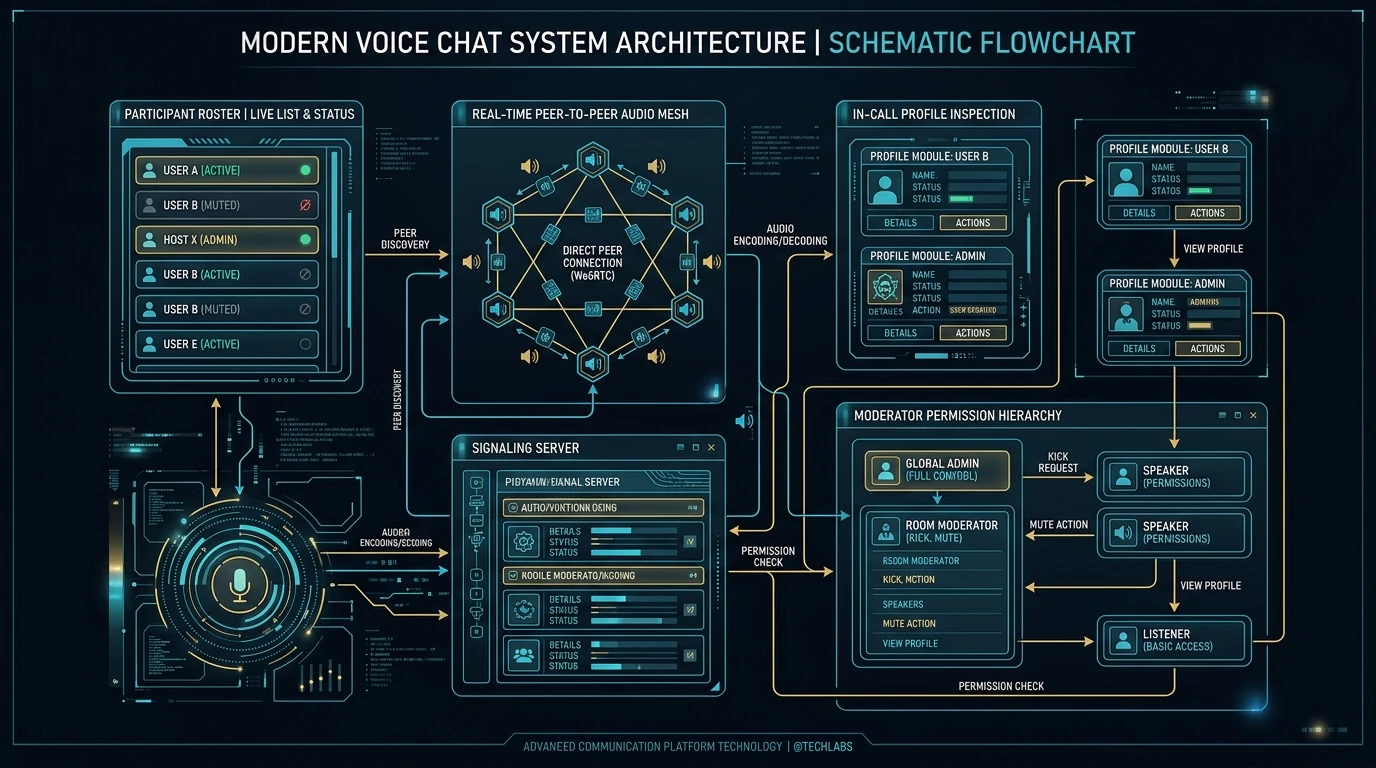
One-Page Executive Infographic
Telegram Voice Chat Profile System Architecture at a Glance
A comprehensive visual blueprint explaining in-call WebRTC identity mapping, DSP volume mixing, moderator permission hierarchies, and seamless profile sheet injection.
💡 Tip: Click the image to view the ultra-sharp full-resolution infographic poster in the interactive lightbox viewer.