
How to Use Telegraph & Instant View in Telegram: Markdown Publishing, Zero-Latency Articles & Rich Media Embeds Guide
Publish beautifully formatted blogs, long-form technical guides, and visual essays in seconds. Learn how telegra.ph converts browser text and markdown into native, zero-latency Instant View layouts directly inside Telegram with no web page load times.
auto_stories
Official demonstration: Authoring an article on telegra.ph and reading it instantly via native Instant View in Telegram.
Sub-10ms Instant View
Articles pre-cached on Telegram's MTProto edge servers open instantaneously without downloading ads, heavy trackers, or bloated scripts.
Headless Zero-Auth Publishing
Publish anonymously with zero mandatory signup, or link your browser session to @Telegraph bot for cross-device editing persistence.
Rich Multimedia Embeds
Seamlessly embed YouTube clips, Twitter/X posts, Vimeo videos, and high-resolution photo galleries simply by pasting URLs.
menu_book Instant View Architecture: How Telegram Eliminates Mobile Web Latency
Modern web pages average over 2.5MB in size, packed with third-party tracking scripts, cookie consent walls, and render-blocking CSS. Clicking an external link on a cellular connection can easily introduce a 5-second wait before text becomes readable.
Telegram solves this with server-side DOM minification and Instant View (IV) templating. When a telegra.ph link is posted, Telegram's edge parsers extract the core semantic content (headings, paragraphs, images, code blocks) and compile it into a compact binary format. When a user taps "Instant View", Telegram renders the article using native OS UI components in under 10 milliseconds with zero network latency.
tune
Interactive Telegraph & Instant View Composer
Simulate Telegraph Authoring & Live Instant View Rendering
Format content using the buttons below, then click "Open in Instant View" to experience Telegram's native zero-latency reader engine.
edit
Telegraph Web Editor (telegra.ph)
bolt
TELEGRAM INSTANT VIEW
0.008s render
The Future of Distributed Messaging
By Anonymous Author • telegra.ph/dist-msg-06
Telegram has transformed modern communication through end-to-end cryptographic integrity and seamless cross-platform synchronization.
Speed and privacy are not mutually exclusive.Instant View ensures that readers access content without bloated browser overhead.
format_list_numbered Step-by-Step: Publishing & Sharing Telegraph Articles
1
Visit Telegraph in Any Browser
Navigate to telegra.ph. You are immediately presented with a clean, distraction-free canvas with Title, Your name, and Your story fields.
2
Format Content & Embed Media
Highlight any text to reveal the inline formatting toolbar (Bold, Italic, Headings, Quotes, Code). Press Enter on a new line and tap the camera or code icon to embed images, YouTube videos, or Twitter/X tweets.
3
Publish & Share in Telegram
Click Publish in the upper right. Copy the resulting URL and paste it into any Telegram chat. Telegram will instantly attach the lightning-fast Instant View button below your message card.
table_chart Publishing Comparison: Telegraph Instant View vs External Web Articles
| Metric / Capability | Telegraph (Instant View) | Standard Web Page |
|---|---|---|
| Time to First Render | < 10 milliseconds (Instantaneous) | 1,800ms – 4,500ms |
| Payload Size | 15 KB – 80 KB (Pure Markdown/DOM) | 1.5 MB – 5.0 MB (Scripts, Ads, Trackers) |
| Mandatory Registration | None (Headless / Zero Signup) | Often requires CMS account or login |
| In-App Dark Mode Sync | Automatic (Adapts to app theme) | Depends on website CSS implementation |
| Third-Party Tracker Cookies | Zero (100% Tracker Free) | Multiple tracking pixels & cookie banners |
| Offline Reading Cache | Cached locally in MTProto database | Requires network connection to load |
lightbulb
Pro Tip: Link Your Browser with @Telegraph Bot for Author History
Want to edit your Telegraph posts from multiple computers or your phone? Start the official @Telegraph bot inside Telegram and tap "Log in on this device". The bot will link your browser cookies with your Telegram account, letting you view page analytics and edit past articles across all your devices!
auto_graph
Vertical Architecture Breakdown
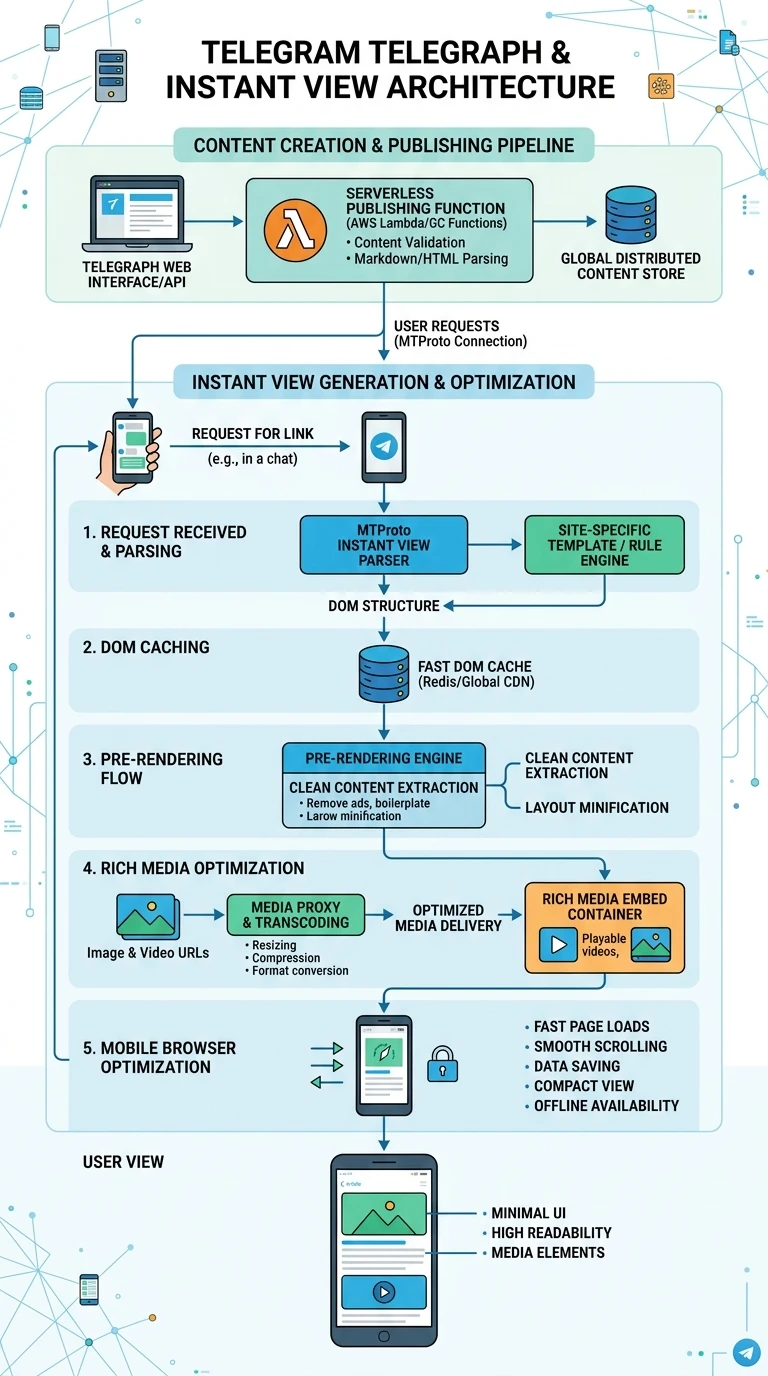
Executive Infographic: Telegram Telegraph & Instant View Architecture
A comprehensive vertical architectural poster detailing Telegraph serverless publishing, the MTProto Instant View parser pipeline, edge DOM caching, rich media transcoding, and zero-latency client rendering. Click the preview below to inspect in high-resolution lightbox view.
auto_stories
More in "Tips & Video Shorts" Learning Track


