
How to Use Telegram Video Calls on Tablets: Split-Screen Multi-Tasking, Responsive Grid Layouts & Landscape Mode Guide
Maximize screen real estate during large group meetings on iPad and Android tablets. Learn how Telegram leverages widescreen displays with dedicated participant sidebars, dynamic responsive video tiles, landscape multitasking, and hardware-accelerated rendering.
tablet_mac
Official demonstration: Tablet split-screen video call layout with responsive side panel participant list and video grid.
Adaptive Dual-Column UI
In landscape orientation, the participant roster docks neatly on the left rail while the main video grid occupies the widescreen canvas.
Seamless Orientation Shift
Rotate between portrait and landscape instantly without interrupting audio streams, dropping frames, or reconnecting to the room.
Vulkan / Metal GPU Pipeline
Leverages low-overhead GPU shaders to compose multiple video feeds simultaneously, preventing thermal throttling during multi-hour meetings.
architecture Responsive Viewport Engine: Tailored for Large-Screen Form Factors
Most messenger applications simply stretch their mobile phone interface when running on tablets, resulting in comically enlarged buttons and wasted display area. Telegram takes an entirely different approach.
On iPadOS and Android tablets (display width > 720dp), Telegram activates an independent multi-pane compositing engine. The left sidebar functions as an active participant controller where hosts can search, manage audio permissions, and monitor unmuted speakers, while the main viewport arranges video tiles in dynamic auto-fitting CSS/GPU grids based on aspect ratios.
tune
Interactive Tablet Viewport Sandbox
Test Landscape vs Portrait Tablet Layouts
Toggle the simulated tablet orientation below to see how Telegram automatically reflows participant sidebars and multi-feed video grids.
Participants (4)
Alex Vance
mic
Elena R.
mic
Marcus T.
mic_off
You
mic
Alex (Camera)
Elena (Camera)
Marcus (Screen)
You (Camera)
format_list_numbered Step-by-Step: Best Practices for Tablet Group Calls
1
Rotate to Landscape for Presentations
Unlock screen rotation on your iPad or Android tablet and turn it horizontally. Telegram instantly expands the video canvas and renders the participant management sidebar on the left.
2
Pin Key Presenters to Hero Viewport
Double-tap any speaker's tile in the grid to pin them as the large primary video feed, moving all secondary participants into a neat horizontal thumbnail strip below.
3
Activate Picture-in-Picture (PiP) Multitasking
Swipe up or tap the minimize button to float the video call window anywhere on your screen. You can read PDF notes, browse other Telegram channels, or take meeting minutes in another app simultaneously.
table_chart Tablet Experience: Telegram vs Other Group Call Apps
| Specification | Telegram for Tablets | Generic Mobile Port Apps |
|---|---|---|
| Layout Optimization | Native Multi-Column Dual View | Stretched smartphone UI |
| Orientation Flexibility | Instant zero-flicker reflow | Often forces portrait or video reloads |
| Picture-in-Picture (PiP) | System-native PiP with resize handle | Basic in-app PiP only |
| Battery Efficiency | Hardware GPU shaders (Vulkan/Metal) | CPU software compositing |
| Participant Management | Permanent left rail sidebar in landscape | Obscures entire screen with popups |
lightbulb
Pro Tip: Split View Multitasking with Apple Notes or Notion
On iPadOS, drag your favorite note-taking application (like Apple Notes or Notion) from the Dock to the right side of the screen to enter Split View. Telegram will automatically compress its call grid while keeping all video feeds running smoothly at full frame rate!
auto_graph
Vertical Architecture Breakdown
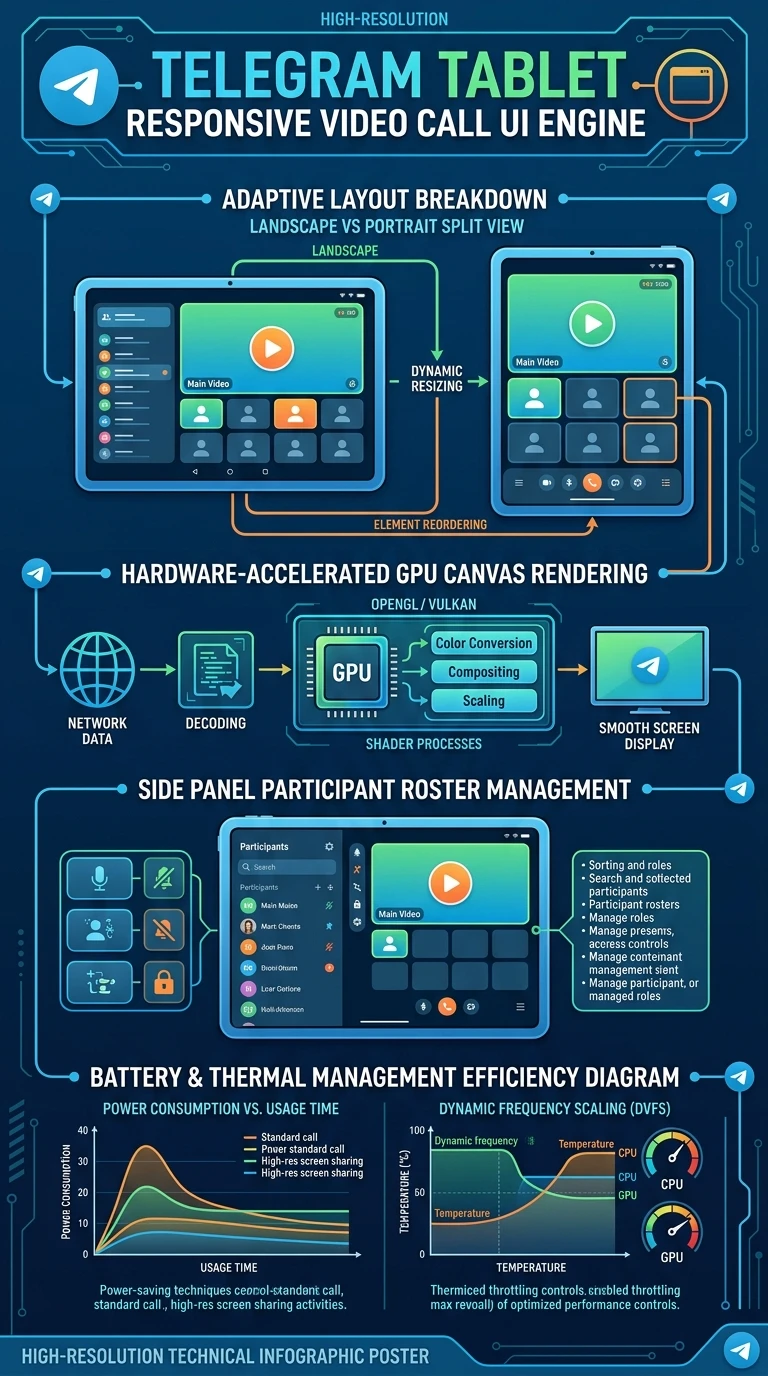
Executive Infographic: Telegram Tablet Responsive Video Call UI Engine
A vertical technical architecture poster illustrating Telegram's adaptive tablet layout reflow engine (Landscape Split View vs Portrait Stack), GPU canvas shader pipeline, participant sidebar management, and battery efficiency optimization. Click the preview below to inspect in high-resolution lightbox view.
auto_stories
More in "Tips & Video Shorts" Learning Track


