
How to Use Telegram Bot Menus: Contextual Command Palettes, Role-Based Access & Quick Action Buttons Guide
Eliminate memorizing slash commands when interacting with automated services. Discover how Telegram's persistent Bot Menu button provides instant access to organized command lists, contextual descriptions, language-aware action triggers, and seamless Web App launches.
smart_toy
Official demonstration: Opening the dedicated bot menu button to browse categorized commands with inline descriptions.
Persistent Menu Button
A dedicated menu pill docks on the left of the input field, replacing manual slash typing with a 1-tap interactive command sheet.
Localized Command Scopes
Bot commands adapt automatically to the user's language settings and permissions, hiding admin commands from standard members.
Mini-App Web Launchers
Developers can configure the menu button to launch full-screen interactive Web3 apps and e-commerce stores directly inside chats.
architecture Bot API Scope Architecture: Context-Aware Command Routing
In legacy bot systems, typing a slash (
/) produced an unorganized wall of dozens of commands regardless of whether the user was in a private chat or a 10,000-member group.
Telegram solves this through MTProto BotCommandScopes. Bot developers can register granular scopes via the Bot API (
setMyCommands):
default (all users), all_group_chats, all_chat_administrators, or chat_member for custom user overrides. When a user opens the bot menu, Telegram evaluates client language and role hierarchy locally to render only actionable, authorized tools.
tune
Interactive Bot Command Palette Sandbox
Experience Contextual Bot Menus & Role Scopes
Switch user roles below to test how Telegram dynamically changes the command palette, then click the Menu button to trigger commands.
format_list_numbered Step-by-Step: Utilizing Bot Menus Effectively
1
Open Any Chat with a Verified Bot
Search for or open any modernized Telegram bot. You will notice a prominent blue Menu pill permanently positioned on the bottom left of your chat bar.
2
Browse Command Descriptions & Categories
Tap Menu to reveal an organized scrollable sheet. Each command displays a clear, concise description of what it performs (e.g.,
/settings, /balance, /export).
3
Execute Instantly with a Single Tap
Tap any command from the list. Telegram automatically formats and dispatches the instruction into the conversation thread without manual typing errors.
table_chart Bot Navigation: Modern Menu Button vs Legacy Slash Typing
| Capability | Dedicated Bot Menu Button | Legacy Slash Commands (/) |
|---|---|---|
| Input Discovery | 1-Tap persistent visual sheet | Requires typing / to trigger popup |
| Role-Based Filtering | Displays only permissions user has | Shows all commands including denied ones |
| Multi-Language Localization | Translates descriptions on the fly | Usually static English strings |
| Web App Launch Support | Yes (Can launch Web3 Mini-Apps) | No (Text commands only) |
| Mobile Typing Speed | Instant zero-friction execution | Prone to keyboard typos |
lightbulb
Pro Tip for Bot Developers: Dynamic Scope API
Building a bot? Use the
setMyCommands method with BotCommandScopeChatAdministrators to expose secret management tools (like /ban, /purge, and /stats) strictly to group admins while keeping the regular member menu clean and uncluttered!
auto_graph
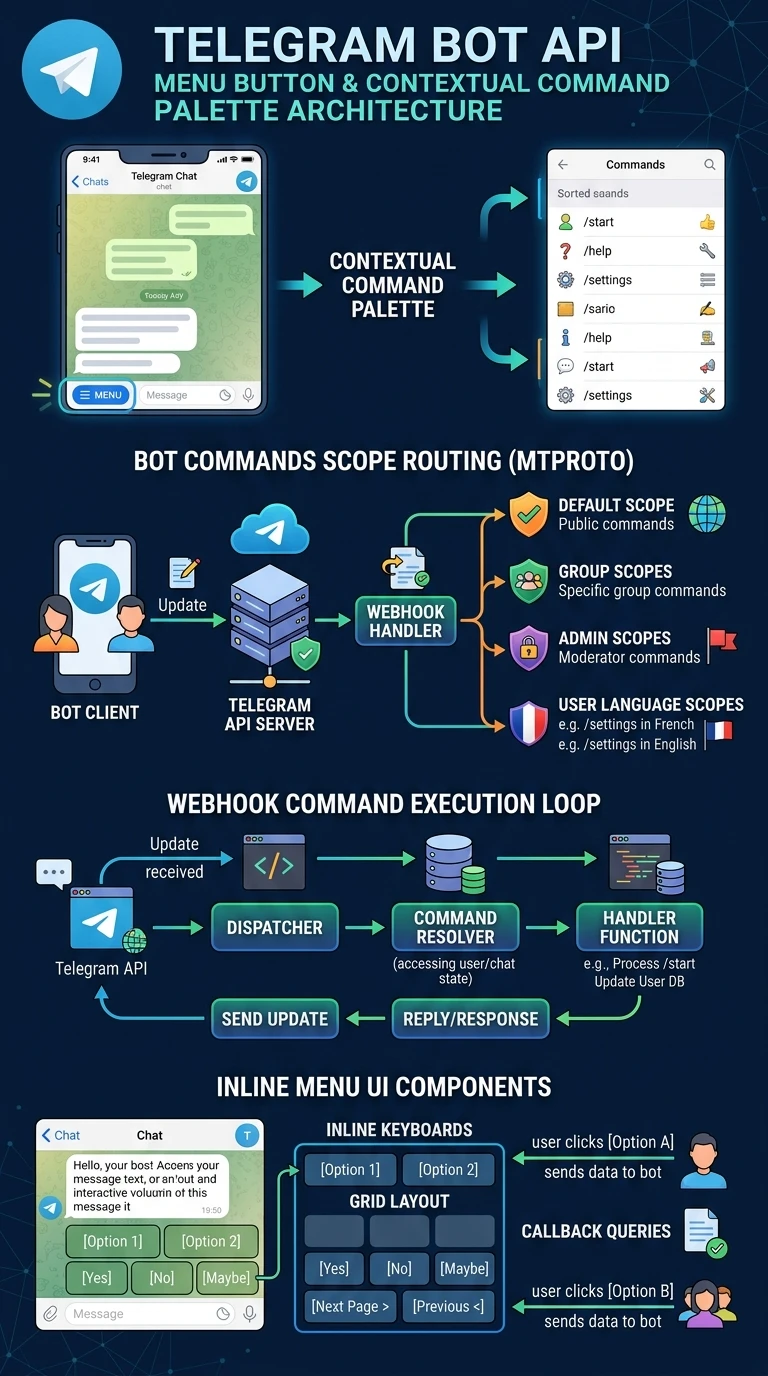
Vertical Architecture Breakdown
Executive Infographic: Telegram Bot API Menu Button & Contextual Command Palette Architecture
A high-definition vertical technical architectural poster detailing Telegram's MTProto BotCommandScope routing, webhook dispatch loops, multi-language localization, and inline keyboard UI integration. Click the preview below to inspect in high-resolution lightbox view.
auto_stories
More in "Tips & Video Shorts" Learning Track


