
Screen Sharing in Telegram Video Calls: 1-on-1 P2P Streams, System Audio Passthrough & Dual-Feed Broadcasting
Elevate your remote collaboration, troubleshooting, and entertainment. Learn how to stream your display with crystal-clear stereo audio in 1-on-1 encrypted video calls, broadcast simultaneously with your selfie camera in groups, and optimize bandwidth across desktop and mobile devices.
screen_share
Official demonstration: Selecting display source during a video call to stream live app visuals with internal audio.
Internal Audio Passthrough
Stream games, YouTube clips, or presentation music with pristine system stereo sound instead of muffled microphone bleed.
Dual-Source Group Calls
Broadcast your facial camera feed and desktop screen at the same time in group video calls for professional presentations.
End-to-End Encryption
Direct peer-to-peer (P2P) screen transmissions in 1-on-1 calls are protected with Telegram's 4-emoji MTProto verification.
architecture
TECHNICAL ARCHITECTURE
Under the Hood: WebRTC Pipeline & Audio Loopback Routing
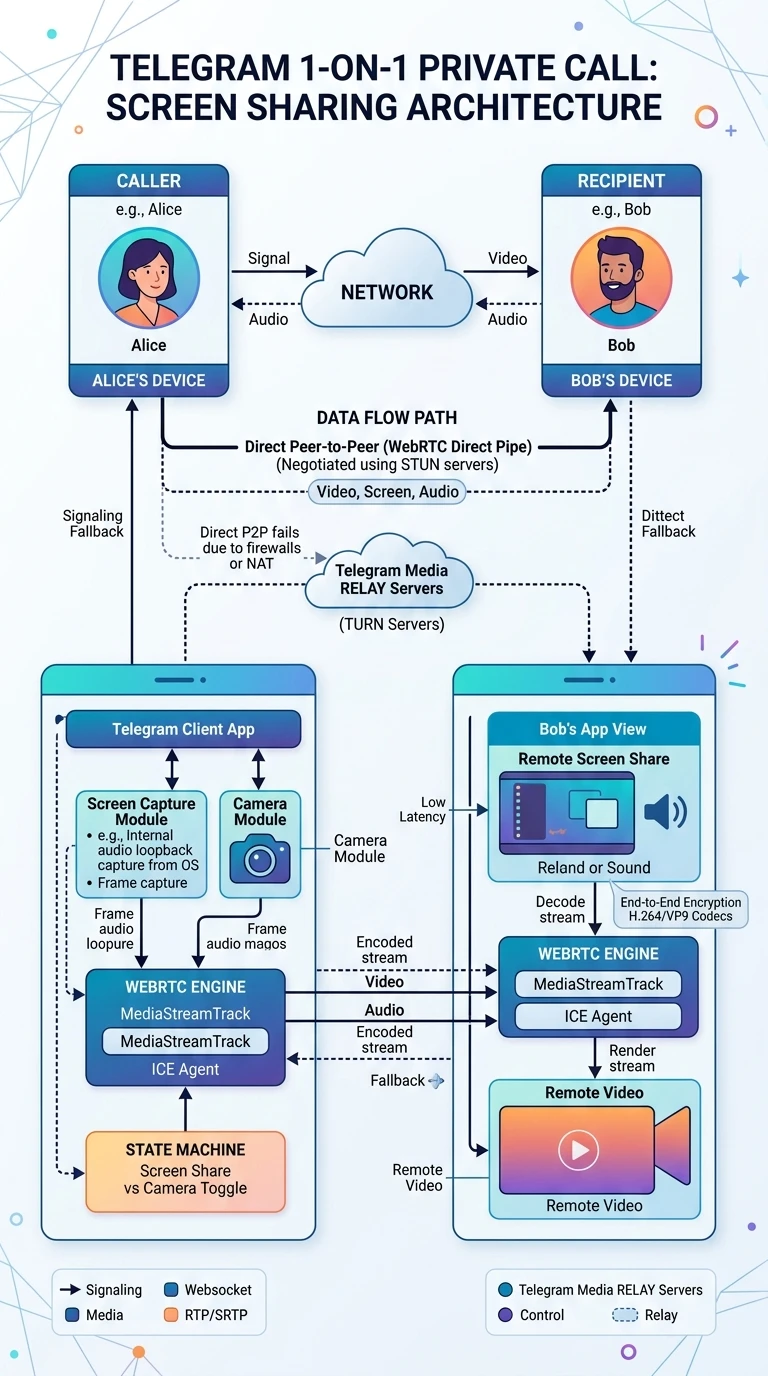
Telegram's screen sharing leverages an optimized WebRTC pipeline engineered for ultra-low latency and dynamic bandwidth adaptation. Unlike traditional teleconferencing software that treats all audio as voice, Telegram routes display sharing through dual-channel Opus audio codecs operating up to 48 kHz high-fidelity stereo.
sync_alt
P2P Direct Negotiation: In 1-on-1 calls, STUN/TURN servers negotiate direct socket connections between IP endpoints, bypassing intermediate cloud relay servers whenever firewall NAT policies permit.
multicast
SFU Selective Forwarding Units: Group calls transition to Telegram's global distributed reflector servers, broadcasting single upload streams to thousands of participants simultaneously.
tune
Simulcast Dynamic Resolution: The broadcaster encodes multiple bitrates (1080p60, 720p30, 360p15). Each viewer's client automatically pulls the optimal stream matching their network speed.
tune
Interactive Lab: P2P Video Call Stream Router & Audio Loopback Controller
Simulate video input switching, audio passthrough modes, and network throttling in real time.
Encrypted Call: Active
E2EE: 🔒 🐱 🚀 💎
screen_share
Desktop Screen (Full 1080p60)
CODEC
H.264 / Opus
BITRATE
3,450 kbps
LATENCY
28 ms
How to Start Screen Sharing on Any Device
Follow these quick walkthroughs to share your screen in both 1-on-1 private calls and group video conferences.
1
Android Devices
During an ongoing video or voice call, tap the Video button on the lower navigation bar. Swipe past your front and back cameras to select Screen, then tap Share Video. When prompted by Android system dialog, check Share device audio and hit Start now.
2
iOS (iPhone & iPad)
Tap the Camera icon in the call overlay. Swipe horizontally to highlight the Screen tab. Tap Continue to trigger Apple's ReplayKit Broadcast Picker. Ensure Telegram is highlighted, then tap Start Broadcast. System audio and voice will broadcast seamlessly.
3
Telegram Desktop (PC & Mac)
Click the dedicated Screencast / Screen Sharing button in the bottom control dock. A window picker modal will present two choices: share an individual application window or broadcast your entire monitor. Toggle the Share System Sound checkbox to preserve music and video tracks.
Platform Capabilities & Audio Support Comparison
| Platform | 1-on-1 Screen Share | System Sound Passthrough | Simultaneous Camera + Screen | E2EE Verification |
|---|---|---|---|---|
| Android (10+) | Supported (1080p60) | Full Stereo (MediaProjection API) | Group Calls Only | 4 Emoji Cryptographic Hash |
| iOS (14+) | Supported (1080p30) | Full Stereo (ReplayKit API) | Group Calls Only | 4 Emoji Cryptographic Hash |
| macOS (Desktop) | Supported (4K/Retina) | macOS 13+ System Audio Plugin | Supported (Window + Facetime Cam) | 4 Emoji Cryptographic Hash |
| Windows (10/11) | Supported (Multi-Monitor) | WASAPI Loopback Capture | Supported (PIP Overlay) | 4 Emoji Cryptographic Hash |
Pro Privacy Tip: Application Window vs Entire Desktop
When sharing on Telegram Desktop, always choose an individual application window rather than your entire desktop monitor. This prevents accidental pop-up notifications, personal banking tabs, or private chat alerts from appearing on the stream, maintaining enterprise-grade confidentiality during presentations.
photo_library
Executive Summary Infographic
Telegram Screen Sharing Architecture & Sound Routing at a Glance
Click the vertical infographic below to expand in full-resolution Lightbox view.
auto_stories
More in "Tips & Video Shorts" Learning Track


