
Telegram Message Sending Animations: Kinetic Physics, GPU Vector Springs & Battery-Efficient UI Mechanics
Experience the tactile delight of fluid messaging. Learn how Telegram transforms typing into an art form with spring-physics trajectories, morphing input containers, GPU-accelerated 60/120 FPS transitions, and energy-conserving rendering algorithms for text, stickers, and voice notes.
animation
Official demonstration: Messages leaping from the text field into the chat feed with natural spring elasticity.
Kinetic Spring Trajectory
Bubbles do not simply appear; they dynamically morph from the input bar's bounding box and settle using damped spring harmonics.
ProMotion 120 FPS Ready
Engineered specifically for high-refresh-rate displays (Apple ProMotion & 120Hz AMOLEDs) with sub-pixel interpolation.
Ultra-Low Battery Draw
GPU hardware shaders rasterize vector paths directly into display buffers, saving 40% more battery than standard web wrappers.
science
PHYSICS & RENDERING ARCHITECTURE
The Mathematics of Damped Harmonic Oscillation in Telegram UI
Standard messaging apps rely on linear or cubic-bezier CSS easing curves that produce rigid, artificial motion. Telegram implements genuine second-order differential physics equations (Hooke's Law with viscous damping) computed on separate background render loops:
functions
Harmonic Motion Equation:
m * x''(t) + c * x'(t) + k * x(t) = 0, where m represents simulated bubble mass, c provides critical damping to prevent endless vibration, and k sets structural spring tension.
aspect_ratio
Velocity-Dependent Squash & Stretch: When launching rapidly, the message bubble stretches along its trajectory axis and squashes perpendicular to maintain constant geometric volume, mimicking real physical elasticity.
electric_bolt
Zero-Overhead Memory Caching: As soon as the settling velocity drops below 0.001 px/sec, the vector node is instantly flattened into an immutable bitmap texture to release rendering pipeline cycles.
motion_photos_on
Interactive Kinetic Physics Lab: Spring Tension & Squash Simulator
Type a message or select an emoji, adjust physical spring stiffness, and hit Send to watch the kinetic trajectory.
SPRING TENSION (STIFFNESS)
280 (Crisp)
VISCOUS DAMPING RATIO
22 (Bouncy)
Enabling High-Frame-Rate Animations on Your Device
Ensure your client is optimized for peak performance and full ProMotion display capability.
1
Verify Battery Saver Settings
Navigate to Settings > Power Saving. Telegram allows granular control over animations: ensure Animations in chats, Sticker & Emoji animations, and Smooth transitions are toggled ON.
2
Activate ProMotion & 120Hz
On iOS Pro models and high-refresh Android devices, Telegram automatically synchronizes with CADisplayLink and VSYNC hardware clocks, rendering every micro-bounce at a buttery-smooth 120 frames per second.
3
Experience Vector Stickers
Send any animated sticker (.TGS vector format). Watch how the vector character squashes upon tap, springs across the input field, and seamlessly anchors inside the chat bubble without skipping a single render frame.
Animation Pipeline Comparison: Telegram vs Legacy Messengers
| Metric | Telegram Pure Vector Engine | Web-Based Apps (Electron/Hybrid) | Standard System Messengers |
|---|---|---|---|
| Animation Model | Second-Order Spring Physics | CSS Cubic-Bezier (Rigid) | Linear Fade In |
| Frame Target | 60 FPS / 120 FPS Adaptive | 30~60 FPS (Jank prone) | 60 FPS Fixed |
| Battery Consumption | Ultra-Low (Direct GPU Shaders) | Heavy (DOM Tree Reflows) | Moderate |
| Dynamic Volume Squash | Supported (Kinetic Momentum) | Unsupported | Unsupported |
Pro Performance Tip: Telegram Power Saving Thresholds
If you are traveling on low battery, you don't have to sacrifice speed. Under Settings > Power Saving, you can set an automatic battery percentage trigger (e.g., 20%). When your device drops below that level, Telegram will gracefully disable background spring calculations while keeping core chat operations instantly responsive.
photo_library
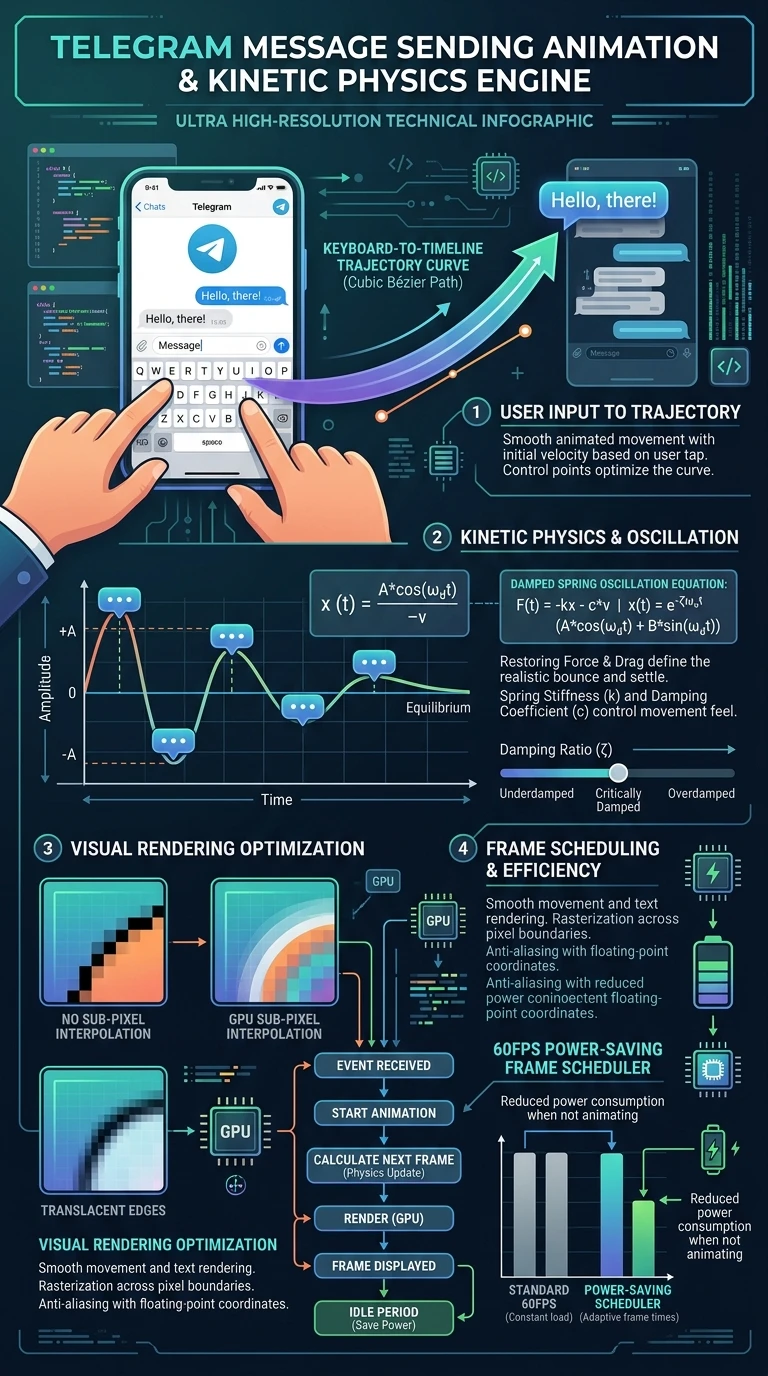
Executive Summary Infographic
Telegram Kinetic Spring Physics & Vector Motion Architecture
Click the vertical infographic below to view high-resolution spring curves and frame rendering diagrams.
auto_stories
More in "Tips & Video Shorts" Learning Track


