
How to Use Telegram Sticker Suggestions: Instant Emoji-to-Sticker Matching, Keyword Tries & Suggestion Tray Guide
Accelerate your visual expression without digging through dozens of sticker packs. Learn how typing a single emoji in Telegram instantly summons a horizontal smart tray of animated and static sticker recommendations matching your exact emotion and context.
sentiment_satisfied
Official demonstration: Typing a single emoji into the input field to trigger instant animated sticker suggestions above the keyboard.
Instant 1-Tap Trigger
Type any standard Unicode emoji in your message bar to pop up a contextual tray of installed and trending stickers with zero lag.
Multilingual Emoji Mapping
Sticker creators tag art with emotions; Telegram's linguistic trie matches your input across synonyms and multiple global languages.
1-Tap Instant Dispatch
Tapping any suggested sticker immediately replaces the draft emoji and dispatches the animated vector asset into the conversation.
search
ENGINEERING DEEP DIVE
Client-Side Trie Matching & Cloud Keyword Resolution
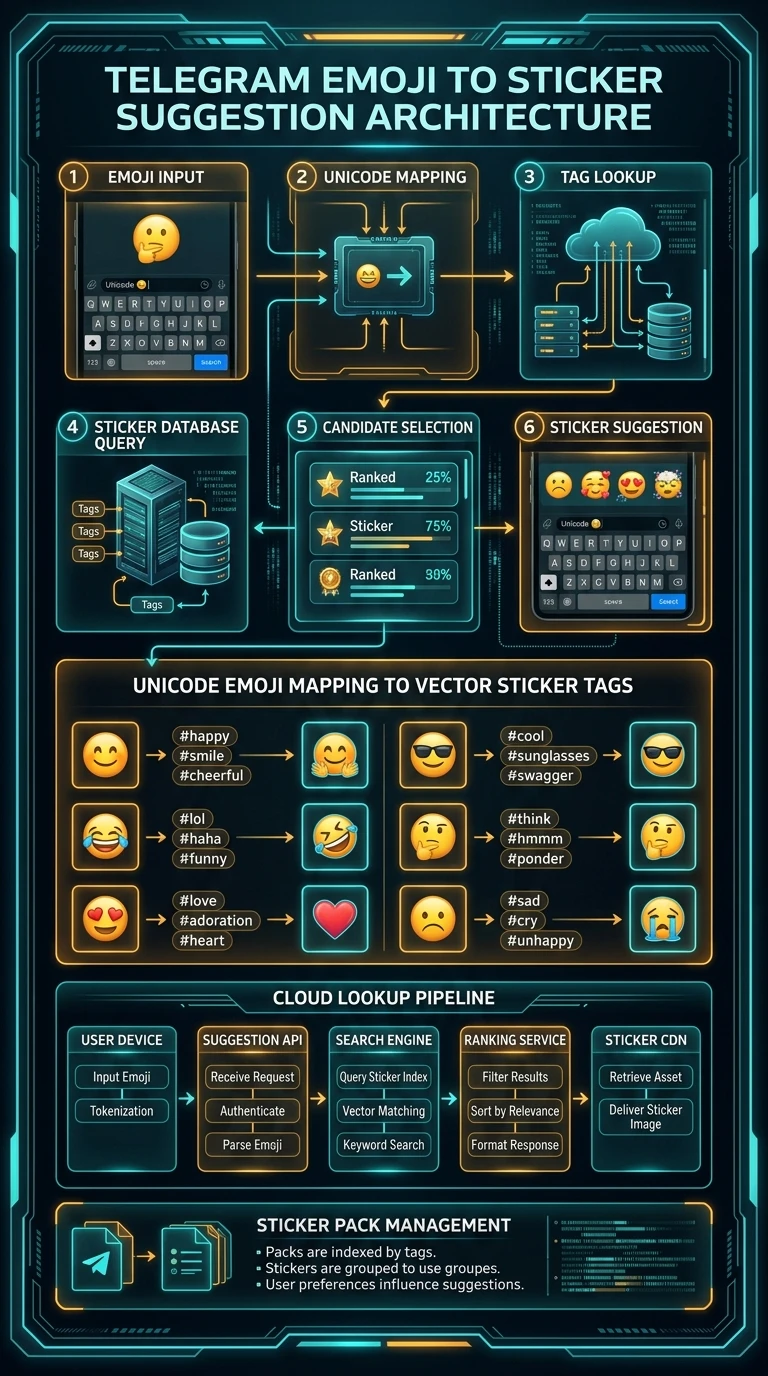
Standard messaging systems send every keystroke to external suggestion servers, introducing network latency and privacy exposure. Telegram computes emoji-to-sticker mappings using an in-memory prefix trie residing directly inside the client:
bolt
Sub-5 Millisecond Lookup: When an emoji is typed, the client queries local pack manifests. Emojis act as hash table keys pointing directly to cached Lottie vector document IDs.
star_half
Installed vs Trending Separation: Stickers from packs you have actively added to your account appear first, followed gracefully by viral candidates from the global Trending directory.
tune
Granular Privacy Toggle: Under Settings > Chat Settings > Stickers and Emoji, you can toggle suggestions between All Sets, My Sets, or None based on your preference.
psychology_alt
Interactive Lab: Emoji-to-Sticker Suggestion Engine Simulator
Click or type an emoji below to observe how Telegram's recommendation tray generates instant vector stickers.
Quick Test Emojis:
Type an emoji below to see matching sticker suggestions pop up! 👇
Suggestions:
Lookup: 1.8ms
How to Use Sticker Suggestions
Follow these three simple steps to summon stickers effortlessly in any chat.
1
Type a Single Emoji
In your message input bar, type one emoji (e.g. 👏 or 😎). Ensure there is no accompanying text, as the suggestion trigger requires an isolated glyph.
2
Browse Suggestion Tray
A horizontal strip of matching stickers will pop up immediately above your keyboard. Swipe horizontally to browse through your installed and trending packs.
3
Tap to Send
Tap any sticker thumbnail. The draft emoji will vanish and your chosen animated sticker will fly into the chat instantly at 60 FPS.
Sticker Suggestion Configuration Modes
| Setting Mode | Installed Packs Included | Trending Packs Included | Network Traffic |
|---|---|---|---|
| All Sets (Default) | Yes (Priority 1) | Yes (Priority 2) | Zero (Local in-memory index) |
| My Sets Only | Yes (Strictly personal library) | No | Zero |
| None (Disabled) | Disabled | Disabled | None |
Pro Creator Tip: Multi-Tagging for Maximum Reach
When creating custom sticker packs via @Stickers, you can assign up to 3 different emojis to a single sticker. For instance, assign 🎉, 🥳, and 🎂 to a celebration sticker so your artwork surfaces across multiple user query contexts!
photo_library
Executive Summary Infographic
Telegram Emoji to Sticker Suggestion Architecture
Click the vertical infographic below to inspect Unicode mapping, trie lookup, and ranking mechanics.
auto_stories
More in "Tips & Video Shorts" Learning Track


