LIVE PORTAL Telegram v11.8 API Synchronized Free Animated Stickers
shield_person ADMIN LOGGED IN + Write Guide
admin_panel_settings ADMIN CONTROLS Guide #10588 • Tips & Video Shorts
How to Master Shared Media & Calendar Navigation in Telegram: Time-Travel Date Bar, Media Filters & Zoom Grids
play_circle Official Video Tip #303
Telegram Tips & Video Shorts Series

How to Master Shared Media & Calendar Navigation in Telegram: Time-Travel Date Bar, Media Filters & Zoom Grids

Turn any chat into an organized, infinite cloud archive. Discover how to swift-scroll back across years with the high-speed date bar, open interactive monthly calendar sheets with thumbnail previews, pinch to rescale grid density, and jump to exact chat moments.

calendar_month Official demonstration: Navigating the Shared Media timeline, tapping the date bar to launch calendar view, and filtering by photos or videos.
timeline
High-Speed Date Bar
Drag the side date bar indicator to glide seamlessly through months or years of shared history in less than two seconds.
calendar_view_month
Calendar Day Previews
Tap the date header to unlock a calendar sheet showing visual thumbnail previews for every single day media was exchanged.
zoom_in
Pinch-to-Zoom Grid
Pinch on the screen to switch between 2-column detailed previews and dense 4-column compact mosaic layouts on the fly.
folder_shared SHARED MEDIA ARCHITECTURE

Categorical Cloud Tabs: Beyond Photos and Videos

The Shared Media header in Telegram is not merely an image reel; it operates as a full-featured categorical database indexing every asset ever transmitted:

photo_library
Media Tab (Photos & Videos): Supports instant toggle filters (Photos only, Videos only, or Combined) with seamless video scrubbing right inside the gallery.
description
Files & Documents Tab: Indexes PDF contracts, ZIP archives, APKs, and documents up to 2GB (or 4GB for Telegram Premium) with search-by-extension filtering.
link
Shared Links & Audio: Separate high-speed tabs cataloging web bookmarks with rich metadata previews, and voice/audio files with embedded playback playlists.
tune Interactive Lab: Shared Media Timeline & Calendar Explorer
Drag the timeline slider across dates, toggle media filters, switch grid zoom density, and click calendar days to inspect previews.
Grid Zoom:
date_range Timeline Scrubber: November 2021 (Tip #303 Launch)
Jan 2021 Jun 2021 Nov 2021 (Target) Dec 2021
💡 Press and hold (or click) any thumbnail above to jump directly to its original conversation timestamp in the chat!
touch_app POWER USER GESTURES

Gesture Shortcuts Every Telegram Power User Should Know

The Shared Media interface is built around high-dexterity mobile gestures designed to reduce screen taps to absolute zero:

pinch
Smooth Pinch Scaling: Pinch inward with two fingers to collapse the media gallery down to a high-density 5-column mosaic; pinch outward to expand into 2-column widescreen viewing cards.
swipe_vertical
Accelerated Scroll Haptics: Holding and pulling the fast-scroll scrubber triggers subtle haptic feedback as you cross yearly milestones (2025, 2024, 2023...), letting you navigate without reading dates.
near_me
Show in Chat (Context Retrieval): Long-press any image or video file to trigger the context menu and tap "Show in Chat". Telegram instantly loads the surrounding dialogue context.
auto_awesome EXECUTIVE VISUAL SUMMARY

Shared Media & Calendar Navigation Reference

A complete 9:16 vertical architecture guide showcasing the Shared Media database schema, calendar time-travel controls, grid zoom densities, and instant jump mechanics.
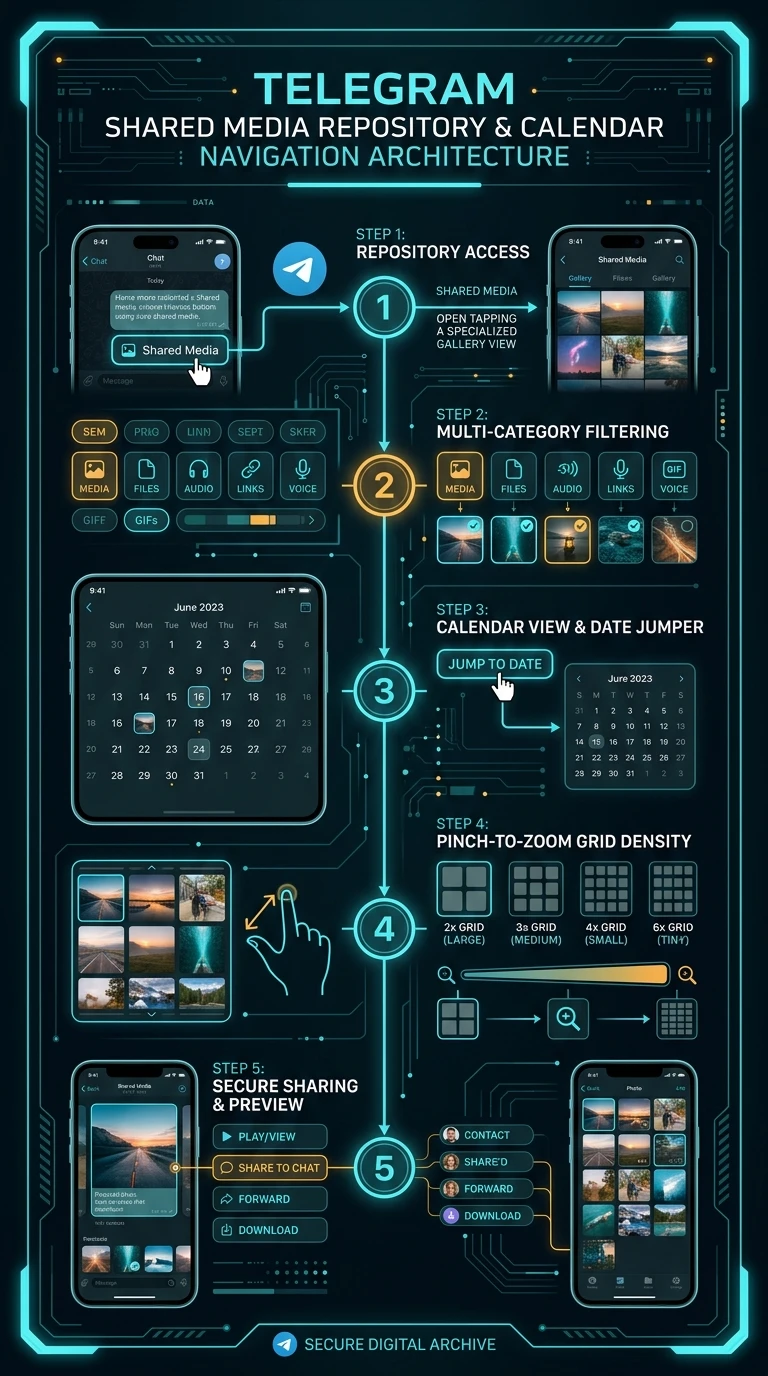
Telegram Shared Media & Calendar Navigation Infographic
zoom_in Click to Expand (9:16 Hi-Res)
admin_panel_settings ADMIN Guide #10588 Actions
Enlarged Preview
Click anywhere outside or press ESC to close viewer
smart_display Telegram Video Short
1080p HD
Official Source: @TelegramTips Post #44 Press ESC or click outside to close