How to Set Custom Mute Durations in Telegram: Flexible Time Sliders, Silent Notifications & Sound Toggle Controls
Silence noisy group conversations for exactly the duration of a vacation, exam session, or business meeting. Master Telegram's custom mute time pickers, silent notifications mode, and global exception controls.
notifications_off
Official demonstration: Accessing chat notifications, selecting 'Mute for...', picking an exact custom duration from minutes to months, or disabling sounds entirely.
Granular Mute Intervals
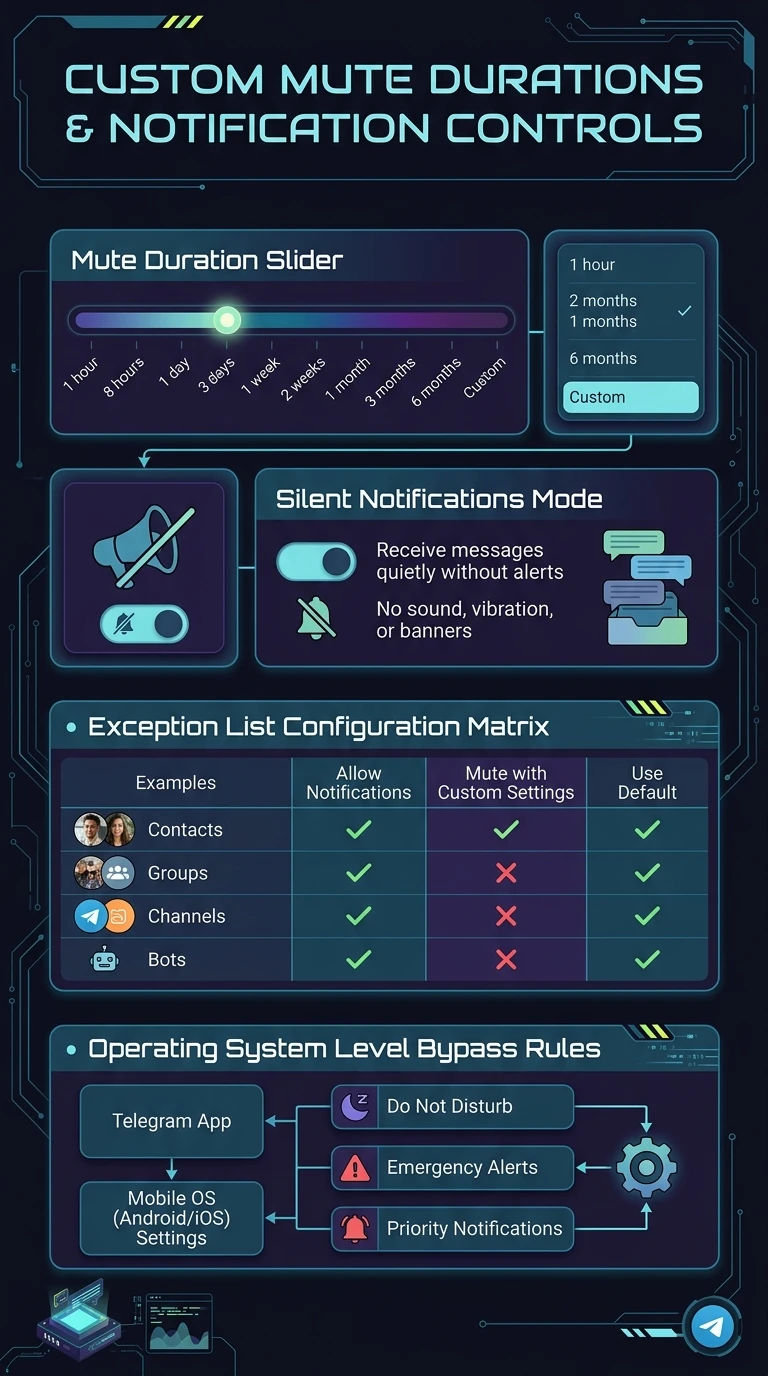
Select standard presets (8 hours, 2 days) or define completely bespoke intervals such as 3 weeks or 6 months.
Silent Notification Mode
Receive unread badges and banners quietly on your lock screen without triggering audio tones or physical haptic vibrations.
Global Exception Matrix
Configure global notification defaults across private chats, groups, and channels with explicit whitelist overrides.
tune
GOVERNANCE PROTOCOL
Mute for... vs. Disable Sound vs. Mute Forever
Telegram provides three distinct levels of notification suppression to balance focus and connectivity:
hourglass_top
Mute for (Duration): Temporarily mutes both sound and lock screen banner alerts. When the timer expires, standard notification behavior automatically resumes.
volume_mute
Disable Sound (Permanent): Delivers lock screen notifications and unread badges normally, but suppresses sound effects and haptic vibration permanently.
notifications_off
Mute Forever: Completely stops banner push notifications and sounds until manually unmuted by the user.
science
INTERACTIVE MUTE LAB
Custom Mute Timer & Quiet Hours Sandbox
Adjust the slider to simulate custom mute schedules and inspect how Telegram calculates automatic unmute timestamps.
Mute Duration:
14 Days (2 Weeks)
1 Day
1 Week
1 Month
2 Months (60 Days)
Calculated Unmute Date & Time:
Calculating...
auto_awesome
EXECUTIVE VISUAL SUMMARY
Custom Mute Durations & Notification Controls
A vertical 9:16 reference architecture illustrating the custom mute duration slider, silent notifications mode, exception list configuration matrix, and operating system level bypass rules.
auto_stories
More in "tips" Learning Track