LIVE PORTAL • Telegram v11.8 API Synchronized • Free Animated Stickers
translate Translated

How to Use Telegram Mini Apps: JavaScript Web Interfaces, Bot APIs, Dynamic Theming & Seamless Payments

play_circle Video tip • Mini apps

Some bots open an interface instead of replying: a shop, a form, a game, a booking screen. It fills the app, it has buttons and fields, and it closes back into the chat when you are done.

What you are looking at is a web page, running inside Telegram. Knowing that answers most of the questions people have about what these things can and cannot do.

What you will be able to do

  • check_circle Open and close a mini app deliberately.
  • check_circle Say what it knows about you and what it does not.
  • check_circle Judge one before putting anything into it.
  • check_circle Recognise when one is asking for too much.
play_circle Official Telegram video short — mini apps
1080p clip from @TelegramTips #332 • 0:23
AUTOPLAY

It opens over the chat and closes back to it, which is why it feels like part of the app.

extension A web page with an introduction

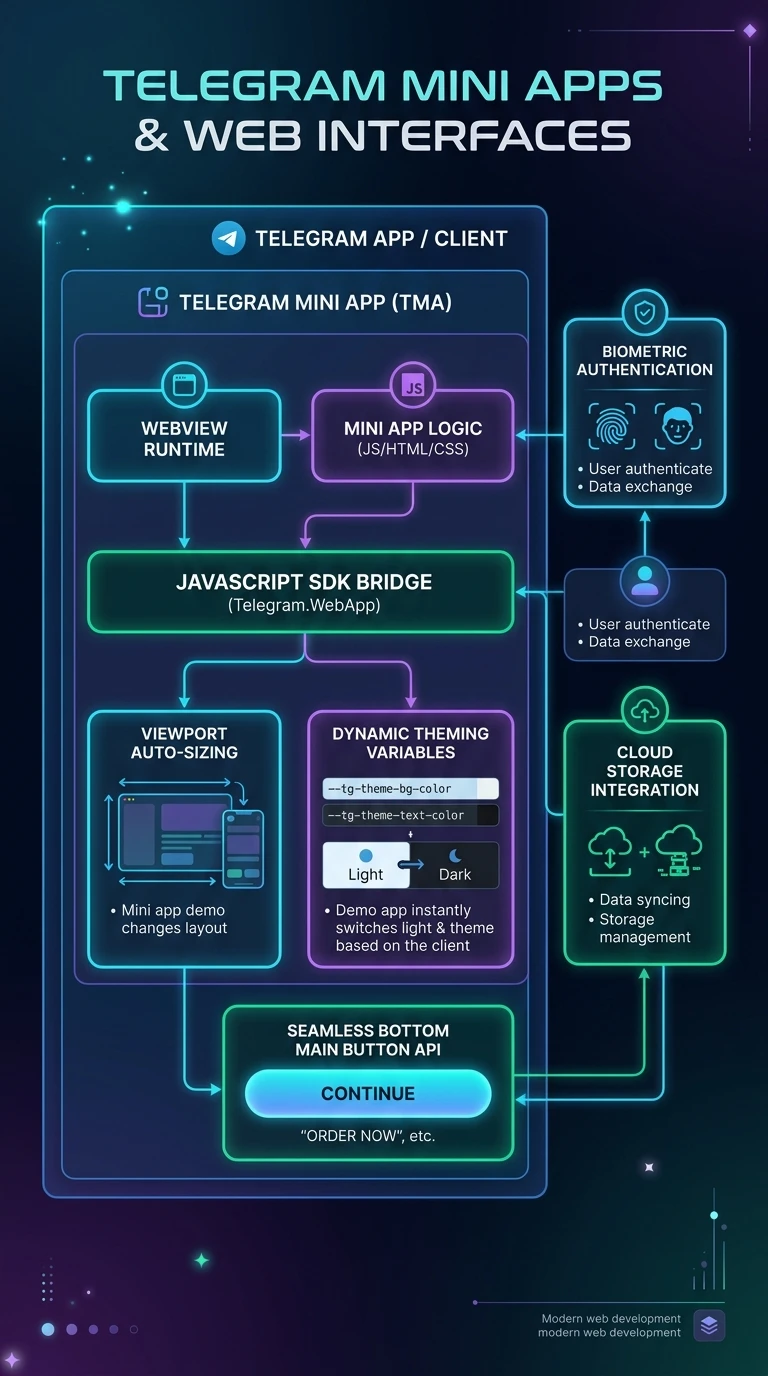
A mini app is an ordinary web page shown inside Telegram, run by whoever runs the bot. What makes it feel native is that Telegram passes it a small amount of information when it opens — who you are, in Telegram terms, and your theme — so it can greet you and match the app's colours without asking you to sign in.

That is the whole of the integration. It is not an application installed on your phone, it has no special access to your device, and it cannot read your chats. Everything else it knows is what you type into it.

The advantage over a website is real: no account to create, no password, no verification email. The disadvantage is that the seamlessness makes it easy to forget you are on somebody else's site.

shield
It knows who you are before you say anything Opening a mini app identifies you to its operator as a Telegram user. That is the convenience and the cost. For anything sensitive, ask whether you would have created an account on that website — because effectively you just did.
smart_toy Interactive

Four kinds of mini app

Two are straightforwardly useful. Two need the same care as any unfamiliar website.

checklist The good case

check_circle Registering for an event, choosing a slot, filling in a short form. No account, no password, and it remembers you next time.
check_circle Confirmations come back into the chat, so the record is in a conversation rather than an email you will lose.
check_circle This is what the format is genuinely better at than a website.

Treat it as a website you are already logged in to. That is both why it is convenient and where the care belongs.

settings Using one

  1. Open it from the bot's menu button or a button in a message Both routes open the same thing.
  2. Check whose bot it is before typing anything The username, against the project's own site.
  3. Pay through Telegram's payment form, not through fields in the page The form is the safe route.
  4. Close it from its own close control It returns you to the chat.
  5. Never enter a key, a seed phrase or a login code Whatever the app claims.
  6. Block and delete the bot afterwards If it was a one-off.
menu_book
Part of the beginner curriculum Step 88 — Telegram mini apps

This page is using one. The curriculum step is how they are built: what the platform hands a mini app when it opens, how that identification is verified, the viewport and theme integration, and what a developer can and cannot reach.

insights Visual recap

Mini apps at a glance

A web page inside the app, what it is told about you, forms and shops, payment through the proper form, and the financial category to avoid, on one page. Tap to open it at full resolution.

Infographic summarising Telegram mini apps and what they can access
Enlarged Preview
Click anywhere outside or press ESC to close viewer
smart_display Telegram Video Short
1080p HD
Official Source: @TelegramTips Post #44 Press ESC or click outside to close