Skip to content
TGWAY
How-to

How to Add Reaction Stickers to Telegram Stories

A reaction sticker is a sticker placed on a story that viewers can tap. The tap registers as a reaction and the counter on the sticker goes up, so the…

  • LevelL1
In this article
  1. touch_app Lowering the cost of responding
  2. settings Adding one
  3. At a glance
play_circle Video tip • Stories

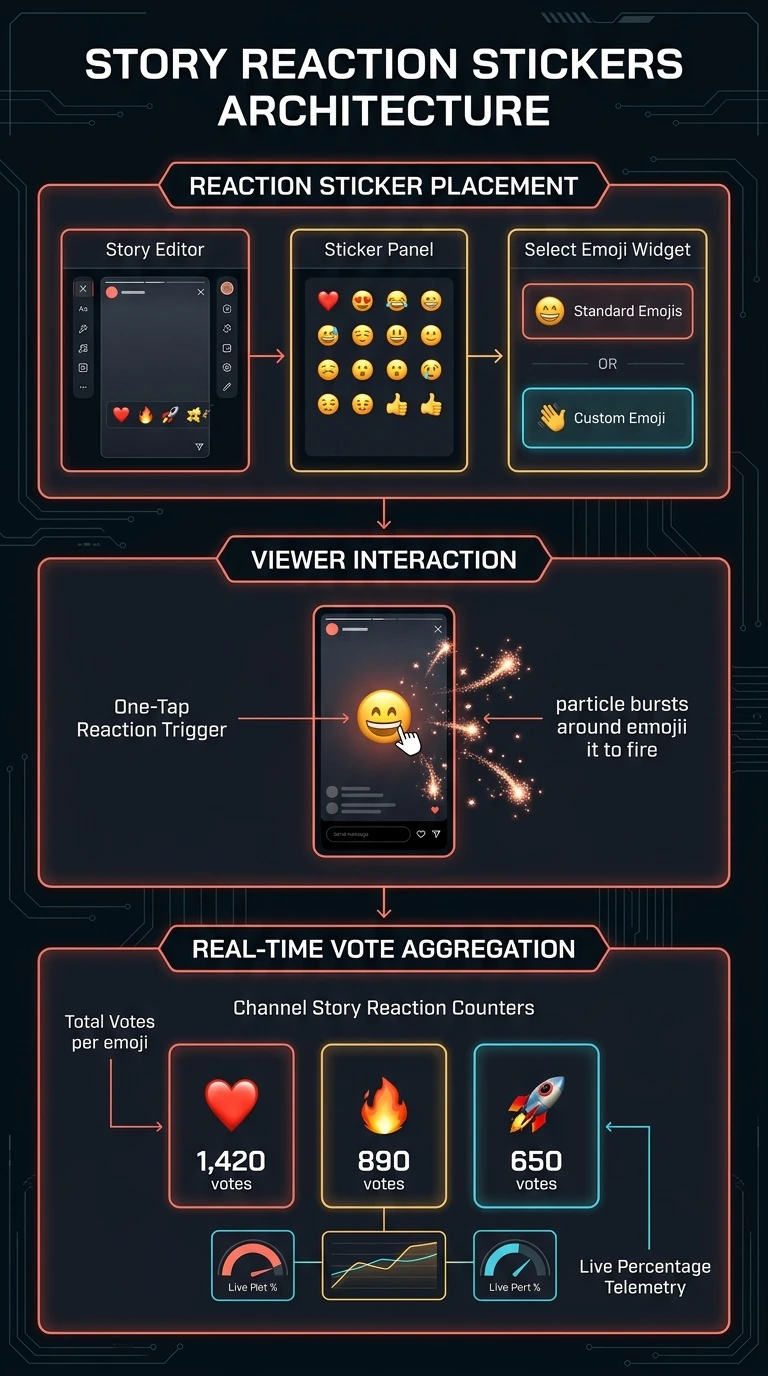
A reaction sticker is a sticker placed on a story that viewers can tap. The tap registers as a reaction and the counter on the sticker goes up, so the story shows its own response.

It is the cheapest interaction there is: no typing, no reply, no decision about what to say.

What you will be able to do

  • check_circle Put a tappable reaction on a story.
  • check_circle Place it where it will actually be tapped.
  • check_circle Read the count for what it is worth.
  • check_circle Know when a reply would serve you better.
play_circle Official Telegram video short — reaction stickers in stories
1080p clip from @TelegramTips #395 • 0:25

The sticker carries its own counter, which rises as viewers tap it.

touch_app Lowering the cost of responding

Most viewers of most stories do nothing, and not because they disliked it. Replying means opening a keyboard and composing a sentence, and that is more effort than a passing thought is worth.

A reaction sticker removes that step entirely. One tap on something already on the screen, and the viewer has said the small thing they would otherwise not have said. The counter then makes the response visible to everybody who comes after, which is a second effect: a story with a hundred taps is read differently from an identical one with none.

What you get back is a number, not a sentence. That is the trade — far more people respond, and each response tells you far less.

ads_click
Placement decides everything A sticker over the subject of the picture gets covered by the viewer's own thumb; one in the corner is not noticed at all. Put it in clear space near the middle of the lower half, where a thumb naturally rests.
compare_arrows Comparison

What a tap can and cannot tell you

Three uses that work, and the one that quietly replaces the answer you wanted with a number.

  What it gives you How to set it up What it will not do
Asking a yes-shaped question A count of people who agreed, from an audience that would not have replied Write the question as text on the story and place the sticker directly beneath it. Nobody infers what a floating sticker is asking. Hold two answers. Anything needing a choice between options is a poll; one counter cannot represent a decision.
Warming a silent channel The first thing most readers ever do, and a visible sign to the next viewer that other people are here Use it sparingly enough that it stays a signal. A subscriber number does not show presence; a live count does. Survive being on every story. At that point it is furniture, and the count stops meaning anything even when it is high.
Reading the count A ratio against your own view count — the only figure that travels Compare it to your views, never to somebody else's taps. A sudden drop is more informative than a high number. Mean agreement, enthusiasm or intent. It is the cheapest gesture available and should be weighted as one. A drop usually means bad placement, not a bad story.
Asking what people think Nothing you can use Leave the sticker off and ask for replies. You get fewer, and each one is worth reading. Give reasons. A decision needs them and a counter contains none — and offering the sticker guarantees taps instead of the answers you were after.

A reaction sticker buys volume at the cost of meaning. Use it when volume is what you want.

visibility
A tap is not anonymous The count is what the audience sees; the author sees the viewer list, and who tapped sits in it. That is worth knowing from both sides. As the reader, a tap is a small public act rather than a private one, which is part of why some people watch and do not touch it. As the author, it means a sticker is genuinely useful when you need to know who is coming — and that a low count from an audience who understand this is not indifference so much as caution.

settings Adding one

  1. Compose the story Photograph or video as usual.
  2. Add the reaction sticker from the sticker tool And choose the emoji it carries.
  3. Write the question next to it So the tap has a meaning.
  4. Place it in clear space, lower half Where a thumb lands and nothing is covered.
  5. Post, and watch the ratio Taps against views, not taps alone.
  6. Leave it off when you need replies The sticker will absorb them.
menu_book
Part of the beginner curriculum Step 81 — Interactive inline keyboards

This page is one tappable thing on a story. The curriculum step is the general case: buttons attached to messages, what each one can do, and how to design an interaction where the response drives something afterwards.

Summary

At a glance

  1. 1Reaction sticker

    Add a tappable reaction to your story.

  2. 2Place it well

    Put it where thumbs can reach it.

  3. 3A count, not replies

    Use a question if you want real answers.

Share this guide

Send it to a friend who has the same question.

Telegram WhatsApp
More

Open on your phonePoint your phone camera here to open this guide.

Updated

Related articles

View all ›