Skip to content
TGWAY
How-to STEP 04 / 102

How to Send View-Once Photos on Telegram

A photo, video or voice message can be sent so that it opens once. The recipient taps it, sees it, closes it, and there is nothing left in the chat but…

  • LevelL1
In this article
  1. lock_clock What it removes, and what it does not
  2. settings Sending one
  3. At a glance
play_circle Video tip • Privacy

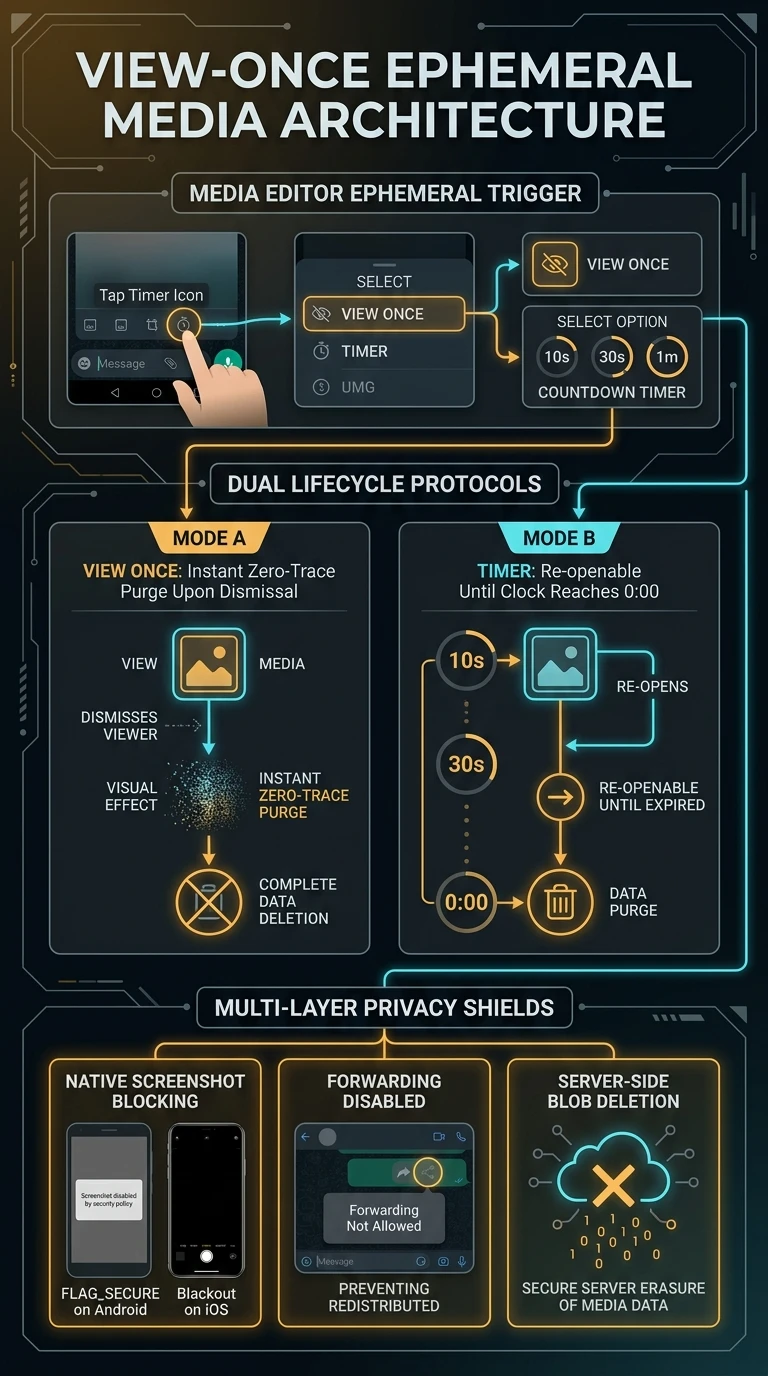
A photo, video or voice message can be sent so that it opens once. The recipient taps it, sees it, closes it, and there is nothing left in the chat but a note that something was there.

It removes the copy that would otherwise sit in a conversation for years. It does not stop anybody who has decided to keep it.

What you will be able to do

  • check_circle Send media that can only be opened once.
  • check_circle Judge what it actually protects against.
  • check_circle Choose between this and an auto-delete timer.
  • check_circle Handle one you have been sent.
play_circle Official Telegram video short — view-once media
1080p clip from @TelegramTips #397 • 0:15

The option is set on the attachment before sending, not after.

lock_clock What it removes, and what it does not

The real risk with a sensitive photo is not usually that somebody screenshots it. It is that it stays in a chat, gets backed up, shows up in a shared album, and is still there when the phone is handed to somebody else two years later. View-once deals with exactly that, and it deals with it well.

What it cannot deal with is intent. A second phone pointed at the screen produces a perfect copy and nothing in any app can prevent it. The client may block or flag a screenshot depending on the platform, and that is a speed bump, not a wall.

So the honest way to use it: send things you are content for that person to see, where you would rather no permanent copy existed. If you would be harmed by them keeping it, the feature is not the answer — the decision about whether to send it is.

photo_camera
A camera always works No setting in any messenger can stop a person photographing their own screen with another device. Treat every capture protection as a deterrent against carelessness, never as a guarantee.
visibility Interactive

Four things to be clear about

The third compares it with the option most people confuse it with.

task_alt Things that should not linger

check_circle A photograph of a document, a card, a form, a meter reading. Needed once, useless afterwards, awkward forever.
check_circle A voice note you would rather not have quoted back. It is heard once and then it is not a recording any more.
check_circle Anything you are sending mainly so that somebody can check it and confirm. The checking is the whole purpose.

View-once removes the copy that lingers, not the copy somebody decides to make.

settings Sending one

  1. Attach the photo, video or voice message As you normally would.
  2. Set it to open once On the attachment, before sending.
  3. Send it when the other person can look Not at three in the morning.
  4. Say what it is in a normal message They cannot reopen it to check.
  5. Use an auto-delete timer for the conversation If the whole chat should clear.
  6. Do not send anything that grants access Whatever the mode.
menu_book
Part of the beginner curriculum Step 26 — Self-destruct timers and what disappearing really means

This page is one item that vanishes on opening. The curriculum step is the whole idea: timers across a conversation, what is actually deleted where, and where a disappearing message quietly survives.

Summary

At a glance

  1. 1View once

    Media that can be opened a single time.

  2. 2Not foolproof

    A second phone can still photograph it.

  3. 3Receiving one

    Open it when you can pay attention.

Share this guide

Send it to a friend who has the same question.

Telegram WhatsApp
More

Open on your phonePoint your phone camera here to open this guide.

Updated

Related articles

View all ›