How to Monitor Telegram New Login Alerts: Instant Security Notifications, Active Session Audits & One-Tap Remote Killswitch
Shield your Telegram account against credential stuffing and SIM-swap intrusions. Learn how Telegram's real-time security alerts notify all active endpoints simultaneously, how to audit device session metadata, and how to execute a remote killswitch to sever unauthorized sessions.
security_update_good
Official demonstration: Receiving instant login cards at the top of the chat list with device, IP, and location details, plus one-tap session termination.
Top-of-List Alert Card
Unrecognized logins trigger a prominent, high-priority security notification pinned directly at the top of your chat list across all devices.
Forensic Session Meta
Instantly inspect client software version, device hardware name, public IPv4/IPv6, and approximate geo-location.
One-Tap Killswitch
Revoke compromised auth keys immediately from the alert banner or terminate all remote sessions in Settings > Devices.
security
MTPROTO SESSION LIFECYCLE
How Telegram Manages Distributed Session Keys & Instant Invalidation
Telegram uses a distributed multi-session architecture where every phone, tablet, and computer operates as an independent authenticated client:
vpn_key
Ephemeral Auth Key Generation: Every login performs a Diffie-Hellman key exchange producing a unique 2048-bit
auth_key_id. Clients never share secrets or passwords directly.
broadcast_on_personal
Simultaneous Service Broadcast: When an
auth.signIn RPC succeeds on a new device, Telegram's core infrastructure pushes an un-dismissible high-priority service message (ID: 777000) to all pre-existing sessions within 250 milliseconds.
power_settings_new
RPC Invalidation (auth.resetAuthorizations): Tapping 'Terminate Session' calls
account.resetAuthorization, instructing all edge proxy nodes to tear down the TCP socket and blacklist the target auth_key_id instantly.
tune
SESSION AUDITOR & KILLSWITCH
Test Active Session Audit & Remote Revocation
Review simulated active logins below and test executing a remote killswitch on an unrecognized session.
Active Authorized Sessions (3)
smartphone
iPhone 15 Pro • This Device
Telegram iOS 10.2 • Seoul, South Korea (211.204.xx.xx)
laptop_chromebook
Chrome 124 on Linux (Unknown)
Telegram WebK • Frankfurt, Germany (185.190.xx.xx)
desktop_windows
Telegram Desktop (Windows 11)
App v4.11 • New York, USA (104.28.xx.xx)
Click 'Terminate' on the suspicious Linux session to test instant auth key revocation.
account_tree
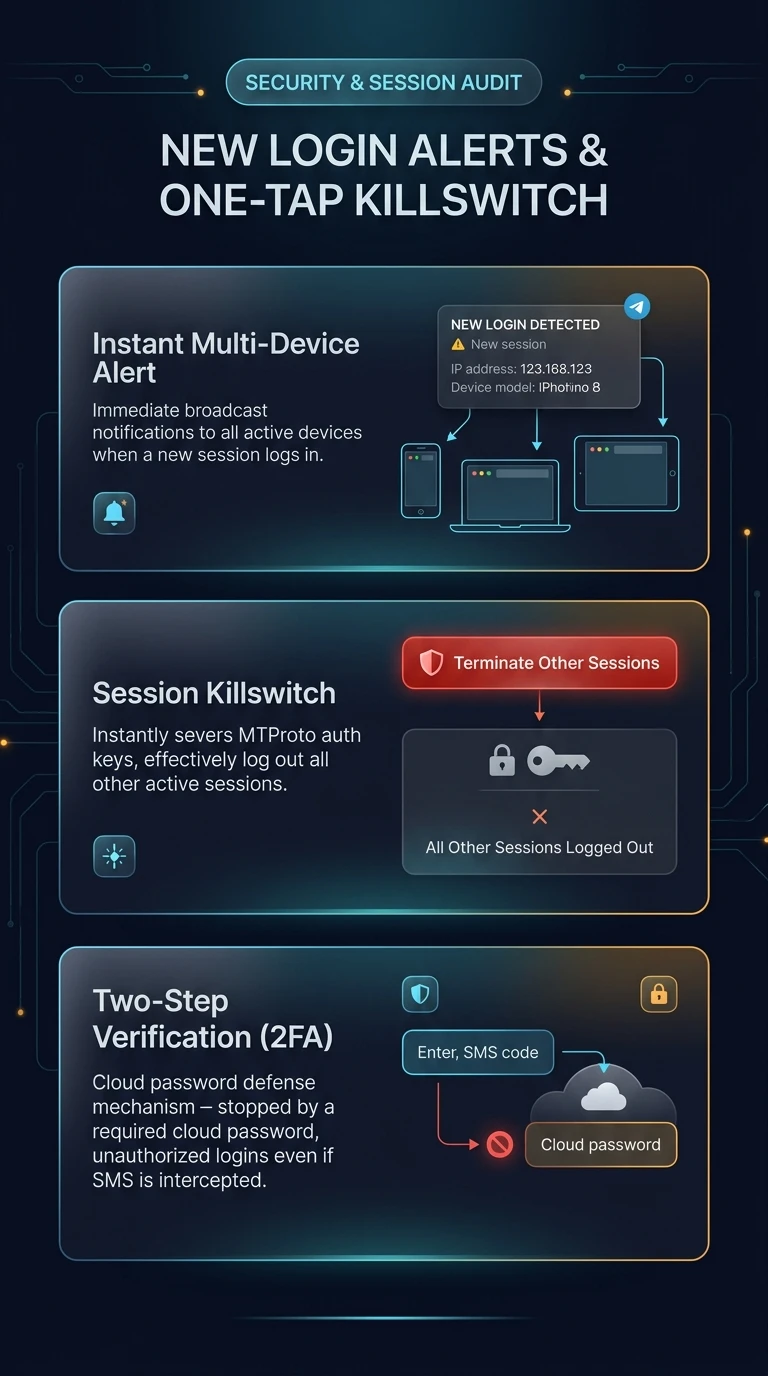
One-Page Executive Infographic
Telegram Real-Time Session Auditing & Distributed Auth Revocation Engine
Visual breakdown of instant multi-device security broadcasts, IP/device metadata verification, and one-tap cryptographic session termination.
zoom_in
Click to inspect full-resolution infographic
checklist
SECURITY HARDENING PROTOCOL
What to Do When You Receive an Unrecognized Login Alert
1
Verify Device and Geolocation Details
Inspect the device model, operating system, and IP address in the notification card. If you did not log into that device, treat your account as targeted.
2
Execute Immediate Session Termination
Tap No, It's Not Me! on the alert banner or navigate to Settings > Devices, tap the rogue session, and select Terminate Session.
3
Enable or Update Two-Step Verification (2FA)
Go to Settings > Privacy and Security > Two-Step Verification. Set an alphanumeric cloud password with a recovery email. This prevents attackers from logging in even if they intercept your SMS code.
help
FREQUENTLY ASKED QUESTIONS
Frequently Asked Questions
Can an attacker prevent the login alert from reaching my phone?
No. The login notification is pushed directly by Telegram's core MTProto infrastructure to all active sessions as a system-level event. The newly logged-in device cannot intercept, delay, or suppress this broadcast.
Can a newly logged-in device immediately terminate my existing sessions?
Telegram imposes a mandatory security cooldown period (typically several hours to a few days) on newly authorized sessions before they are permitted to terminate pre-existing established sessions.
What is 'Automatically Terminate Inactive Sessions'?
In Settings > Devices, you can configure Telegram to auto-revoke sessions inactive for 1 week, 1 month, 3 months, 6 months, or 1 year. This safeguards old tablets or decommissioned laptops from persistent access.
auto_stories
More in "tips" Learning Track