How to Customize Link Previews in Telegram: Media Size Toggles, Above/Below Text Layout & Multi-URL Selectors
Take full aesthetic control of shared web links. Discover how to toggle between full-width media banners and compact thumbnails, position link previews above or below your text, and pick which URL generates rich preview cards when sharing multiple web links.
link
Official demonstration: Tapping the link preview header before sending to switch between large and small media, repositioning above or below text, and choosing specific URLs.
Media Size Customization
Toggle between high-impact 16:9 full-width media banners or compact horizontal thumbnails to save vertical chat height.
Above or Below Placement
Position preview cards above your text for visual hero lead-ins or below your commentary for traditional reference notes.
Multi-URL Selector
When typing messages with multiple URLs, explicitly pick which link gets the rich preview card or disable previews completely.
terminal
WEBPAGE PREVIEW ENGINE
How Telegram Manages OpenGraph Caching & InvertMedia Flags
Link preview generation in Telegram is powered by a high-throughput crawler network and client-configurable presentation flags:
data_object
invert_media Protocol Flag: When you place a preview above your text, the client sends
invert_media:flags.3?true in messages.sendMessage. This alters the rendering z-order without mutating the message text payload.
aspect_ratio
force_small_media / force_large_media: Clients explicitly override default OpenGraph presentation by setting media preference attributes, eliminating inconsistent card layouts across different client platforms.
visibility_off
no_webpage Stripping: Setting
no_webpage = true tells Telegram's bot servers to suppress rich card rendering entirely, leaving clean hyperlinked text for minimalist posting.
tune
LINK PREVIEW STAGING CANVAS
Test Link Preview Customization in Real Time
Toggle the layout controls below to watch how Telegram reconfigures link preview cards dynamically.
Check out this major architectural breakdown of distributed consensus algorithms: https://techcrunch.com/consensus and the companion repository https://github.com/consensus/core.
[ TechCrunch Header Banner ]
TECHCRUNCH.COM
Understanding Next-Gen Distributed Consensus Architecture
A comprehensive technical deep dive into Byzantine fault tolerance and ultra-fast state synchronization.
✓ Layout: Large banner positioned below text commentary.
account_tree
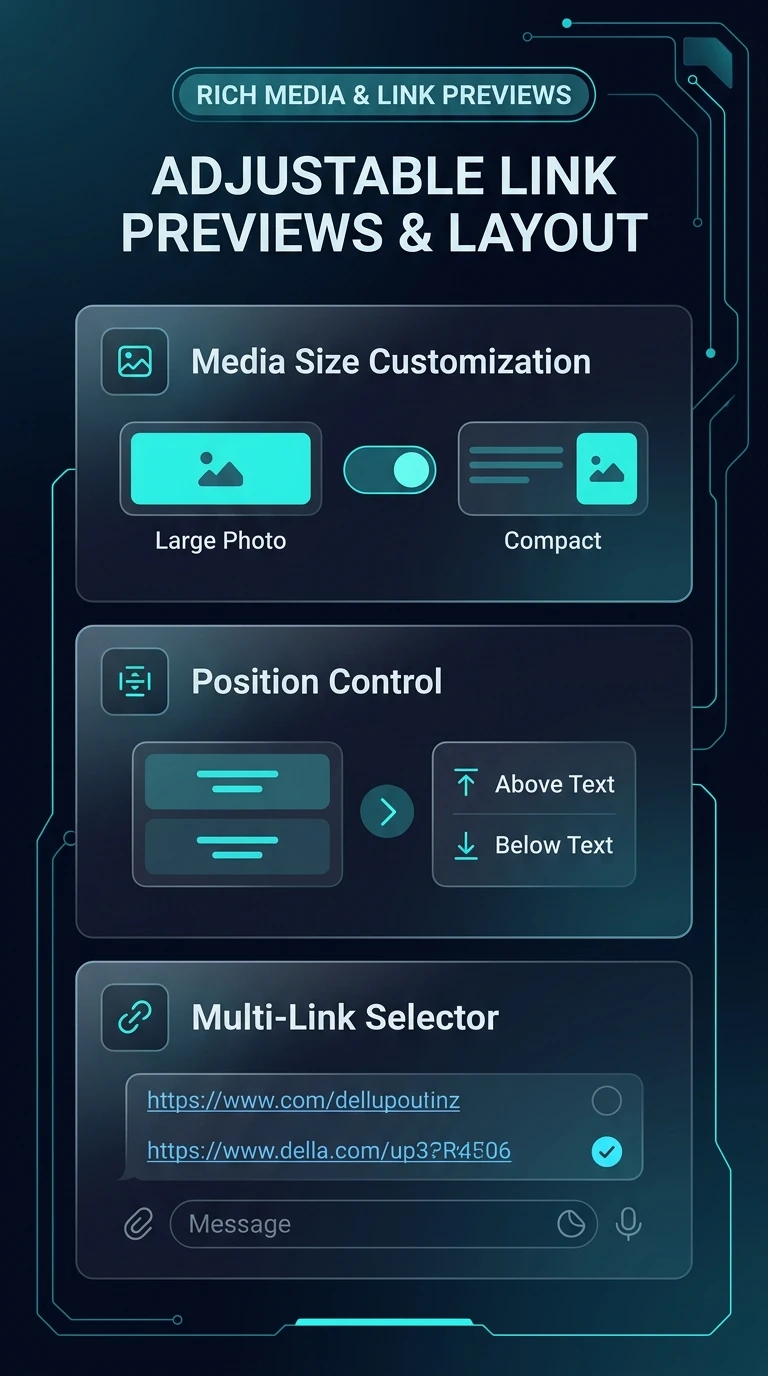
One-Page Executive Infographic
Telegram Dynamic WebPage Layout & Link Preview Control Engine
Visual schema illustrating OpenGraph crawler parsing, invert_media positioning toggles, force_small_media thumbnail flags, and multi-link selector routing.
zoom_in
Click to inspect full-resolution infographic
checklist
OPERATING GUIDE
How to Customize Link Previews Before Sending
1
Type or Paste Your Message with Links
Paste one or more hyperlinks into the chat input bar. Telegram automatically generates a preview panel docked directly above your message field.
2
Tap the Preview Header Area
Tap the preview header (or swipe it up) to access layout options: Enlarge/Shrink Media, Move Above/Below Text, and Choose Preview Link.
3
Select Preferences & Transmit
Select your desired media size and position. If you want no preview, tap the 'X' button to strip the card. Tap Send to publish.
help
FREQUENTLY ASKED QUESTIONS
Frequently Asked Questions
Can I modify the link preview after the message is sent?
Yes! Tap and hold your sent message, select Edit, and you can change the preview size, flip position above/below, or remove the link card completely.
Does Telegram generate previews for links behind paywalls or logins?
Telegram's crawler respects public web standards. If a site requires authentication or blocks bot user-agents via robots.txt, Telegram generates only a basic domain title card without rich media.
Why do some websites show large preview banners while others show small squares?
Websites declare their preferred layout via OpenGraph metadata tags (
twitter:card, og:image:width). However, Telegram's preview controls give you the power to manually override this on any link.
auto_stories
More in "tips" Learning Track