How to Customize Telegram Account Colors: Premium Name Hues, Link Accent Styling & Custom Pattern Monograms
Establish a bold, personalized visual signature across every community. Explore Telegram Premium's account color engine to choose custom name palettes, style links with matching accent bars, and watermark message replies with unique custom emoji patterns.
palette
Official demonstration: Selecting vibrant dual-tone gradients for your account name in Settings, previewing matching link accents, and adding custom emoji background patterns.
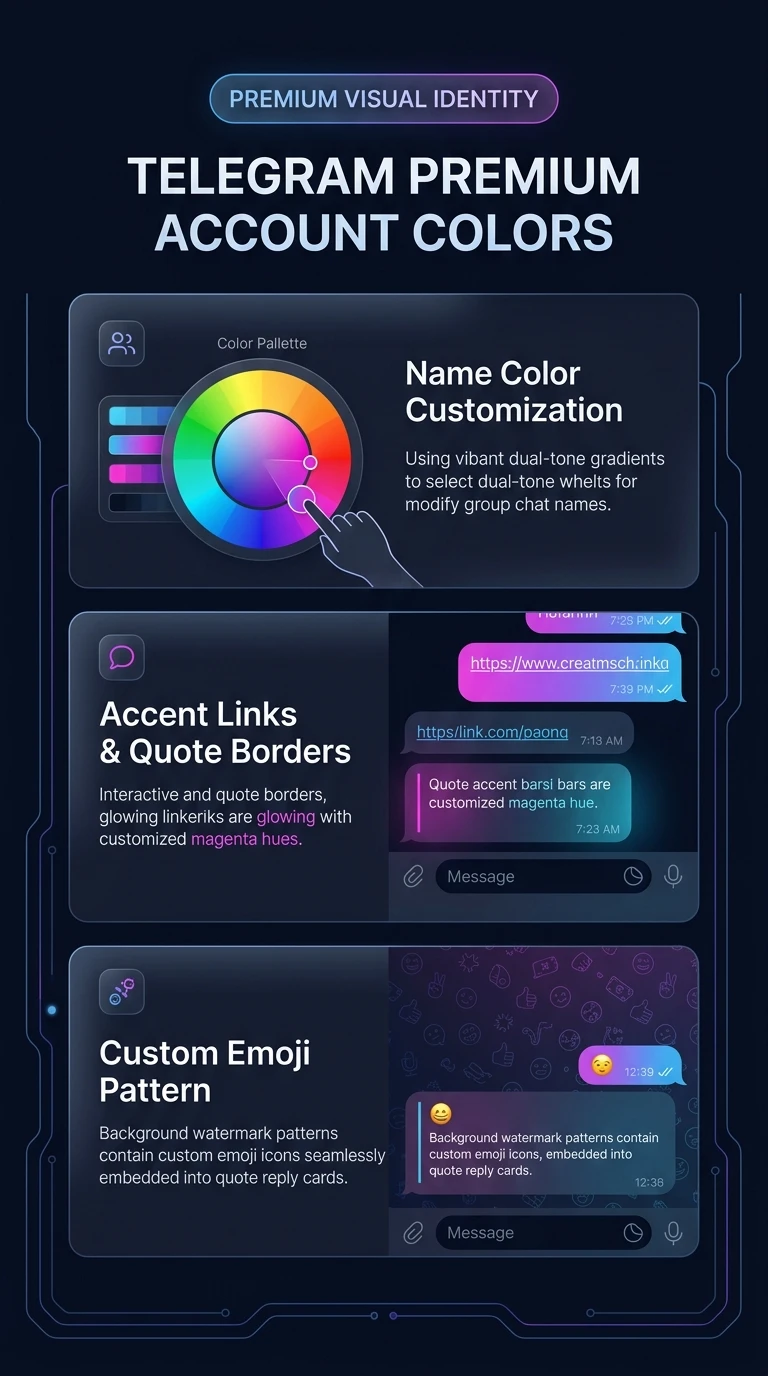
Vibrant Name Gradients
Select from dozens of curated dual-tone palettes to stand out instantly in busy group discussions and member rosters.
Accent Links & Quote Bars
Every web link you share and every quote block replying to your messages inherits your chosen identity color accent.
Custom Emoji Watermark
Pick from hundreds of custom emoji icons to generate an elegant vector repeating pattern in your reply backgrounds.
palette
COLOR PROTOCOL ARCHITECTURE
How Telegram Synchronizes Client-Side Color Shaders via MTProto
Telegram avoids sending bulky images or CSS style sheets for customized user names. Instead, it uses compact identity color IDs:
fingerprint
peerColor Attribute in userFull: The Telegram backend stores a compact
peer_color integer (0 to 20+) in your profile record. All receiving clients map this integer to their local theme shader palettes.
emoji_symbols
background_emoji_id Binding: If a custom pattern is selected, MTProto serializes a 64-bit
background_emoji_id. Official clients rasterize this vector glyph as an in-memory alpha mask at 12% opacity.
public
Global Client Compatibility: Even non-Premium users view your custom name colors and quote accents. The feature is baked directly into the core rendering pipeline for iOS, Android, and Desktop.
tune
COLOR & PATTERN STUDIO
Test Telegram Premium Name Colors & Quote Patterns
Choose a color palette and background pattern below to see how your messages and replies appear to other users.
Select Color Palette:
Background Pattern Icon:
⭐️
Alex Vance PRO
Just deployed the high-availability clustering protocol. Check the release notes:
https://core.telegram.org/api/updates
✓ Active: Azure Stream palette with Star pattern monogram.
account_tree
One-Page Executive Infographic
Telegram Premium Color Profile & Vector Pattern Compositing Pipeline
Visual architecture diagram showing peer_color attribute hashing, client shader gradient rendering, and custom emoji background pattern watermarking.
zoom_in
Click to inspect full-resolution infographic
checklist
CONFIGURATION GUIDE
How to Set Your Custom Account Color
1
Navigate to Appearance / Chat Settings
On iOS, go to Settings > Appearance > Your Color. On Android, go to Settings > Chat Settings > Change Name Color.
2
Choose Your Hue & Background Pattern
Browse the gradient carousel. Tap any color to preview your name in group chats. Tap Add Icon to Pattern to select a repeating background emoji.
3
Apply & Broadcast Instantly
Tap Apply Color. The update broadcasts across Telegram's datacenters instantly without requiring app restarts or device cache reloads.
help
FREQUENTLY ASKED QUESTIONS
Frequently Asked Questions
Can channels also set custom colors?
Yes! Channels that achieve higher Boost Levels (Level 5+) unlock custom channel name colors, link preview styling, and custom background pattern watermarks for channel posts.
Can I use custom animated emojis as my pattern?
Yes. You can choose any emoji from your installed Telegram custom emoji packs to serve as your background watermark pattern.
Does my custom color disappear if my Premium subscription lapses?
If a Premium subscription expires, your account reverts to standard default theme colors until the subscription is renewed.
auto_stories
More in "tips" Learning Track