How to Use Telegram Stories Front Flash: Color Warmth Adjustment, Low-Light Intensity & Dual-Tone Studio Lighting
Elevate nighttime selfie stories with calibrated studio illumination. Discover Telegram's hidden front flash controls to dial color temperature from golden candlelight warmth to cool daylight, and modulate display luminance to banish unflattering shadows.
flash_on
Official demonstration: Pressing and holding the lightning bolt icon in front camera mode to reveal continuous warmth and brightness sliders.
Hidden Long-Press Trigger
Hold the flash icon (⚡) in selfie story camera mode to unveil hidden dual-slider colorimetry controls.
2500K to 6500K Spectrum
Seamlessly dial between warm golden candlelight to icy cool daylight to harmonize with your environment.
Diffuse Screen Fill-Light
Transforms screen bezels into a soft diffuser ring light, eliminating harsh glare and washed-out facial tones.
lightbulb
DISPLAY COLORIMETRY ARCHITECTURE
How Telegram Emulates Ring Light Diffusers via Screen Hardware
Most smartphone front cameras lack physical LED flash diodes. Telegram engineers turned modern OLED displays into studio-grade softboxes:
tune
Sub-Pixel Color Temperature Mapping: Modulating warmth adjusts the ratio of red and blue sub-pixel luminance values along Planckian locus coordinates, simulating black-body radiation curves from 2500K to 6500K.
contrast
Peripheral Screen Masking: The camera viewfinder scales inwards slightly, allowing the outer perimeter of the display to emit high-nit illumination without blocking the user's eye line.
hdr_on
Dynamic Auto-Exposure Synchronization: The camera sensor's ISO and shutter speed values are locked to the chosen flash luminance, preventing jarring camera auto-hunting while you speak.
tune
FRONT FLASH LIGHTING STUDIO
Test Color Temperature & Fill Intensity
Adjust the warmth and brightness sliders below to see how Telegram's front flash ring transforms facial illumination.
😊
⚡ FRONT FLASH ON
Color Warmth: 3200K (Warm Amber)
Fill Intensity: 75%
✓ Harmonized: Natural warm skin tone fill light active.
account_tree
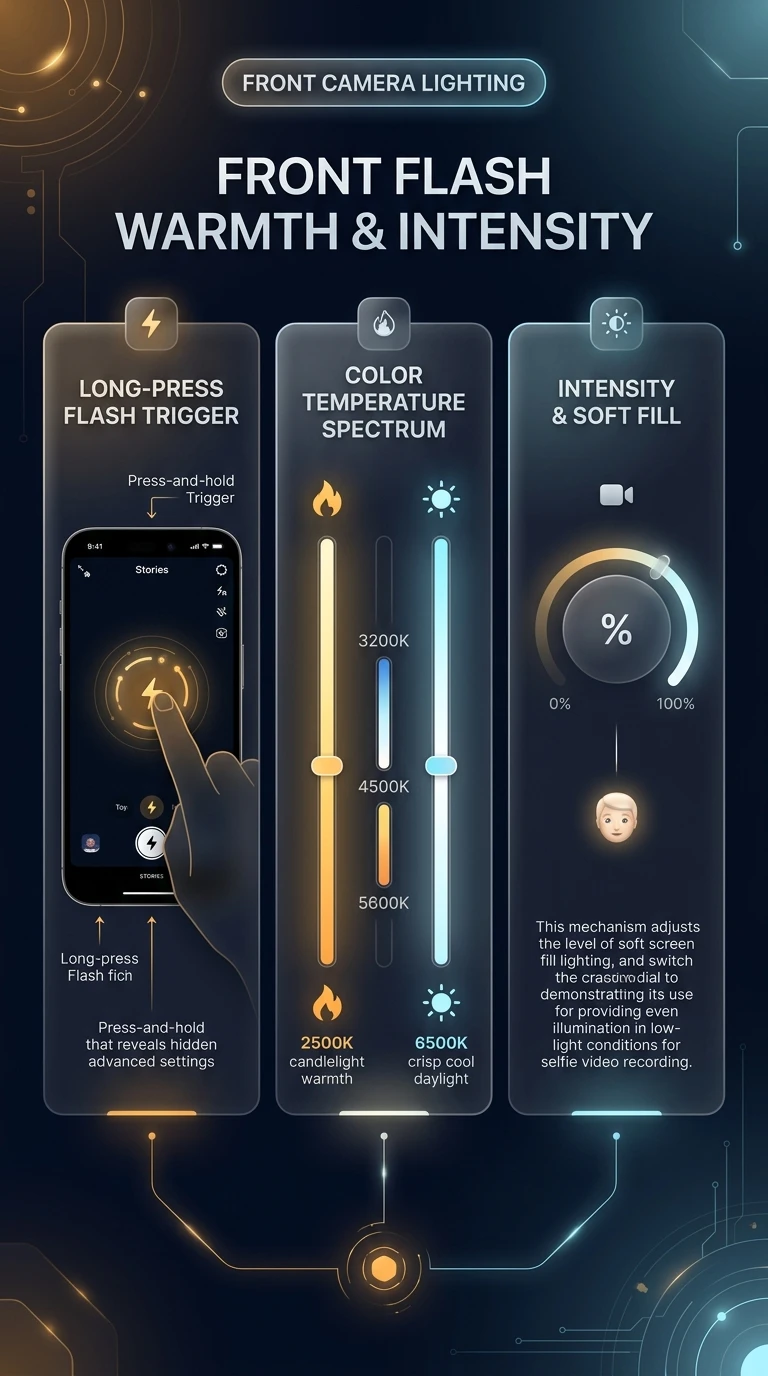
One-Page Executive Infographic
Telegram Front Flash Colorimetry & Adaptive OLED Screen Lighting Engine
Technical diagram showing long-press trigger mechanics, Planckian locus Kelvin calibration, and peripheral bezel screen fill emission.
zoom_in
Click to inspect full-resolution infographic
checklist
STEP-BY-STEP INSTRUCTIONS
How to Access and Adjust Front Flash Settings
1
Switch to Front-Facing Story Camera
Open the Story Camera from your chat list and switch to the selfie camera (tap the camera-flip icon).
2
Press and Hold the Flash (⚡) Icon
Do not just tap the flash icon. Hold down on the lightning bolt until the circular warmth and brightness controls expand onto your screen.
3
Dial Color Temperature & Record
Drag the warmth dial toward amber for flattering indoor/sunset lighting or toward cyan for daylight. Release and record your selfie video with studio-grade illumination.
help
FREQUENTLY ASKED QUESTIONS
Frequently Asked Questions
Does front flash stay active throughout the entire video recording?
Yes! Unlike a brief snapshot flash, Telegram keeps the calibrated screen fill light continuously illuminated during the entire duration of your story recording.
Does this feature work on older smartphones with LCD screens?
Yes. While OLED displays provide the highest contrast and peak nits, Telegram's color temperature shaders function reliably on all modern iOS and Android displays.
Can I combine front flash with dual-camera recording?
Yes! When using Dual Camera mode with the selfie camera active in either primary or secondary PIP position, front flash provides fill lighting for your face.
auto_stories
More in "tips" Learning Track