LIVE PORTAL β€’ Telegram v11.8 API Synchronized β€’ Free Animated Stickers
shield_person ADMIN LOGGED IN + Write Guide
admin_panel_settings ADMIN CONTROLS Guide #10892 β€’ tips
How to Customize Telegram Channel Appearance: Boost Levels, Accent Palettes, Custom Covers & Wallpapers
play_circle Official Video Tip #412
Telegram Tips & Video Shorts Series

How to Customize Telegram Channel Appearance: Boost Levels, Accent Palettes, Custom Covers & Wallpapers

Transform your community feed from standard chat bubbles into a bespoke branded destination. Learn how subscriber boosts unlock progressive visual customization tiersβ€”from customized message reply accents and gradient profile covers to custom status emojis and synchronized channel wallpapers.

palette Official demonstration: Opening Channel Settings > Appearance, selecting brand color palettes, setting custom profile cover banners, and configuring channel wallpapers.
rocket_launch
Boost Level Milestones
Each boost level gained from Premium subscribers unlocks progressively deeper visual controls for channel administrators.
style
Cohesive Accent Styling
Customize the color of your channel name, reply links, blockquote borders, and preview cards across all subscriber feeds.
wallpaper
Global Channel Wallpapers
Apply a bespoke visual background that displays automatically for every visitor entering your channel feed.
hub CHANNEL LEVEL PROGRESSION SPECS

Boost Milestones and Unlocked Visual Privileges

Telegram dynamically calculates the boost threshold required for each level based on total subscriber volume (approximately 0.1% of active members per level):

looks_one
Level 1 - 3 (Core Accents): Custom message name colors, quote accent bars, link preview styling, and 1 custom story post per day.
looks_4
Level 4 - 6 (Profile Covers & Status): Dynamic gradient profile cover banners, custom pattern monograms, and custom animated status emoji badge next to the channel name.
looks_two
Level 7 - 10 (Full Theming & Wallpapers): Synchronized channel chat wallpaper applied to all visitors, custom link icons, voice message transcriptions, and dedicated custom emoji packs for subscribers.
tune CHANNEL BRANDING SIMULATOR

Interactive Channel Level & Appearance Preview

Drag the boost level slider to see which appearance perks unlock and preview the dynamic channel feed styling in real-time.

Channel Boost Level: Level 4
Lvl 1 (Colors) Lvl 4 (Cover) Lvl 7 (Wallpaper) Lvl 10 (Max)
TG
Tech Insider Channel πŸ’Ž
142,500 subscribers • Level 4
Tech Insider Broadcast
Welcome to our redesigned channel! All posts now feature our custom cyan accent theme.
Active Privileges: Accent Colors, Profile Cover Gradient Banner, Status Emoji.
tune How to Configure Your Channel's Appearance
1

Open Channel Administration

Navigate to your channel's profile info screen, tap the pencil icon (or Manage Channel on Desktop), and select Appearance.

2

Choose Accent Color & Monogram Pattern

Select your brand's primary color palette for message headers and replies. Add an optional repeating monogram pattern to brand message quotes.

3

Set Profile Cover & Channel Wallpaper

At Level 4+, configure your header gradient cover banner. At Level 7+, upload or choose a synchronized chat wallpaper that applies to every member who visits.

verified Community Strategy: Boosting Incentives

Share your channel's direct boost link (t.me/YourChannel?boost) in milestone announcements. Premium subscribers receive multiple boosts with their subscription and are eager to support high-value creators.

design_services Executive Architecture Guide

Channel Appearance & Boost Level Architecture

Visual breakdown of Telegram channel levels, unlocked appearance perks, profile cover banners, and wallpaper synchronization.
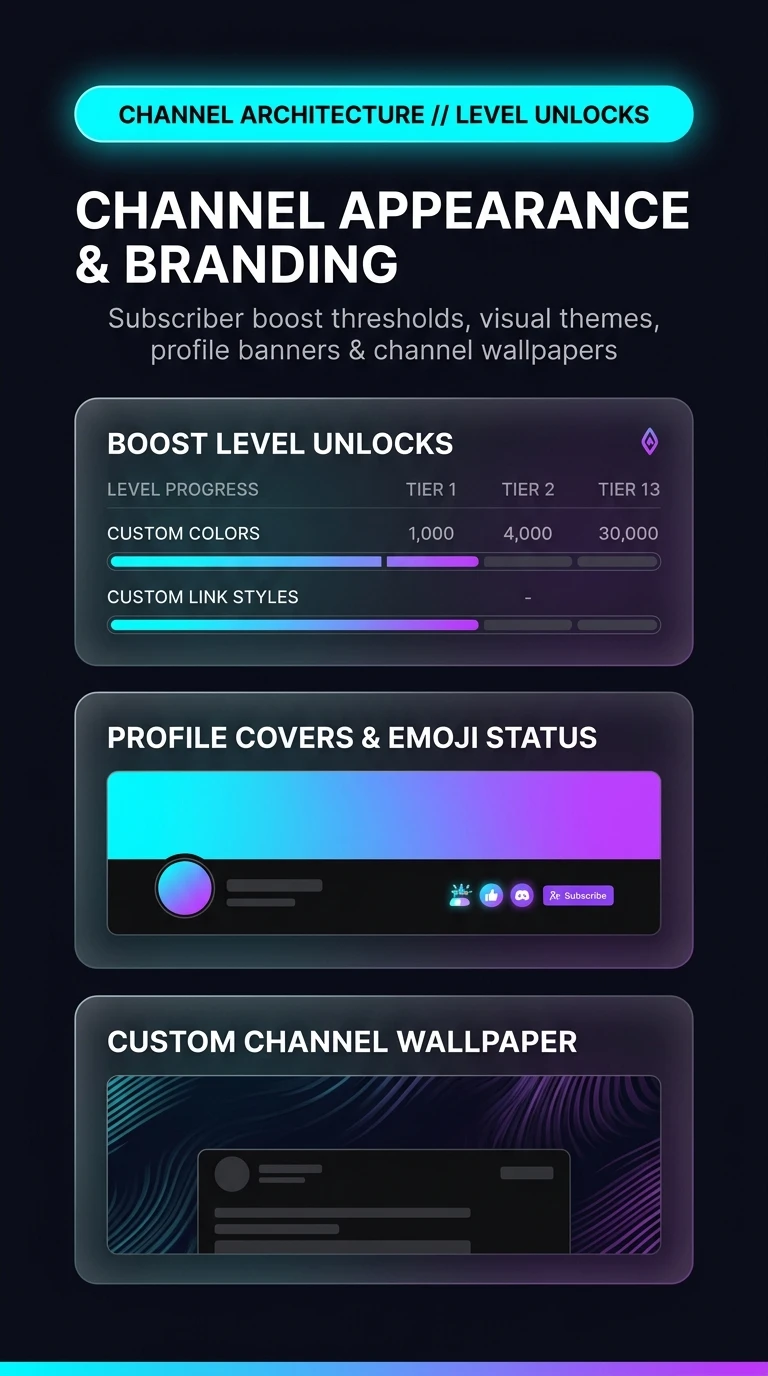
Telegram Channel Appearance Architecture Infographic
zoom_in Tap infographic to view high-resolution schematic
admin_panel_settings ADMIN Guide #10892 Actions
Enlarged Preview
Click anywhere outside or press ESC to close viewer
smart_display Telegram Video Short
1080p HD
Official Source: @TelegramTips Post #44 Press ESC or click outside to close