LIVE PORTAL Telegram v11.8 API Synchronized Free Animated Stickers
shield_person ADMIN LOGGED IN + Write Guide
admin_panel_settings ADMIN CONTROLS Guide #10894 • tips
How to Repost Channel Posts to Telegram Stories: Scalable Message Cards, Link Previews & Virality Amplification
play_circle Official Video Tip #414
Telegram Tips & Video Shorts Series

How to Repost Channel Posts to Telegram Stories: Scalable Message Cards, Link Previews & Virality Amplification

Transform static broadcast announcements into viral, interactive visual stories. Learn how Telegram enables users and administrators to repost any channel post into their 24-hour stories canvas, scale and rotate floating message widgets, and capture high-converting subscriber traffic via direct tap-to-jump channel deep links.

forward_to_inbox Official demonstration: Tapping the share arrow on any channel message, selecting 'Repost to Story', resizing the message widget, and testing direct tap navigation.
touch_app
One-Tap Repost Trigger
Tap the forward share arrow on any public channel post to instantly create a floating, interactive message widget inside the story creator.
aspect_ratio
Freely Scalable Canvas
Move, pinch to resize, rotate, and decorate the post card alongside photos, text captions, stickers, and animated emojis.
ads_click
Direct Tap-to-Jump Link
Anyone watching your story can tap the message card to instantly open the original post directly in its host channel.
layers STORY VECTOR OVERLAY PIPELINE

How Telegram Renders Interactive Message Cards in Stories

Unlike other social networks that flatten reposted posts into static raster screenshots, Telegram maintains a dynamic vector rendering pipeline:

vector_polyline
Dynamic Vector Rendering: The reposted card remains an interactive UI object rendered natively by the recipient's client. Text stays crisp and media plays without lossy recompression.
link
Deep-Link Entity Attribution: Telegram embeds a cryptographic inputMediaStoryVenue and peer entity ID into the story metadata, ensuring direct navigation to the exact message ID.
monitoring
Preserved View Analytics: When viewers tap through to the original channel message, impressions and forward counters increment transparently in the channel's post statistics.
aspect_ratio STORY REPOST CANVAS STUDIO

Interactive Message Card Scaling & Tap Navigation

Customize the scale and rotation of the message widget on the simulated story canvas, and tap the card to test direct navigation.

alex_dev 2h ago
more_vert
TG
Telegram Tips
Channel Post #414
Channel messages of any type can now be reposted directly to Stories! Tap to read full post.
open_in_new Tap to open message
checklist Step-by-Step: How to Repost Any Channel Message to Stories
1

Locate Message and Tap Share

In any public channel, tap the forward share arrow icon (forward) located next to the message bubble.

2

Select 'Repost to Story'

In the forward recipient tray, tap the top option labeled Repost to Story. Telegram automatically opens the story camera canvas with the message embedded.

3

Pinch, Reposition & Publish

Pinch with two fingers to resize or rotate the card, drag it anywhere across the frame, add background photos or stickers, and tap Post Story.

verified Growth Hack: High-Converting Story Syndication

When running giveaways, major product announcements, or breaking news, repost the channel message to admin stories and encourage community members to repost it as well. Viewers tap directly through to the original post, providing friction-free subscriber conversion.

auto_stories Executive Architecture Guide

Telegram Stories Channel Repost Architecture

Visual breakdown of one-tap repost triggers, vector card canvas transformation, and deep-link attribution routing.
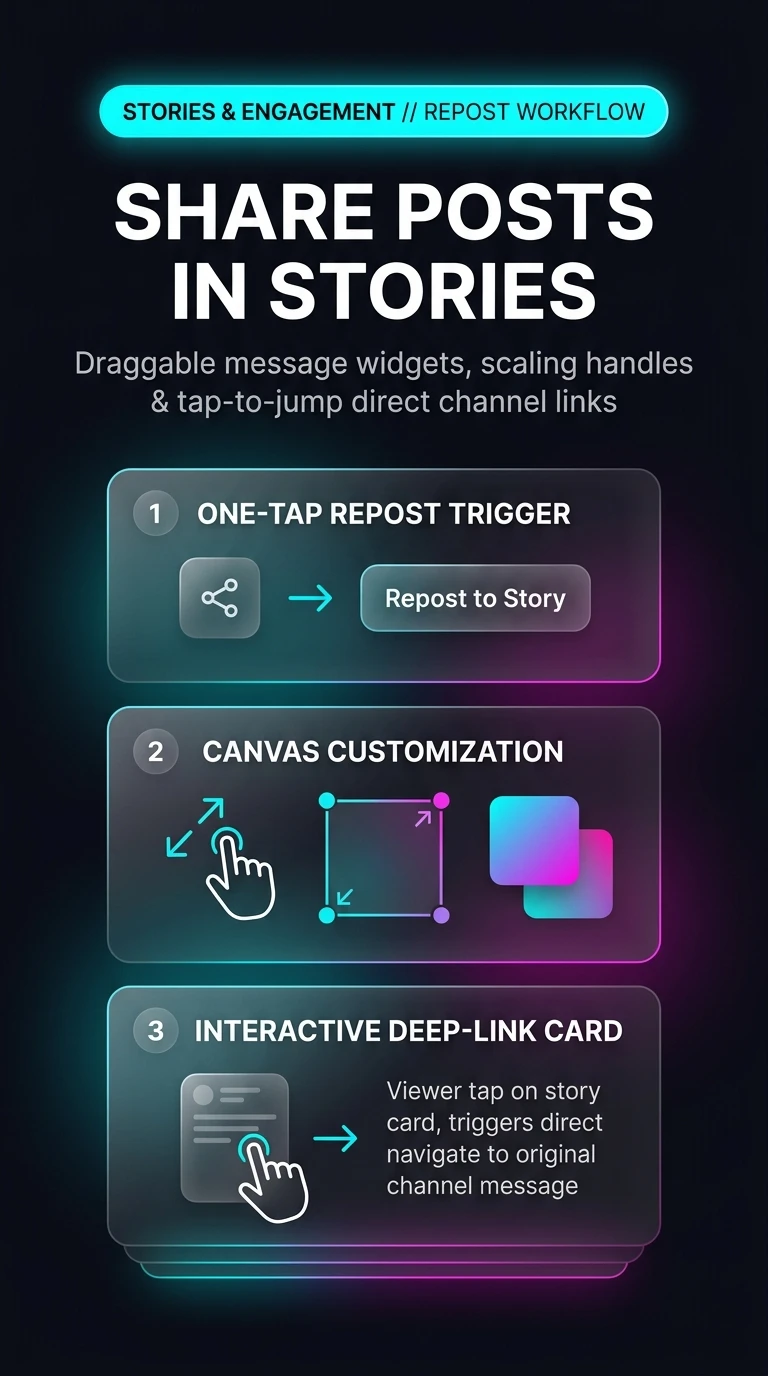

Telegram Stories Repost Architecture Infographic
zoom_in Tap infographic to view high-resolution schematic
admin_panel_settings ADMIN Guide #10894 Actions
Enlarged Preview
Click anywhere outside or press ESC to close viewer
smart_display Telegram Video Short
1080p HD
Official Source: @TelegramTips Post #44 Press ESC or click outside to close