How Telegram Voice and Video Calls Work: End-to-End Encryption, Screen Sharing & 4-Emoji Key Verification
Communicate with military-grade privacy and crystal-clear acoustic fidelity. Master Telegram's end-to-end encrypted calling architecture, peer-to-peer UDP connection handshakes, high-definition screen sharing, and the cryptographic 4-emoji visual key exchange that guarantees absolute protection against Man-in-the-Middle attacks.
How Telegram Negotiates Encrypted Calls and Relays
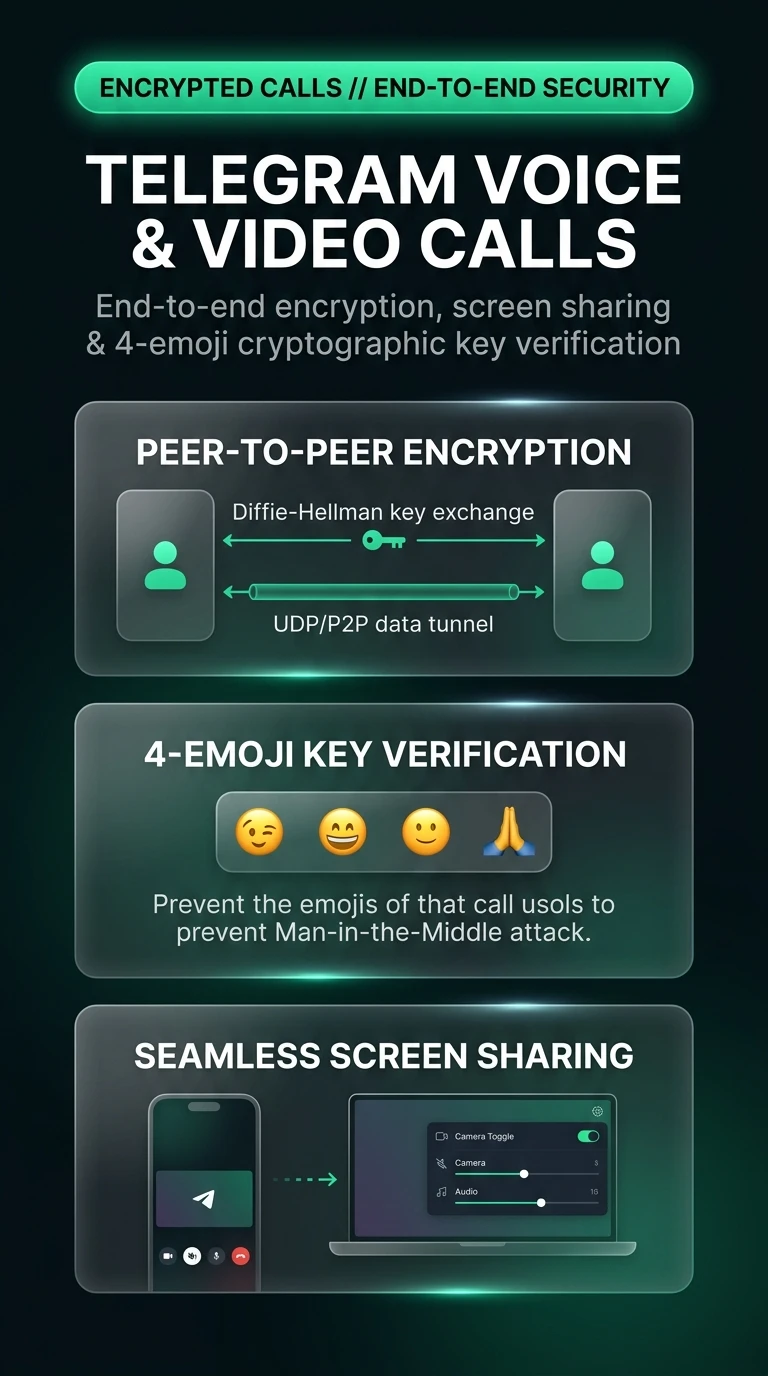
Under MTProto, calls establish a direct, low-latency communication tunnel between participant endpoints:
Test End-to-End Key Verification & Man-in-the-Middle Defense
Observe how the 4-emoji verification system proves connection integrity and detects simulated interception attempts.
Open Contact Profile and Tap Call
Open any direct chat, tap the contact's header profile, and tap the Call (telephone) or Video icon.
Toggle Video or Screen Sharing
During the call, tap the video camera icon to turn on your front/back camera, or tap Share Screen to stream presentations or troubleshooting sessions.
Compare the 4 Emoji Symbols
Glance at the top-right corner of both screens. Confirm out-loud that the 4 emoji symbols match to guarantee absolute end-to-end encryption integrity.
While direct P2P connections optimize audio latency, they reveal your device IP address to the other party. Go to Settings > Privacy and Security > Calls > Peer-to-Peer and set it to 'My Contacts' or 'Nobody' to route all calls through Telegram's encrypted relay servers if you value IP anonymity.
Telegram Encrypted Calls & Screen Sharing Architecture
Visual breakdown of Diffie-Hellman session key exchange, 4-emoji visual verification, and peer-to-peer screen streaming.