Telegram Theme Architecture: Color Accents, Dynamic Gradients, Doodle Wallpapers & Cloud Sync
While competing messaging apps restrict visual customization to a blunt toggle between system light and dark modes, Telegram features an enterprise-grade UI theming engine. Located under Chat Settings (or Appearance on iOS), Telegram enables users to select from dozens of curated color schemes, customize precision Hex accent tints, render multi-stop gradient chat bubbles with GPU shader acceleration, and overlay vector doodle wallpapers with gyroscopic motion parallax. Furthermore, customized palettes can be bundled into shareable t.me/addtheme/slug cloud links that sync across mobile and desktop clients in real time.
- arrow_forward 1. Comprehensive Color Schemes & Precision Hex Accents
- arrow_forward 2. Multi-Color Gradient Bubble Shaders
- arrow_forward 3. Motion Doodle Wallpapers & Parallax Tilt
- arrow_forward 4. Interactive Theme & Palette Designer Studio
- arrow_forward 5. Executive Infographic & Production Blueprint
1. Comprehensive Color Schemes & Precision Hex Accents
In Telegram, themes are defined as cascading JSON/key-value style property files that govern hundreds of discrete UI parameters (including action bars, navigation tabs, unread counter badges, and bubble shadow depths). Users can toggle between foundational bases:
Bases: Classic (Warm Grey) | Day (Paper White) | Dark (Deep Slate) | Night (True OLED #000000) | Arctic (Icy Cyan) -> Paired with 16.7M Hex Accent Override Controllers.
Selecting an accent color automatically computes secondary states: active press tints, subtle hover glazes, and contrast-compliant typography colors to preserve WCAG 2.1 AA readability standards.
2. Multi-Color Gradient Bubble Shaders
Unlike flat background fills, Telegram's message rendering engine supports chromatic linear gradients with up to 4 custom color stops:
Gradient interpolation executes on device GPU shaders, ensuring that 120Hz scrolling remains silky smooth without CPU heating or memory spikes.
Assign specific color schemes and gradients to individual 1-on-1 chats. Both participants experience the agreed-upon aesthetic ambiance.
The shader dynamically measures the perceived brightness of the bubble background and flips text color between pure white and charcoal to prevent unreadable contrast.
3. Motion Doodle Wallpapers & Parallax Tilt
Telegram's wallpapers are not static JPEG images; they are multi-layer composited graphics:
By subscribing to mobile accelerometer and gyroscope sensor feeds, the vector doodle layer subtly shifts coordinates relative to the underlying background gradient, creating an authentic 3D spatial depth illusion as you rotate your phone.
4. Interactive Theme & Palette Designer Studio
Customize your own Telegram aesthetic. Choose from the curated theme presets below or tune the primary accent and bubble gradient stops. Watch the live chat mockup dynamically transform!
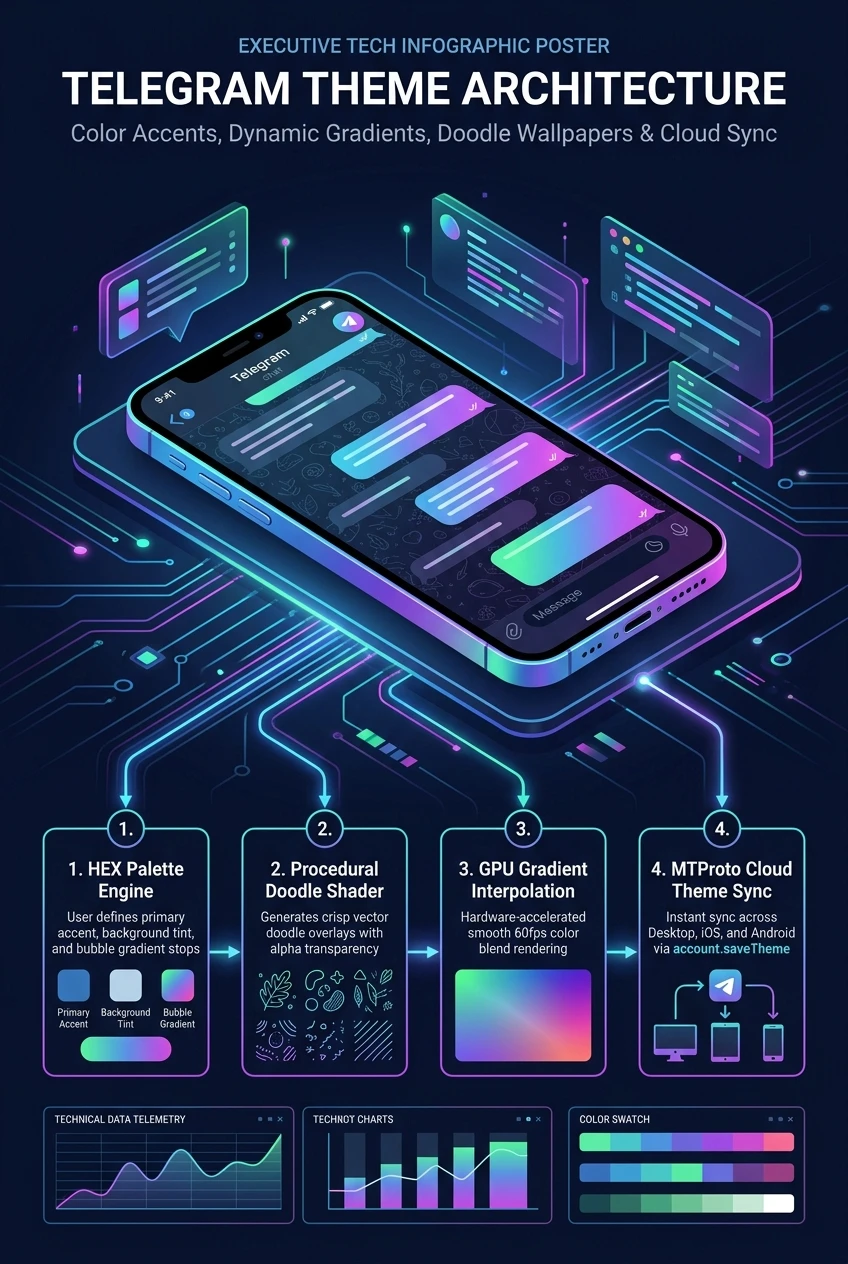
Telegram Theme & Color Architecture at a Glance
A comprehensive visual flowchart summarizing Hex accent customizers, multi-stop gradient shaders, doodle wallpapers, and cloud theme synchronization.