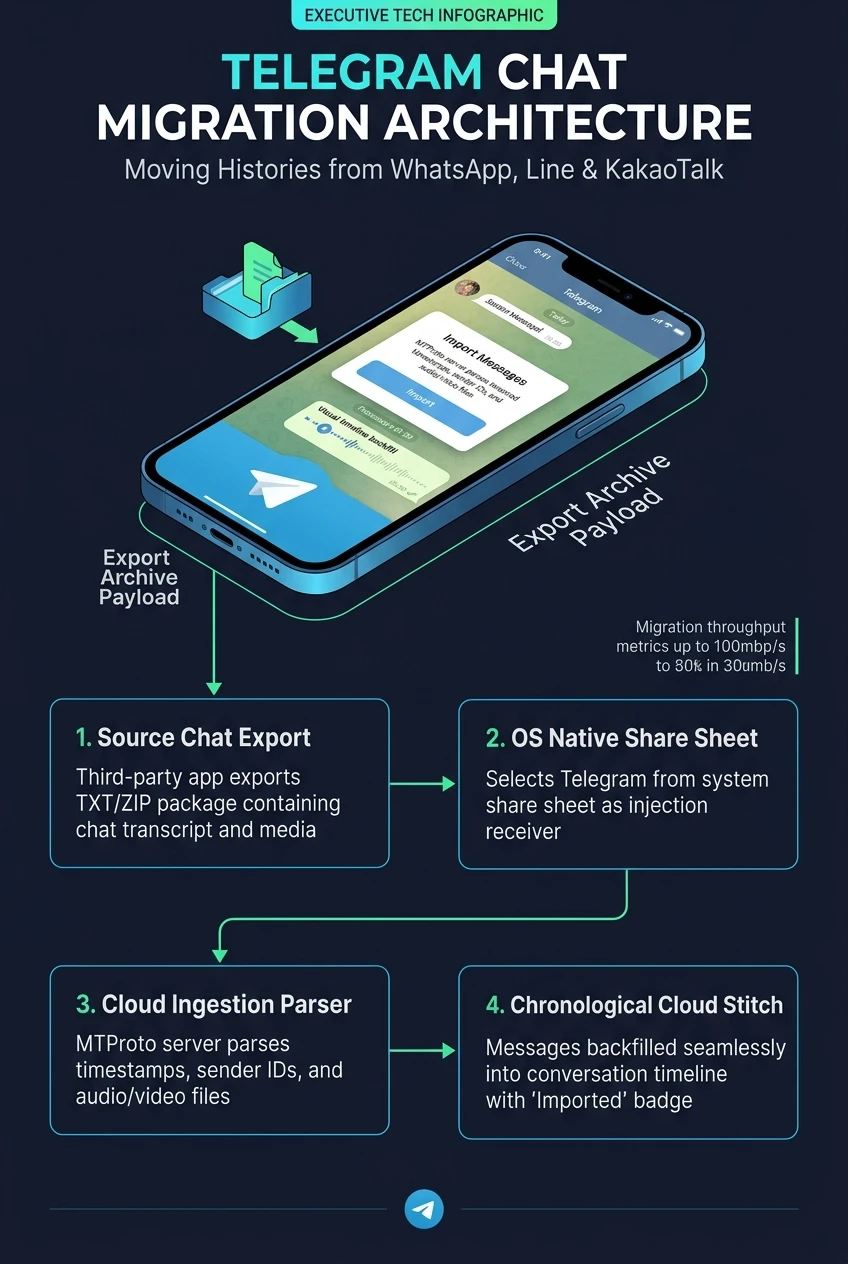
Telegram Cross-Platform Chat Migration Architecture: Moving Histories from WhatsApp, Line & KakaoTalk
Switching messaging ecosystems historically forced users into a painful dilemma: abandon years of cherished personal conversations, work agreements, and media archives, or remain locked inside proprietary, closed-garden silos. Telegram demolished this barrier by engineering an on-device Cross-Platform Chat Migration Pipeline. By tapping Export Chat within WhatsApp, Line, or KakaoTalk and selecting Telegram from the native share sheet, complete multi-year conversations are chronologically interleaved into Telegram's cloud storage, complete with original timestamps, media attachments, and transparent [Imported] verification tags.
- arrow_forward 1. System Share Sheet Hand-Off & Local Parser
- arrow_forward 2. Timestamp Chronology & [Imported] Verification
- arrow_forward 3. Media Extraction & Cloud Re-Encoding Pipeline
- arrow_forward 4. Bilateral Sync & Zero Recipient Friction
- arrow_forward 5. Interactive Chat Migration Studio
- arrow_forward 6. Executive Infographic & Production Blueprint
1. System Share Sheet Hand-Off & Local Parser
Traditional messaging migrations required complex root scripts, desktop bridge utilities, or dubious third-party cloud scrapers. Telegram solved this entirely through standard operating system extension channels:
WhatsApp / Line / Kakao Export -> .zip / _chat.txt Archive -> Native OS Share Sheet -> Telegram Share Target Extension -> On-Device RegEx Tokenizer.
The migration parser runs entirely in sandbox memory on the user's smartphone. It unpacks the exported zip archive, detects the dialect formatting (e.g. WhatsApp's brackets vs. Line's tab-separated columns), and structures every individual message into an MTProto ingest payload.
2. Timestamp Chronology & [Imported] Verification
A common hazard of importing data into chat timelines is chronology collapse: all imported messages suddenly appearing at the current minute, obliterating the conversational context. Telegram's engine prevents this via two core mechanisms:
The parser extracts the original epoch timestamp from the legacy text file and stores it directly in the message header. Messages from 2018 appear under 2018 date dividers.
To prevent fraudulent spoofing or impersonation, every imported bubble features an explicit "Imported" label next to the timestamp, indicating it originated outside Telegram.
3. Media Extraction & Cloud Re-Encoding Pipeline
When users choose "Attach Media" during export, the archive contains photos, video files, PDFs, and voice clips. Telegram processes them dynamically:
Legacy voice formats (such as .opus/.aac containers from WhatsApp) are indexed and linked to the corresponding message bubble. Media files are streamed to Telegram's cloud storage clusters across parallel multi-part TCP pipelines, consuming virtually zero local smartphone storage once the migration is complete.
4. Bilateral Sync & Zero Recipient Friction
Perhaps the most user-friendly aspect of Telegram's migration architecture is bilateral synchronization:
Sender Imports Archive -> Telegram Server Reconstructs 2-Way Chat -> Both Parties Instantly See Full Chat History Across Phone, Desktop & Web.
Your chat partner does not need to export anything on their phone. As soon as you import the conversation into your mutual 1-on-1 chat, they instantly have access to the exact same full searchable archive across all their devices.
5. Interactive Chat Migration Studio
Simulate the chat import engine below. Select a source legacy messenger, configure media options, and initiate the import to watch the real-time parsing pipeline generate authentic interleaved messages with the [Imported] tag!
Chat Migration Architecture at a Glance
A comprehensive visual flowchart summarizing the cross-app ingestion pipeline, timestamp interleaving, and bilateral instant cloud sync.