![[Telegram Tips & Shorts] How to Apply Tilt Shift & Depth-of-Field Blur in Telegram: Photo Editing Guide](https://tgway.com/images/guides/guide_134.webp?v=1788578100)
How to Apply Tilt Shift & Depth-of-Field Blur in Telegram: Photo Editing Guide
Transform everyday snapshots into miniature dioramas and cinematic portraits. Master Telegram’s circular and linear tilt-shift tools, complete with pinch gestures to scale focal spread, rotation, and edge feathering.
lens_blur Simulating Optical Aperture & Depth of Field on Any Device
In professional photography, tilt-shift lenses physically angle the optical plane relative to the image sensor, creating a razor-thin plane of focus. When applied to wide-angle cityscape or aerial photos, our brains interpret the scene as a miniature model set or tabletop diorama.
Telegram builds this sophisticated optical simulation natively into its media editor without requiring multi-camera portrait hardware:
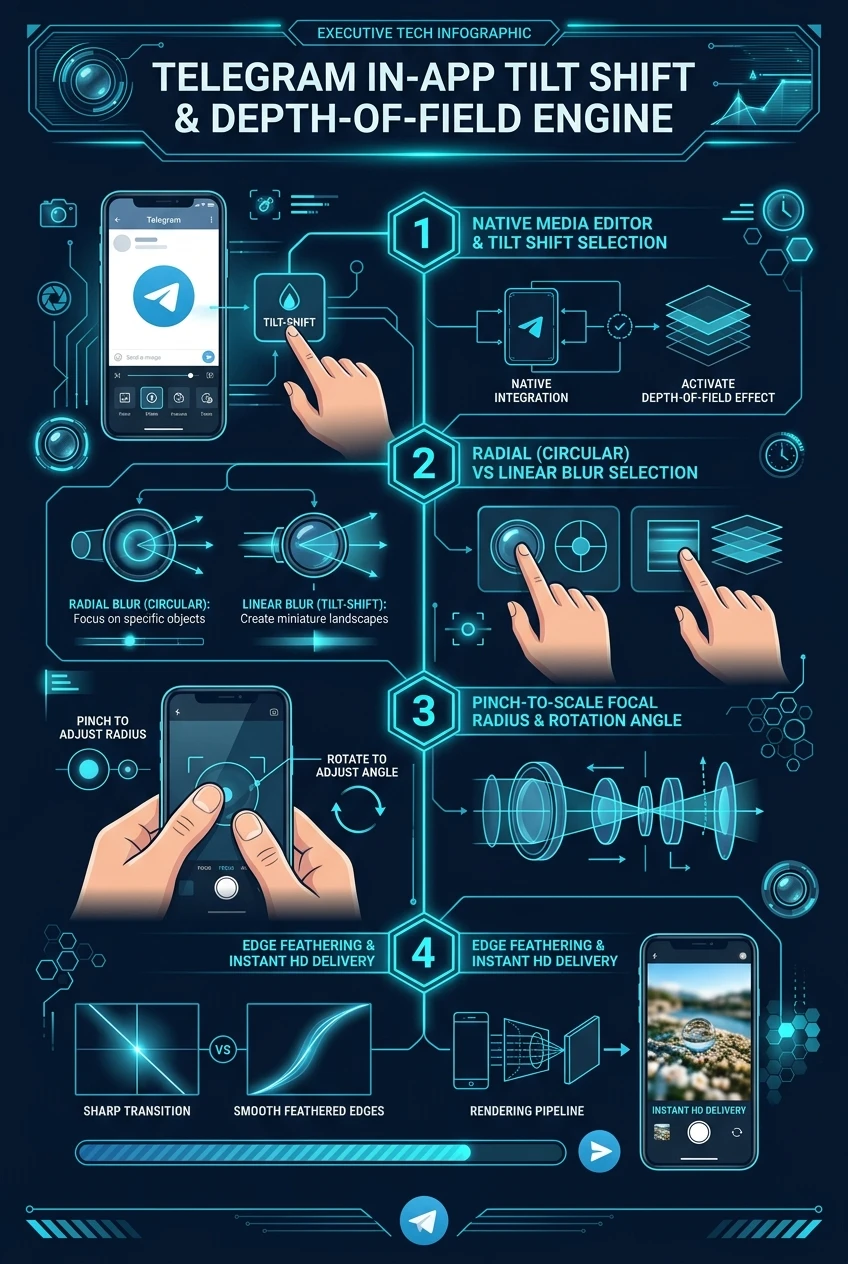
• Radial Blur (Circular): Creates a central circular focus zone surrounded by creamy, progressive edge bokeh. Ideal for portraits, food close-ups, and macro items.
• Linear Blur (Tilt-Shift): Creates a horizontal or diagonal focus band across the frame. Everything above and below the band is softly defocused, producing the classic miniature effect on landscapes and traffic scenes.
• Fluid Pinch-to-Scale Gestures: Two-finger pinch intuitively expands or narrows the focal strip, while rotating your fingers tilts the linear blur to match architectural lines.
Drag the focal circle to any position on the frame to highlight faces, objects, or key details while smoothing busy backgrounds.
Perfect for overhead cityscapes, trains, and landscapes. Rotatable across 360 degrees to follow roads and horizons.
Telegram uses a Gaussian falloff gradient rather than a harsh cut, ensuring natural and organic optical depth transition.

checklist Step-by-Step: How to Activate Tilt Shift in Telegram
Pick any photo from the chat paperclip menu and tap its preview to enter the editor.
Tap the Sliders icon and scroll horizontally to locate the Blur / Tilt Shift tool.
Tap between circular or linear modes. Pinch with two fingers to resize and rotate.
Tap the checkmark to apply the blur and send your depth-enhanced photo in high resolution.
Telegram In-App Tilt Shift & Depth-of-Field Blueprint
A comprehensive visual flowchart breaking down optical aperture simulation, pinch-to-scale focal spread, and feathering pipelines.