Who Would Target Your Telegram Account, and Why

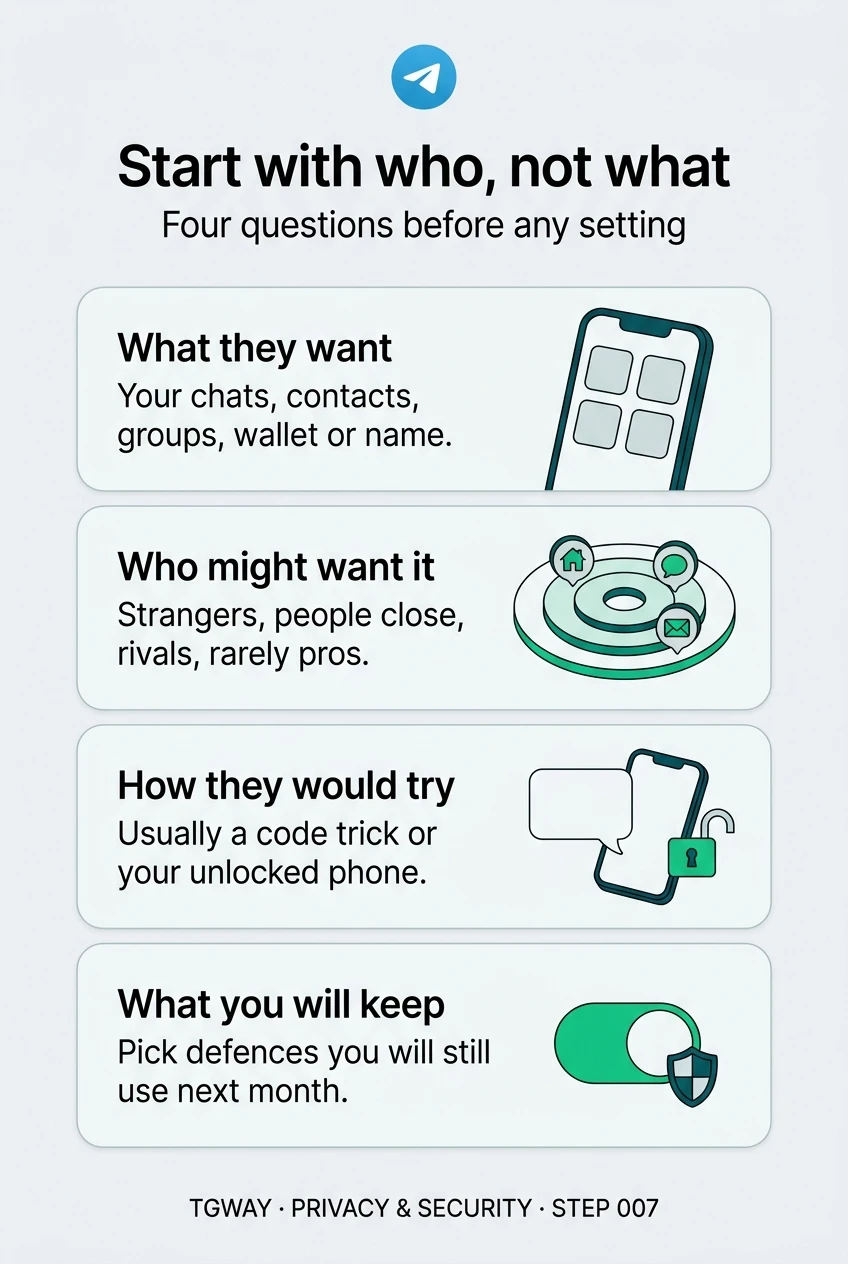
Security advice usually starts with settings: turn this on, hide that, never click this. It works better the other way round. Before choosing any setting, ask a plainer question: who, realistically, would want into your account, and what would they do with it once there?
Security people call this threat modelling. It sounds technical, but it is only four questions, and most people can answer them in five minutes. The answer decides which advice matters for you, and which you can safely skip. A student worried about a nosy flatmate and a journalist protecting sources need very different things, and the same checklist would fail both of them.
What you will be able to do after this step
- check_circle Answer the four threat-modelling questions for your own account.
- check_circle Tell the kinds of people who might target you apart by what they want and how they get it.
- check_circle Pick the few defences that match your answers, instead of every setting at once.
help Four questions
- What is in my account that someone could want? Chats with people you know, contacts, photos, groups you run, a wallet, a public username, or simply your name, which can be used to fool your friends.
- Who might want it? Strangers after money, people close to you who are curious or controlling, someone you are in conflict with, or, for a few people, someone with real resources.
- How would they try, and how bad would it be? Most attempts are cheap: a trick to get your login code, or a moment with your unlocked phone. Think about what losing the account, or someone reading it, would actually cost you.
- What will I actually keep doing? A defence you switch off after a week protects nothing. Choose the ones that fit your life, then keep them.
Who they are, what they want, how they get in
Almost everyone faces the first one. Fewer face the others, but for those who do, they matter more. Pick the one you are thinking about.
They do not know you. They want any account that works.
This is the attacker nearly everyone meets. They send the same message to thousands of people, and the goal is an account to sell, to spam from, or to use to ask your friends for money. As Step 001 showed, the usual route is getting you to hand over a login code.
Because they are not interested in you in particular, the defences are general and cheap: never share a code, turn on Two-Step Verification, and treat unexpected "support" messages as fake.
Against strangers, being slightly harder than average is usually enough.
They know you, and can pick up your phone
A partner, a family member, a flatmate or a coworker does not need to trick you out of a code. They can open your phone while you are in the shower, or sit at your laptop where Telegram is already open. Some are merely curious; some are controlling.
Two-Step Verification does little here, because the account is already open on your device. What helps is a lock on the device and on the app, sessions you check and end, message previews hidden from the lock screen, and knowing that Secret Chats stay on the device they were started on.
When the risk is in the room, lock the device and the app, not only the account.
They want to find you, watch you, or embarrass you
An ex, a harasser, a former business partner. They may not want into your account at all; they want what it shows: your photo, your last seen time, your phone number, your username, the groups you are in. Step 006 listed what that envelope reveals.
The defences here are about visibility: limit who can see your number and find you by it, who sees your photo and last seen time, who can call you and add you to groups. Blocking and reporting matter, and so does not reusing a username they already know.
Against someone who knows you, what your profile shows is the attack surface.
They are after you specifically, and can spend time and money
Journalists, activists, people holding significant crypto, people in legal disputes, public figures. The attacker may try SIM swapping, carefully built impersonation, or pressure on people around you. This is rare, but if it is you, generic advice is not enough.
Use every account protection, rely on Secret Chats for sensitive conversations, keep sensitive material off the account entirely where you can, and get help from specialists in your field. No app settings substitute for that.
If this is your situation, settings are the start, not the plan.
checklist Matching the defence to the risk
Each defence closes a different door. Look for the rows that match your answers above.
| Defence | Stops | Does little against |
|---|---|---|
| Never sharing login codes | Strangers tricking you into signing them in | Someone who already has your unlocked phone |
| Two-Step Verification | A stolen code or a hijacked phone number being enough on its own | A session that is already open on your devices |
| Device lock and app passcode | Someone picking up your phone or using your laptop | Attacks that never touch your device |
| Checking and ending sessions | Someone who logged in once and stayed | A person who can log in again with your code |
| Privacy settings for number, photo and last seen | People watching or finding you through your profile | Anyone already in your chats |
| Secret Chats | Messages being readable on servers or other devices | The person you are talking to, or a screenshot |
quiz Which risk is it?
Someone you live with seems to know what you said in a chat. You have Two-Step Verification on. What is the most likely explanation?
Two-Step Verification protects new logins; it does nothing about a phone or computer that is already signed in. Check Settings > Devices, end sessions you do not use, and lock the device and the app.
You are a small shop owner with no enemies. Which defence matters most for you?
Your realistic attacker is a stranger who wants any working account, and especially a business account customers trust. The two cheapest defences close their usual door. The other options cost you a lot and protect against people who are not after you.
An ex keeps finding out when you are online. What should you look at first?
Seeing when someone is online needs no hacking at all; it is what the profile shows. Limit Last Seen & Online, add them as a "never share" exception, or block them.
task_alt
touch_app Try it now — five minutes, on paper
- Write one line for each of the four questions What is worth protecting, who might want it, how they would try, what you will keep doing.
- Circle the attacker you worry about most For most people it is the stranger. For some it is someone close. Be honest; nobody else will see the paper.
- Find their row in the table Pick the one or two defences that close their door. Those are your priorities for Step 008.
Why your phone number is the weakest door into your account, what a cloud password adds, and why turning it on does not sign out sessions that are already open.
help Questions
Is it paranoid to think about this?
No. It is the opposite: it lets you stop worrying about attacks that do not apply to you. Most people find that two or three habits cover their realistic risks, and they can ignore the rest of the scary advice they read.
Should I assume Telegram itself is my attacker?
That depends on your situation, not on fear. Step 002 covered what Telegram can and cannot see. If what you discuss would put you at risk if a service provider saw it, use Secret Chats for those conversations and keep the rest in mind.
My answers changed. What now?
Redo the four questions. A new job, a breakup, a public project or holding crypto can all change who might want into your account. Threat modelling is not a one-time exam; it is worth repeating whenever your life changes.
What if the person I worry about controls my phone?
Then app settings are not enough, because someone who controls the device can undo them. Consider a device they do not have access to, and reach out to local support services if you feel unsafe. Your safety comes before any account.
Start with who, not what
The four threat-modelling questions, the four kinds of attacker ordinary people face, and matching each defence to the risk it actually stops. Tap to open it at full resolution.