How Telegram Accounts Actually Get Taken Over

Almost nobody's Telegram account is broken into the way films show it. Nobody cracks the encryption, guesses a password in a darkened room, or slips past a firewall. In nearly every takeover, the owner hands over one thing at one moment — a five-digit code, a scan of a QR code, a password typed into the wrong page — usually because a message made it feel urgent or routine.
That is good news, because it means the defence is mostly a handful of habits and three settings rather than technical skill. This first step of the Privacy & Security track maps where takeovers actually come from, so the other ninety-nine steps have somewhere to hang.
What you will be able to do after this step
- check_circle Name the five ways into an account, and which of them need your help.
- check_circle Explain why an account with nothing "valuable" in it is still worth stealing.
- check_circle Recognise the moment in a takeover where you still have the advantage.
group Why anyone wants your account
People often assume they are not a target because their chats are boring. That misunderstands what is being stolen. An account is not valuable for what is in it; it is valuable for who trusts it.
Your contacts. A message from you is read differently from a message from a stranger. Your friends will answer you, click what you send, and lend you money in an emergency. A taken account is used to message every contact at once, often with the same trick that took it, so one lost account becomes ten.
The rooms you run. If you are an administrator of a group or a channel, the attacker inherits that audience. A single post in a busy group, sent from a trusted admin account, reaches more people than any spam campaign could.
Anything with a balance. Stars, gifts, a collectible username, a wallet you connected — anything that can be transferred or sold.
The account itself. An account with years of ordinary history is less likely to be limited than a brand-new one, which makes established accounts useful for sending the kind of messages that get fresh accounts restricted quickly.
None of these depends on you being important. They depend on you being trusted by somebody, which is true of nearly everyone.
lock_open The five doors
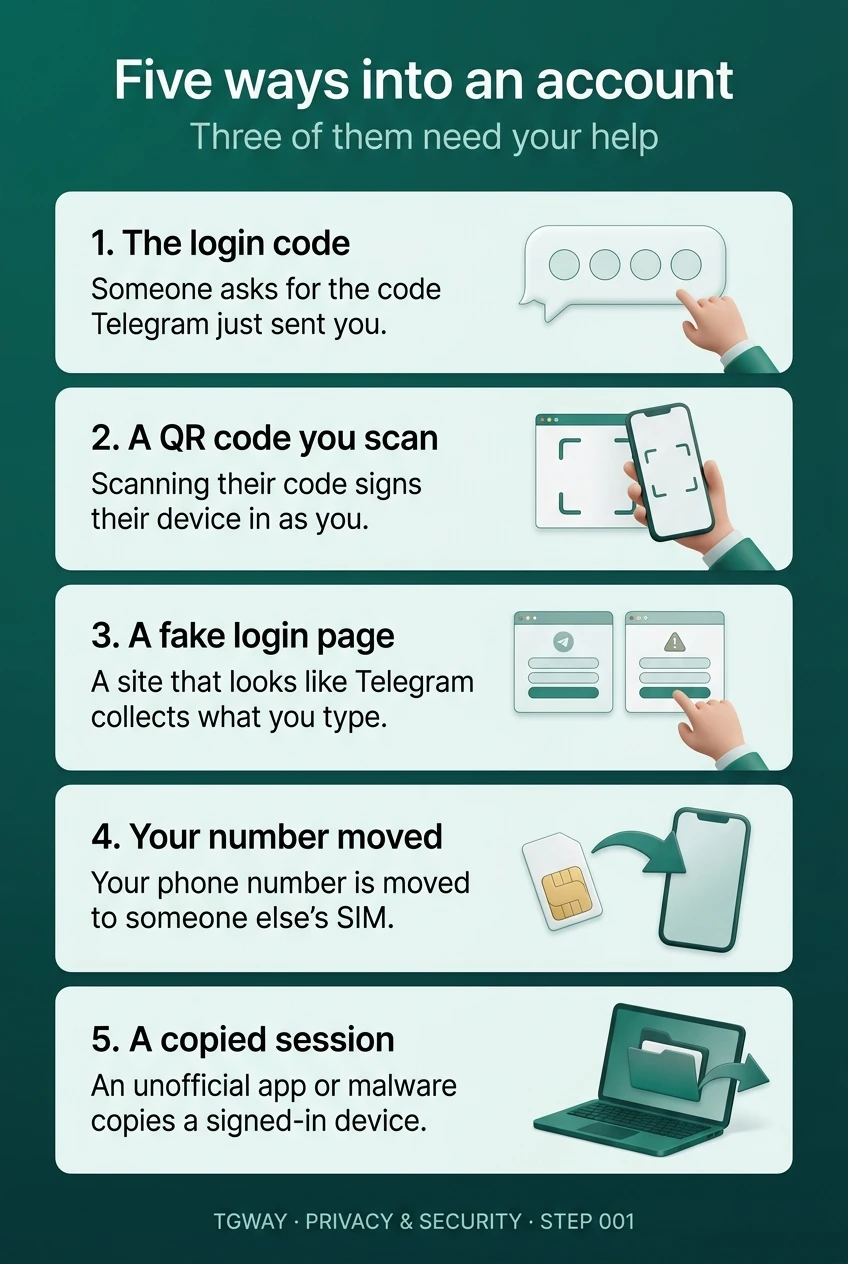
Every takeover comes through one of these. The first three need the owner to do something; the last two do not, which is exactly why they are rarer and why the defences for them are different.
| Door | What the attacker needs | What the owner usually did | Covered in |
|---|---|---|---|
| The login code | The code Telegram just sent you | Read it out, forwarded it, or typed it where they asked | Steps 011 and 082 |
| A QR code you scanned | Your phone to approve their screen | Scanned a code someone else showed or sent | Steps 014 and 083 |
| A fake login page | Your number, code and password, typed by you | Signed in on a site that only looked like Telegram | Steps 025 and 084 |
| Your phone number moved | Your text messages | Nothing — the number was moved at the mobile carrier, or reassigned | Step 037 |
| A copied session | A device that is already signed in | Installed an unofficial app, ran malware, or left a computer signed in | Steps 027, 039 and 078 |
Notice what is missing: guessing. There is no row for an attacker working out your password, because a Telegram login starts with a code sent to your own devices, not with a password somebody could try over and over.
history What a takeover looks like from the inside
The most common version follows the same sequence almost every time, and seeing it laid out makes it much easier to notice while it is happening.
- A message arrives that makes a code feel normal A friend says they sent you a code by mistake. "Support" says your account will be deleted unless you verify it. A giveaway asks you to confirm you are human.
- A real login code appears in your app It is genuine. The attacker typed your phone number into Telegram on their own device, and Telegram did what it always does: sent the code to you. The message containing it even tells you not to share it with anyone.
- You pass it on This is the only step that matters. Without it, nothing else in this list can happen.
- Their device signs in as you If Two-Step Verification is off, they are in. If it is on, they now need a password they do not have, and the attempt stops here.
- Your contacts start hearing from "you" The same message that caught you goes out to everyone in your list, and the chain continues.
quiz Check your instincts
A friend writes: "I sent you a code by mistake, can you send it back to me?" What is actually happening?
A login code is only ever sent to the account that is being signed in to. The only way a code lands in your app is that somebody asked Telegram to sign in as you, a few seconds before this message arrived. The "friend" is very often a friend whose account was taken the same way a moment earlier.
Which of these does Two-Step Verification protect you from?
Two-Step Verification adds a password to every new sign-in, so a code on its own is no longer enough. It does nothing to a session that already exists — that is the fifth door, closed by reviewing your devices and not installing unofficial apps. Online status is a privacy setting, not a security one (Step 029 of Beginner Basics).
You receive a notification about a new login you do not recognise. What is the first thing to do?
The notification only informs you; the device list is where you act. Open Settings > Devices on Android or iPhone, or Settings > Privacy and Security > Active Sessions in Telegram Desktop, and terminate the session you do not know. Then turn on Two-Step Verification if it was off. Changing your username changes nothing about who is signed in.
touch_app Before Step 002 — five minutes
Three small actions close most of the doors above. None of them needs to wait for the rest of the track.
- Turn on Two-Step Verification, with a recovery email Telegram Desktop and Android: ☰ > Settings > Privacy and Security > Two-Step Verification. iPhone: the Settings tab, then Privacy and Security > Two-Step Verification. Add the email when it offers; without it, a forgotten password is a locked door (Step 032).
- Look at your device list once Settings > Devices on a phone, Settings > Privacy and Security > Active Sessions on desktop. Anything you do not recognise, or no longer use, can go.
- Decide now that you will never pass on a code Not to a friend, not to "support", not to a form. Deciding in advance is what makes it easy when the message is urgent.
This track is about situations: who is trying what, and what to do. Every setting it relies on is explained once in Beginner Basics, and Step 40 puts them side by side.
help Questions
Can someone take my account without my login code?
Yes, but it is much less common. The two routes are moving your phone number to another SIM, which still stops at your Two-Step Verification password, and copying a session from a device that is already signed in, which is why unofficial apps and malware matter. Almost everything else needs you to hand something over.
Does Telegram ever ask for my login code?
Never. The code is only ever typed into the Telegram app or the official website when you are the one signing in. Anyone who asks for it — including an account called "Telegram Support" — is trying to sign in as you.
If my account is taken, can I get it back?
Often, especially if one of your own devices is still signed in: end the intruder's session from there as soon as you notice. It becomes harder if the intruder set Two-Step Verification before you did and you have lost every session. Step 081 walks through the first ten minutes.
Does a takeover mean Telegram's encryption was broken?
No. A takeover is somebody signing in as you with something you gave them. Encryption protects messages while they travel; it cannot tell the difference between you and a person holding your code. Step 005 explains what encryption does and does not cover.
I have nothing valuable in my chats. Why would anyone bother?
Because the value is in the people who trust you. Your contacts will read and answer a message from you, and any group or channel you administer comes with its audience. That is enough to make an ordinary account worth stealing.
Will Two-Step Verification lock me out if I forget the password?
Only if you also have no recovery email. With one, Telegram can send a reset code to that address. That is why the email is part of the setup rather than an optional extra, and why Step 032 is about choosing a password you will still know in a year.
Five ways into an account
The five doors from this step on one page, with the three that need the owner's help shown with a hand. Tap to open it at full resolution.