What a Telegram Mini App Is, and What It Is Not

You tap a button in a bot chat and a panel slides up with a shop, a game or a booking form that looks like part of Telegram. It opens instantly, it already knows your name, and there is nothing to install. That is a mini app, and it is one of the most useful things in the app.
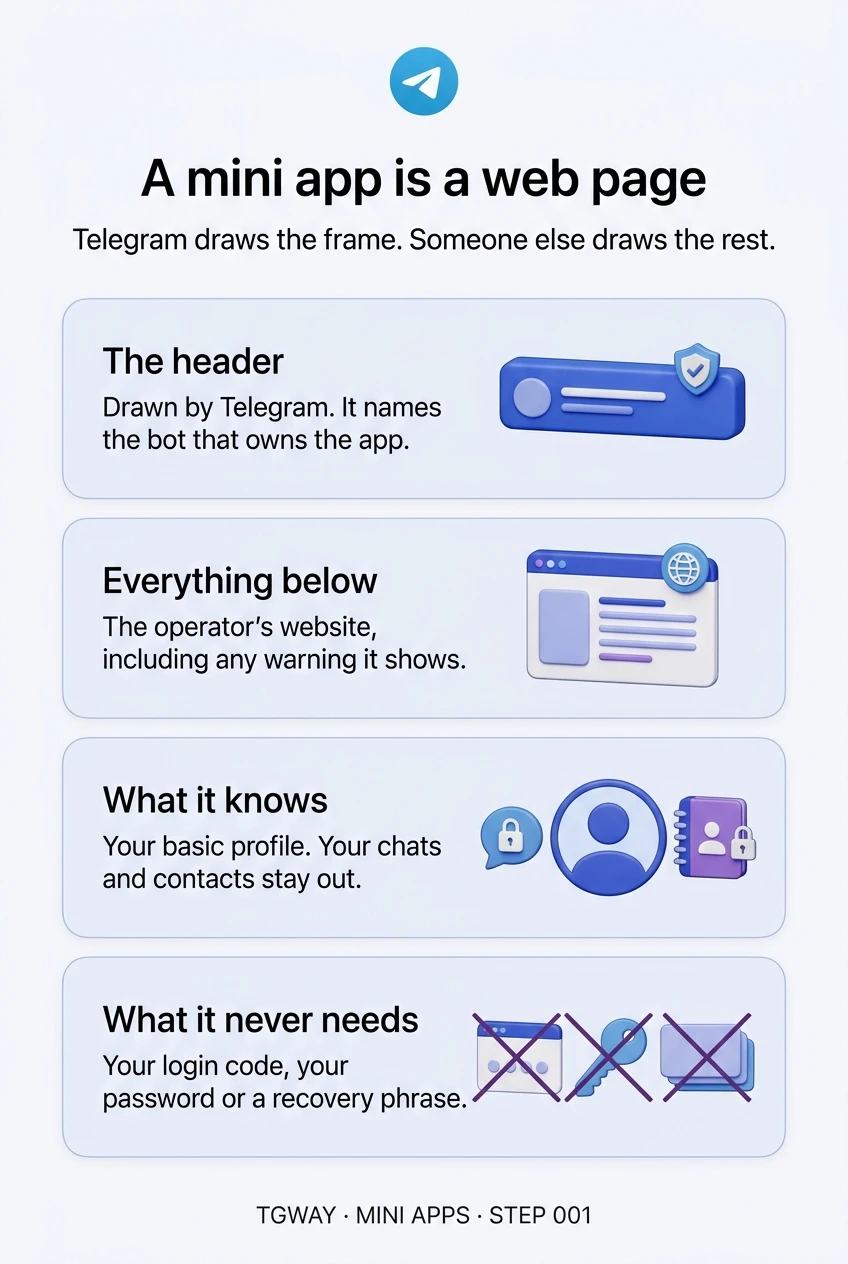
It is also easy to misread. A mini app is a web page made by whoever runs the bot, shown inside a frame that Telegram draws. Telegram provides the frame, the header and the sign-in; everything inside the frame belongs to the operator. Knowing where that line runs is the foundation for every other step in this track.
What you will be able to do after this step
- check_circle Tell a mini app from a bot chat, a web link and Telegram's own screens.
- check_circle Point to the part of the screen Telegram drew and the part the operator drew.
- check_circle Recognise the requests no genuine mini app would make.
layers A web page in a Telegram frame
Technically, a mini app is a website. It is built with ordinary web technology, runs on the operator's own servers, and can change from one day to the next without any update from Telegram. What makes it feel native is that Telegram opens it in a panel inside the app and tells it who you are, so it can greet you by name without asking you to create an account.
That convenience is the whole appeal, and it also explains the risk. The page never had to earn your trust with a sign-up form. It inherits the familiar look of the app around it, and people tend to trust the frame instead of asking who made the picture inside it.
Who drew which part of the screen
Open any mini app and look at it in these two layers.
verified_user Drawn by Telegram
web Drawn by the operator
Trust the header to tell you whose app it is, and treat everything under it as that operator's website. In full-screen mode the header can disappear too, which is exactly when to be most careful.
apps Four things that look alike
Mini apps sit next to other features that open inside Telegram. They behave differently, and the difference tells you who you are dealing with.
| What opens | Who made it | What it knows about you | How to recognise it |
|---|---|---|---|
| Mini app | The bot's operator | Your basic profile, passed when it opens | A panel with the bot's name in a Telegram header |
| Bot chat | The bot's operator | What you type or send to the bot | An ordinary chat with messages and buttons |
| Web link in the in-app browser | Whoever runs the site | Nothing from Telegram unless you sign in | An address bar showing the website's domain |
| Telegram's own screens | Telegram | Your account | Settings, payments and prompts that do not sit inside a bot's panel |
The row people skip is the last one. Telegram's own screens never live inside a bot's panel. A settings page, a security check or a login prompt that appears inside a mini app is part of someone's website, whatever it says.
block What a mini app is not
Not reviewed by Telegram. Anyone can create a bot and attach a mini app to it. Popularity, a polished design or a place in a directory is not an endorsement of what the app does.
Not installed on your phone. There is nothing to uninstall. Closing the panel ends what you see; it does not necessarily end your session with the operator, and a minimised app is still open.
Not able to read your chats. A mini app has no route to your messages, contacts or phone number just by being opened. Anything more, such as your location or your number, it has to ask for, and you can refuse. Step 003 goes through exactly what it learns.
Not a safe place for secrets. No genuine mini app needs your Telegram login code, your cloud password, or a wallet's recovery phrase. A page that asks for any of them is an attack, however official it looks.
Is this Telegram, or the operator?
Tap an answer for each screen.
Inside a game's mini app, a banner says "Telegram Security Check: confirm your login code to keep your rewards."
Everything under the header is the operator's page. Telegram never asks for your login code inside a bot's panel, and no reward requires it.
You tap Buy in a shop's mini app and a sheet slides up from the bottom showing the price, your saved card and a Telegram payment button.
Payments made through Telegram use its own sheet, which the operator cannot restyle. A card form typed into the page itself would be the operator's, not Telegram's.
You close a mini app with the X in the header. Has your session with the operator definitely ended?
Closing ends what you see. What the operator keeps, such as an account it created for you or your progress, stays on its servers. There is nothing to uninstall.
task_alt
touch_app Try it now — five minutes
- Open a mini app you already use A shop, a game or a tool. Look only at the top strip and read the bot name in it.
- Open the header menu The button beside the close control. Its options come from Telegram, not from the app, and usually include opening the bot's chat or reporting it.
- Find the bot behind it Open the bot's profile and check its username letter by letter. The app belongs to whoever runs that bot.
- Notice what it already knew Your name, perhaps your photo. That came from Telegram when you opened it. Anything else it shows about you, you gave it.
Why a mini app is a web page that already knows you, what the frame lets it do, and why payments should only ever go through Telegram's own sheet.
help Questions
Does Telegram check mini apps before they go live?
Anyone can create a bot and attach a mini app to it, so you should not treat an app's existence as approval. Judge it by who runs the bot, what it asks for, and whether it sends payments through Telegram's own sheet.
Can a mini app see my messages or contacts?
No. Opening one passes your basic profile, not your chats, contacts or phone number. Access to things like your location or your number needs a separate prompt that you can decline.
Is a mini app safer than a website?
It is a website. What differs is that Telegram tells it who you are, which saves you creating an account and also means the operator knows which Telegram user you are the moment you open it.
How do I report a mini app that looks like a scam?
Use the menu in the header or open the bot's profile and report it there, then block the bot. Do not type anything else into the app while you decide.
A mini app is a web page
Which part of the screen Telegram draws, which part the operator draws, what the app knows about you, and what it never needs. Tap to open it at full resolution.