Where Telegram Mini Apps Come From

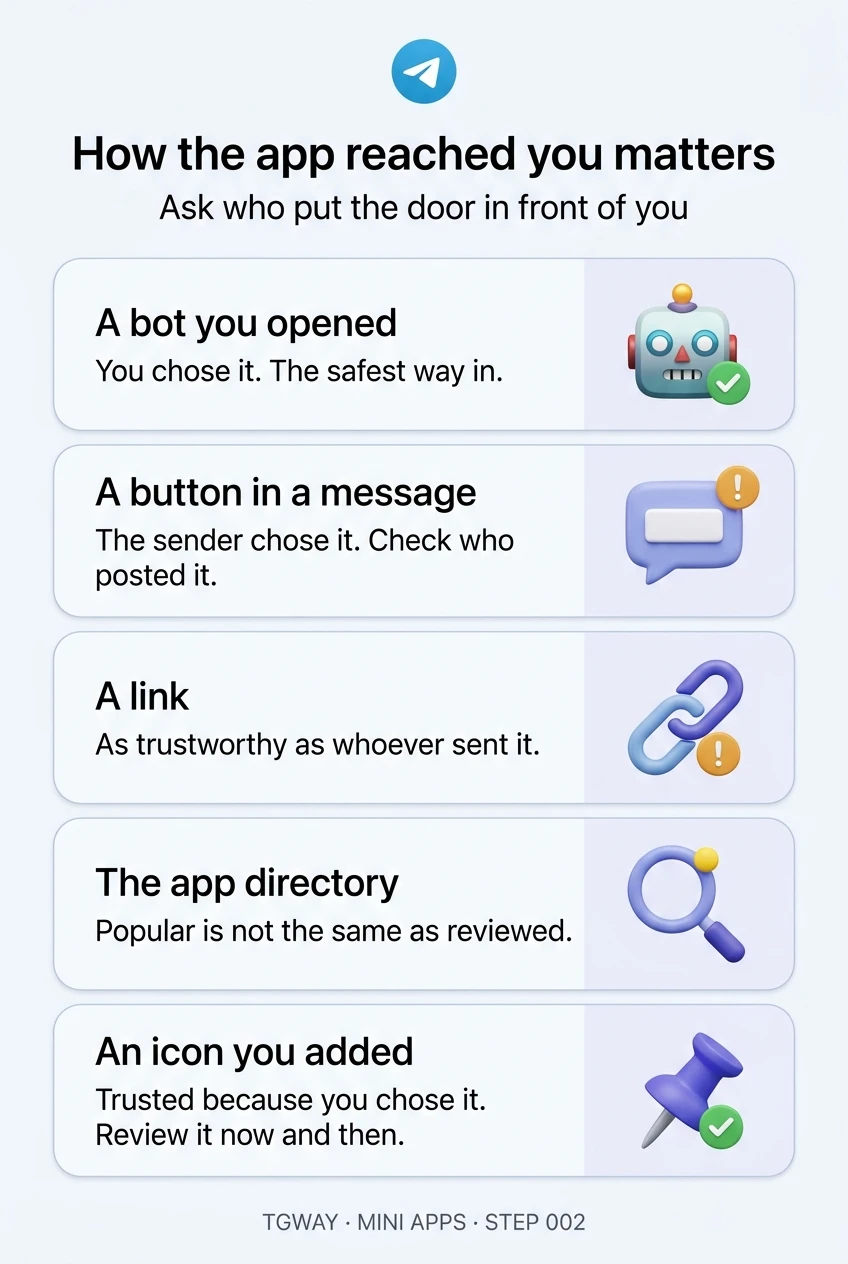
Every mini app you open reaches you through a door: a button in a bot's chat, a button under someone's message, a link, the app directory in search, or an icon you added yourself. Once the app is open, they all look the same. The door is the last moment you can still tell them apart.
How an app reached you says more about whether to trust it than anything the app shows you after it opens. An app you went looking for and an app someone placed in front of you deserve different amounts of care, even if they are the same app. This step goes through the doors one at a time.
What you will be able to do after this step
- check_circle Name the five ways a mini app reaches you.
- check_circle Know who chose to put each door in front of you.
- check_circle Run a ten-second check before opening an app you did not seek out.
person_search The question behind every door
For each way in, ask one thing: who decided this door should be in front of me? Sometimes it was you, when you searched for an app or opened a bot you know. Sometimes it was a stranger, when a message in a group carried a button or a link. Most scams arrive through the second kind, because that is the only kind a scammer controls.
The same app can reach you both ways. A well-known game opened from its own bot is one thing; the same game's name on a button under a message promising free rewards is another, and it may not be the same game at all.
How the app reached you
Pick a door to see who put it there and what to check before you go through.
The menu button in a bot's own chat
You opened the bot, and the bot's owner put the button in its chat. This is the most trustworthy door because two choices were yours: finding the bot and tapping its button. It is also the door to use for any app you rely on regularly.
What to check is the bot itself, once, the first time: its username letter by letter, and where you found it. A bot named after a famous brand but spelt slightly differently is the most common trap.
The safest way in. Make it your habit to open apps from their bot, not from anywhere else.
A button under a message in a group or chat
Somebody else sent that message, and whoever sent it chose the button. Buttons look official because Telegram draws them in its own style, but the label is text the sender wrote, and it does not have to match where the button goes.
Before tapping, look at who posted it and in what context. A button in a stranger's message offering rewards, airdrops or account checks is the classic entrance for fake apps.
The door strangers control. If the offer is urgent or generous, go and find the app yourself instead.
A link that opens an app directly
Anyone can create a link that opens a mini app, and links travel everywhere: other messengers, social feeds, emails. The link names the bot that owns the app, which is the useful part. Read that name before you tap.
A link from the app's own website or official channel is reasonable. A link that reaches you from someone you do not know, especially one that says your account or rewards depend on it, is not.
Trust it as much as whoever sent it. The link itself proves nothing.
The apps section in Telegram's search
You went looking, which is good. But a directory is sorted by how many people use an app, and usage can be bought with rewards and promotion. A top position tells you an app is popular, not that it is careful with your data or money.
Read the name and the bot behind it, and look at what the app is for before opening it. The directory is a fine way to discover; it is not a stamp of approval.
A good way to find apps. Popularity is not a review.
The attachment menu, or an icon on your home screen
Some apps can be added to the attachment menu or put on your phone's home screen as a shortcut. Either way, you agreed to it earlier, so the door is trustworthy for as long as the app still deserves it.
That is the catch: you granted the place once and may never think about it again. Remove shortcuts and menu entries for apps you no longer use; each one is a signed-in door waiting on your screen.
Trusted because you chose it. Review the list now and then, and remove what you have stopped using.
checklist A ten-second check for doors you did not choose
- Look at who placed it A friend, a group admin, a stranger in a public group, an unknown account in your private chats. The further down that list, the more care it needs.
- Read the bot's name before opening Links and headers name the bot that owns the app. Compare it letter by letter with the one you expected.
- Ask what the app wants from you If the message promises money, rewards or an account check, assume it is bait and open the real app through its own bot instead.
swap_horiz Moving an app to a better door
Most people open a new app through whatever door they first met it by, and keep using that door. That is how an app discovered through a stranger's button ends up opened from that same message for months.
The fix takes a minute: once you have decided an app is worth using, open its bot directly, start it, and from then on use the button in the bot's chat. The app is identical; the door is one you chose. Delete or archive the message that first brought you there.
A quick visual of the four common entry points, and the tip on the app directory explains what its rankings do and do not measure.
help Questions
How do I find the bot behind a mini app?
The header of an open mini app shows the bot's name, and its menu offers a way to open the bot's chat. From there, open the bot's profile to see its username. That username is who runs the app.
Is an app in the directory safe?
Safer than a random link, because you chose it, but not reviewed in the sense of an audit. Treat the directory as a way to find apps, then judge each one by what it asks for, as Step 003 explains.
A button under a message says "Open App". Is that the real one?
You cannot tell from the label, because the sender wrote it. If it matters, search for the app's official bot yourself and open it from there. If both lead to the same bot, you have lost nothing.
How do I remove an app from my attachment menu or home screen?
Remove the home-screen icon the way you remove any shortcut on your phone. For the attachment menu, open the app's entry there and remove it, or open the bot and use its menu. Removing the door does not delete anything the operator already has; it only stops the easy way back in.
How the app reached you matters
The five ways a mini app reaches you, and who chose to put each door in front of you. Tap to open it at full resolution.