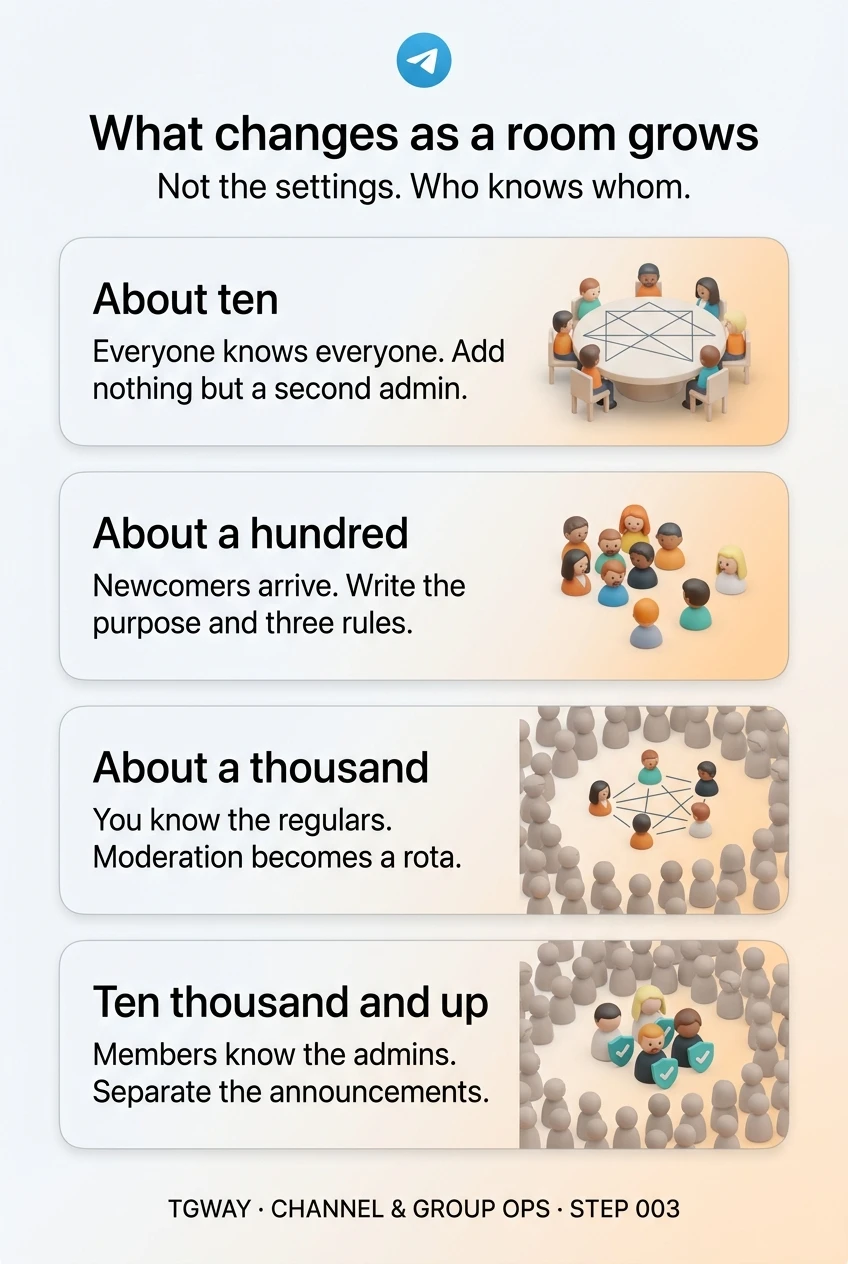
How Group Size Changes Running a Telegram Group

A group of ten and a group of ten thousand use the same app, the same buttons and the same settings. They are still completely different things to run. What changes at each step up in size is rarely a technical limit, because Telegram's groups are built to hold very large memberships. What changes is who knows whom.
At ten members you know everyone. At a hundred you know who is new. At a thousand you know the regulars. At ten thousand, members know the admins and not much else. Almost every rule, tool and role you will add later is a response to losing one of those kinds of recognition. This step walks through each size so you can see the next change coming.
What you will be able to do after this step
- check_circle Say what stops working as a room grows by roughly ten times.
- check_circle Add rules, roles and tools when the size calls for them, not before.
- check_circle Recognise the moment your room has outgrown the way you run it.
What each size needs, and what it does not
The numbers are rough. A room of forty people who know each other behaves like the first tab; a room of forty strangers already behaves like the second.
Everyone knows everyone
A group this size runs on the same manners as a dinner table. Nobody needs written rules, because anyone who oversteps hears about it from a friend. Every member can usually change the group's name and photo, and that is fine.
The mistake here is building for a size you do not have: pinned rules, bots and a moderation plan for a family chat. They make a small room feel like an office.
Add nothing. Make sure a second person can manage the room, and leave it at that.
You know most names, but not all
The first members arrive who were not part of the original circle. They do not know the unwritten rules, and the people who do assume they will learn them by watching. They usually do not, and the first argument is about a rule nobody wrote down.
This is the size for a one-line description of what the room is for, three rules people break by accident, and a second admin who is actually active. If the room is public, spam arrives here too, and someone needs to be around to remove it.
Write down the purpose and three rules, and name a second admin. Steps 005 and 006 cover both.
You know the regulars
Most members now read and never post, and the room's character is set by the small group who talk. You cannot keep track of everyone, so you start relying on tools: join approval or a check for new members, slow mode when a thread overheats, and a log of what admins did.
Moderation becomes a job with shifts, because a spam wave at three in the morning is seen by hundreds before anyone wakes. And every message now costs attention: one careless reply lands on a thousand phones.
Turn moderation into a rota with written limits, and give new members a gate. Consider topics if conversations collide.
Members know the admins, and little else
At this size the room is a public space full of strangers. Impersonators copy admins' names and photos to message members privately, so the admin list and each admin's title become the main defence. Announcements belong in a channel, because in a group they scroll away within minutes.
Decisions also get harder to undo. A pinned message that notifies everyone wakes ten thousand phones, and a rule change affects people who will never read the explanation.
Separate announcements from conversation, make admins easy to verify, and treat every change as public.
compare_arrows What changes and what stays the same
It helps to be clear about what size does not change, because owners often expect the wrong things to break.
trending_up Changes with size
check_circle Stays the same
Growth is a people problem that looks like a settings problem. The settings you need at each size exist from day one; what you are really adding is ways to know who is who.
notifications_active Signs your room has outgrown how you run it
Size itself is not the trigger; the symptoms are. Watch for these and move to the next tab's habits when you see them.
The same question gets asked every few days. The information exists but newcomers cannot find it. It is time for a pinned answer, or a proper welcome.
Spam stays up for hours. Someone is posting while nobody is looking. That calls for more coverage, a gate for new members, or both.
Members ask whether a message from an admin is real. Recognition has broken down. Admin titles, a clear admin list and a pinned "we never message you first" line are due.
People mute the room instead of leaving it. They still want it, but it costs too much attention. That points to topics, slow mode, or moving announcements to a channel.
edit_note Try it now — five minutes
- Place your room on the four tabs Use who knows whom, not the member count. A room of strangers is further along than its number suggests.
- Read the next tab, not the current one Growth is easier when the next habit is ready before it is needed. Note the one change it asks for.
- Check the four warning signs If any is already true, you are running the room one size too small. Fix that first.
What is handed over when a room changes owner, what stays behind, and why the thing that actually changes at scale is your ability to know who is who.
help Questions
Is there a maximum size for a Telegram group?
Groups can hold a very large number of members, far more than most communities ever reach, and channels can have an unlimited number of subscribers. A small group is quietly upgraded to a larger type as it grows or when you change certain settings. Beginner Basics Step 56 explains what changes when that happens.
Should I split a big group into several smaller ones?
Only if the conversations are genuinely different and each smaller room will still be busy. Splitting an active group often produces several quiet ones. Topics inside one group are usually the better first move.
How many admins does a room need at each size?
There is no fixed ratio. What matters is coverage: someone able to act during every part of the day your members are awake. Small rooms need a second person for resilience; large ones need enough people to cover their time zones.
My room is small but public. Which tab applies?
Treat it as one tab larger than its size. A public room is open to strangers from the first day, so spam and unfamiliar members arrive before the numbers suggest they should.
What changes as a room grows
Four sizes of room and the one habit each one needs, because what changes is who knows whom, not the settings. Tap to open it at full resolution.