Choosing Your Business's Front Door on Telegram

A business on Telegram can take five forms: an account customers write to, a channel they follow, a group where they talk to each other, a bot that handles requests, or a mini app that works like a small website inside Telegram. Many businesses end up with more than one. They should still start with exactly one.
That one is your front door: the link on your receipt, the code by your till, the username you say on the phone. Choose it by what customers come to do the first time they tap, not by which option has the most features. Everything else can sit behind that door later.
What you will be able to do after this step
- check_circle Compare the five forms by what the customer does and what you have to run.
- check_circle Pick the one link you will give every customer.
- check_circle Plan what to add behind it, and when.
storefront Five doors, compared by effort
| Door | The customer's first tap | What you have to run | Starts to strain when |
|---|---|---|---|
| Account you answer | Writes to you directly | A person reading and replying | The same questions arrive all day |
| Channel | Subscribes to your updates | Regular posts worth reading | Readers have questions and nowhere to ask |
| Group | Joins other customers | Moderation and a reason to talk | Private orders get discussed in public |
| Bot | Presses a button to start a task | Software someone builds and keeps running | A customer needs a person and cannot find one |
| Mini app | Opens a full shop or tool | A web app and a developer | It is used less than it cost to build |
Read the third column first. The first two doors need nothing but your time. The last two need software, which means building it, hosting it and fixing it when it breaks. A small business that starts with a bot because it looks professional usually ends up maintaining code instead of talking to customers.
What do customers come to do first?
Pick the reason most customers would tap your link today. That reason decides the door.
A service, a trade, a consultancy
Customers want a person. A plumber, a tutor, a designer or a lawyer is chosen partly on how they answer, so the door is an account you reply from. Give it a clear name and photo and keep it separate from your personal account, which Step 003 covers.
When the same questions start to take up your day, Telegram's Business tools add opening hours, a greeting for first-time customers and saved replies to the same account, without changing the door.
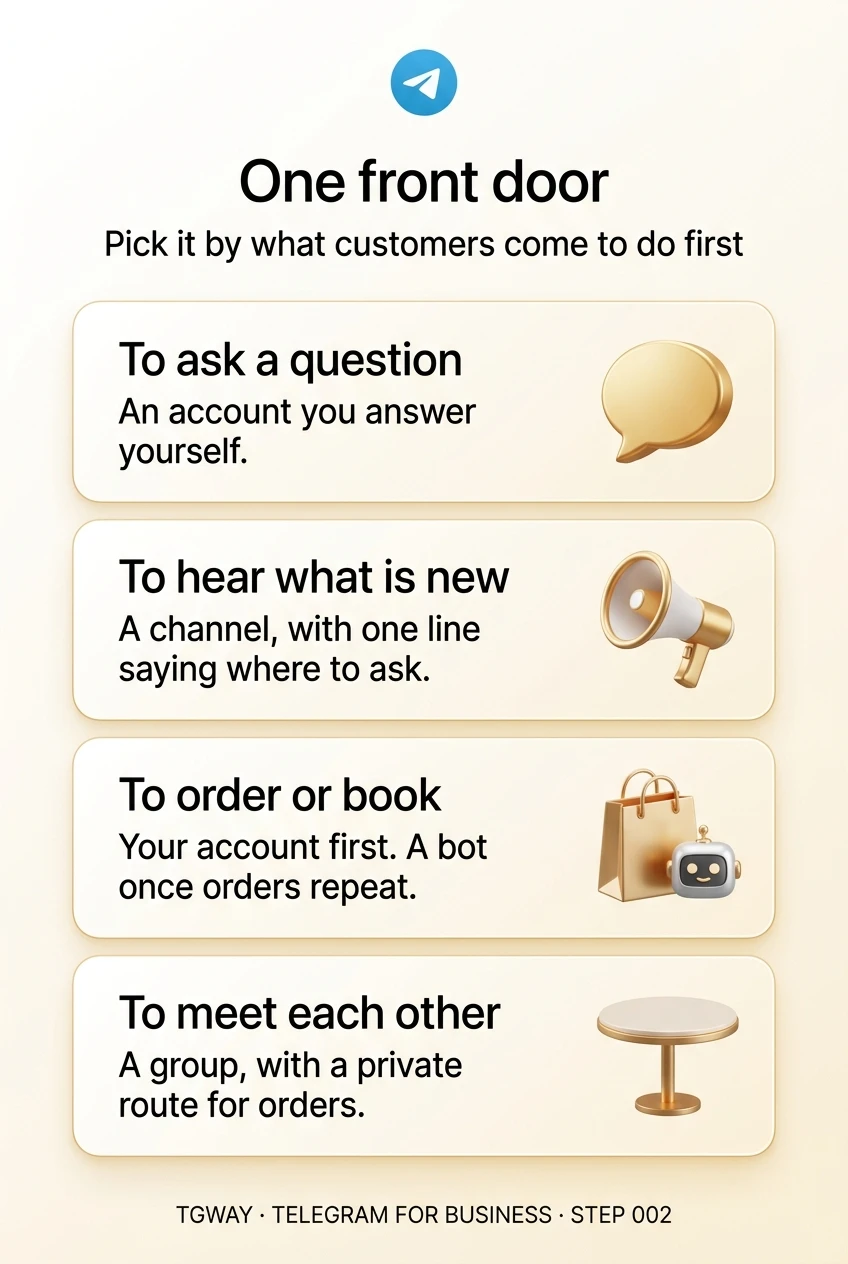
The door is an account you answer. Add automatic replies later, not a bot first.
New stock, schedules, drops, menus
Customers want to be told, not to talk. A channel fits: they subscribe once and your posts arrive in their chat list without anyone needing to reply. It scales from a dozen followers to many thousands without changing how you work.
Say in the channel's description where questions should go, whether that is your account or a linked discussion group. A channel that leaves customers nowhere to ask quietly pushes them to other apps.
The door is a channel, with one line pointing to where people can ask.
Orders, bookings, repeat purchases
This is the one job where software earns its place, but only once there is volume. For a handful of orders a week, customers writing to your account and you replying with a payment link is simpler and more personal than any bot.
When orders repeat in the same shape — choose an item, pick a time, pay — a bot takes over the routine and can issue invoices inside the chat. A mini app makes sense when the catalogue is large enough to need browsing, like a real shop page.
Start with your account; move to a bot when the same order arrives many times a day.
Classes, clubs, users of the same product
Some businesses are partly communities: a gym, a language school, a software tool whose users help each other. A group lets customers talk to one another, which often answers questions before you see them.
A group is also public to its members, so keep anything involving orders, payments or accounts out of it and send those to your account. Opening a group means running a room, which the Channel & Group Ops track covers in detail.
The door is a group, with a private route for anything personal.
add_circle Adding doors behind the first one
Most businesses that last end up with two or three forms, in a common order: an account first, a channel once there is something regular to announce, then a bot or group if the business needs one. The trick is to keep the front door the same while you add rooms behind it.
That means your printed link should not change every time you add something. Point it at the door customers use most, and let that door lead to the rest: the channel's description links to your account, your account's profile shows your channel, the bot's welcome message points to both.
What to avoid is five doors at once. Customers who find a channel, a group, a bot and two accounts for the same business cannot tell which one is really you, and a sixth door set up by an impersonator blends right in.
edit_note Try it now — five minutes
- Write down the first tap Finish the sentence: "Most customers who tap our link want to…". Ask, hear, order or meet.
- Match it to a door Use the tab above. If two fit, choose the one that needs less software.
- Decide the one link you will print The username or invite link that goes on receipts, signs and your website. It is the only one customers need to know.
- Write the trigger for the next door "A channel when we have weekly news", "a bot when orders repeat daily". That turns growth into a decision rather than a guess.
What a bot is, why its token is the bot, and who controls it when the person who made it leaves. Step 88 covers mini apps, and Steps 56 and 71 cover groups and channels.
help Questions
Is a bot more professional than an account?
Only when it saves customers time. For most small businesses, a well-named account that answers quickly feels more professional than a bot that asks customers to press buttons before reaching a person. Bots shine at repetitive tasks, not first impressions.
Can a channel receive messages from customers?
Channels can link a discussion group for public comments, and they can also accept direct messages from subscribers if you switch that on. Either way, someone has to read them; say in the description which route you actually answer.
Should I use my personal account as the front door?
It works on day one and becomes a problem soon after: customers see your personal photo and bio, and your friends' messages sit next to theirs. Step 003 explains how to separate the two before the first customer arrives.
Do I need a mini app to sell on Telegram?
No. Most small sellers take orders through messages or a simple bot. A mini app is worth building when customers need to browse a large catalogue or use a real interface, and when someone can maintain it.
One front door
The door to start with for each thing customers come to do, with the others added behind it later. Tap to open it at full resolution.