How to Report a Harmful Telegram Mini App

Most mini apps are what they claim to be. A few are not: a page that asks for your login code, a "checkout" drawn inside the app to collect card numbers, a copy of a well-known app with one letter different, a game that keeps asking your wallet to approve things. When you meet one, two instincts compete: report it, or get out.
Get out first, then report. Reporting helps other people, but it does nothing for the access the app already has to you. This step closes the first module of the Mini Apps track with the right order: close the doors the app could still use, keep a note of what happened, and then send the report to the place that can act on it.
What you will be able to do after this step
- check_circle Recognise the four common kinds of harmful mini app.
- check_circle Cut off what a harmful app can still reach, in the right order.
- check_circle Report it to the place that can act, with what they need.
What does a harmful mini app look like?
They look different, but each asks for something a real app never needs. Pick the one you met.
It asks for your login code, password or recovery phrase
Framed as "verify your account", "claim your reward" or "restore access". No mini app ever needs these; typing them in hands over your account or your wallet.
If you already entered something, go straight to the steps below and treat the account or wallet as exposed.
A request for a code is the whole diagnosis.
Card fields drawn inside the page
A genuine payment opens Telegram's own payment screen over the app, as Step 005 showed. A card form painted inside the page sends what you type wherever its author wants.
If you entered card details, contact your card issuer as well as reporting the app.
Card fields in the page are not a checkout.
A lookalike of an app you know
Same name, same picture, a username one character off, usually found through a link in a group rather than from the real app's website. It may work normally for a while before asking for something.
Compare it with the one the real service links to. If they differ, you are in the copy.
The route you came by tells you which one it is.
Repeated wallet requests you did not expect
After you connected a wallet, the app keeps sending requests to approve: a "free claim", a "gas refund", a "verification". Each one is a transaction, and approving the wrong one can move what the wallet holds.
Disconnect it in the wallet, as Step 006 described, and approve nothing more.
Read every request on the wallet's own screen.
shield First, close the doors
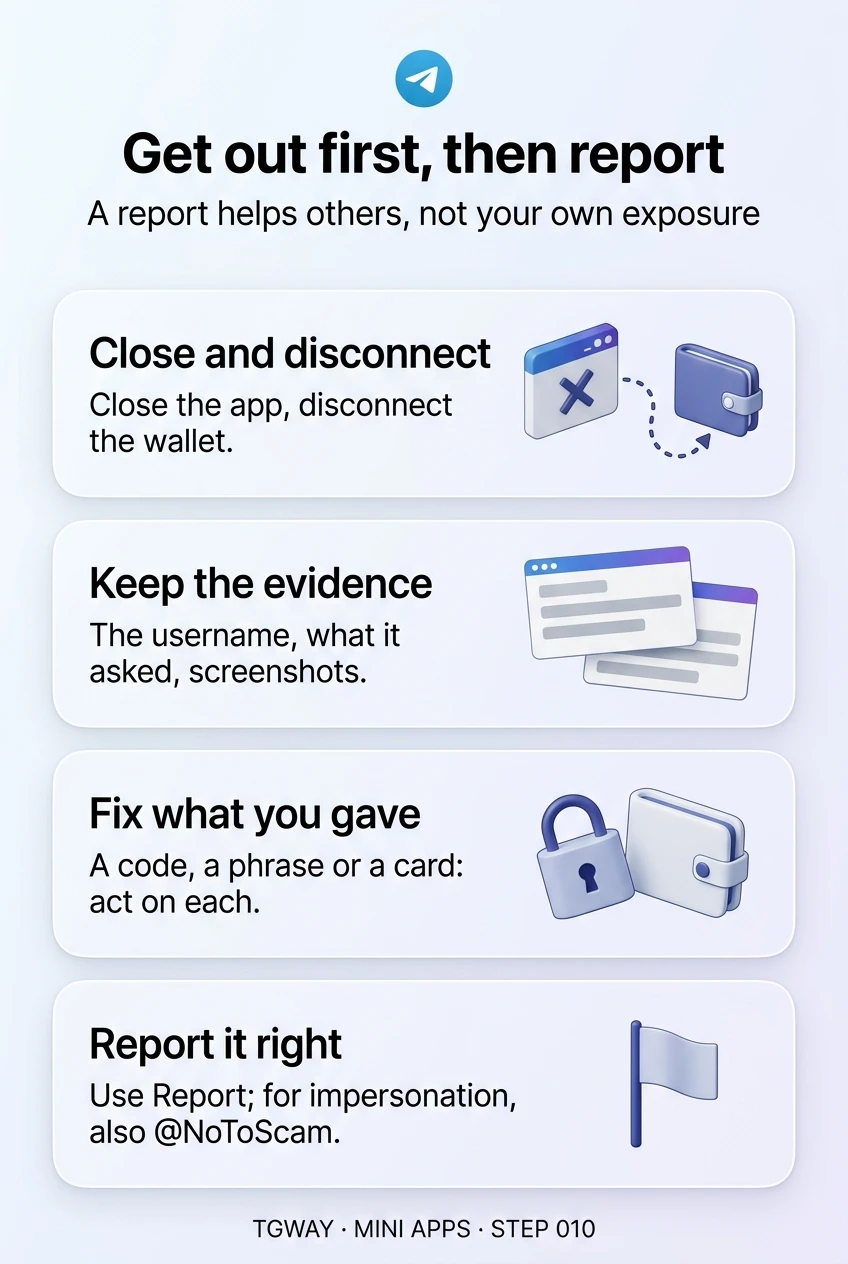
Do these in order, before reporting. Each one takes a minute.
- Close the app Close it properly, not minimise it. A minimised app is still open, as Step 009 explained.
- Disconnect your wallet In the wallet's list of connected apps, not in the mini app.
- Note what happened The bot's username, what it asked for, and screenshots of the key screens. You will need them for the report, and deleting the chat removes them.
- Deal with anything you gave away A login code or password: check Settings > Devices and end unknown sessions, then change your Two-Step Verification password. A recovery phrase: move what the wallet holds to a new wallet. Card details: call your card issuer.
- Stop and block the bot So it can no longer message you.
table_chart Where to report it
| What happened | Where to report | Include |
|---|---|---|
| A scam, phishing or fake checkout | The Report option on the bot's profile or in the mini app's menu | The reason that best fits, and a short note of what it asked for |
| It impersonates you or your business | The Report option, and @NoToScam, which Telegram's FAQ names for impersonation | Your real account and the fake one's username |
| Illegal content | The Report option; Telegram's FAQ also lists abuse@telegram.org | A link to the bot or the content |
| Money was taken by card | Your card issuer, as well as the report | The date, amount and screenshots |
| Crypto was taken from a wallet | The report, and the service it impersonated if any | The wallet addresses involved |
Choose the reason that actually fits. A scam reported as spam is reviewed as spam. And be ready for one more trap: after a loss, strangers often appear offering to "recover" funds for a fee. Nobody can reverse a crypto transfer, and those offers are a second scam.
quiz What would you do first?
A mini app asked for your recovery phrase and you typed it in. What is the first thing to do?
Whoever has the phrase has the wallet, and changing an app password does not change that. Moving the funds is the only protection, and it is urgent. Report afterwards.
You want to report a harmful bot. Why keep notes before deleting the chat?
The username, what the app asked for and the key screens are what make a report useful, and what your bank or card issuer may ask for too.
After reporting, someone messages you offering to get your crypto back for a small fee. What is this?
Crypto transfers cannot be reversed by anyone, and Telegram does not contact you to recover funds. Recovery offers target exactly the people who have just been scammed.
task_alt
Why a mini app is a web page that already knows who you are, which parts of the screen Telegram draws, why it has no route to your chats, and why payment should only happen on Telegram's own sheet.
help Questions
Will I hear back after reporting?
Usually not. Telegram's moderators review reports and act when they judge it appropriate, but individual outcomes are not normally reported back. That is why protecting yourself comes first: the report helps others, not your own situation.
Is blocking the bot the same as reporting it?
No. Blocking stops it from messaging you, and only you are affected. Reporting sends it to moderators, which can protect other people. Do both.
The app only felt suspicious and did nothing bad. Should I report it?
Report what it did, not a feeling. If it asked for something no app should, or copies another service, that is worth reporting. If it was merely annoying, closing it and stopping the bot is enough.
What is next in the Mini Apps track?
This closes the first module on how mini apps work and what they leave behind. The next module is about judging one before you trust it: what to check first, apps that ask for personal information, and the scam patterns that recur inside mini apps.
Get out first, then report
The four common kinds of harmful mini app, the doors to close before reporting, and where each kind of report should go with what it needs. Tap to open it at full resolution.