When a Telegram Mini App Asks for Your Wallet

Sooner or later a mini app shows a button that says Connect Wallet. Sometimes it is a marketplace that genuinely needs one. Sometimes it is a game that has not yet shown you a single level. Sometimes it is the first step of a theft that ends with an empty wallet and nobody to call.
You do not need to understand blockchains to tell these apart. Before you connect, try to finish one sentence: "This app needs my wallet because…". If you cannot finish it with something the app actually does, decline. This step explains what connecting really hands over, what it does not, and where the real risk sits, which is almost always the second request, not the first.
What you will be able to do after this step
- check_circle Say what connecting a wallet shares, and what it cannot do on its own.
- check_circle Tell a reason that justifies a wallet from one that only sounds like it.
- check_circle Recognise the requests that should end the conversation immediately.
link Connecting and approving are different things
A wallet request from a mini app comes in two stages, and they are easy to blur together.
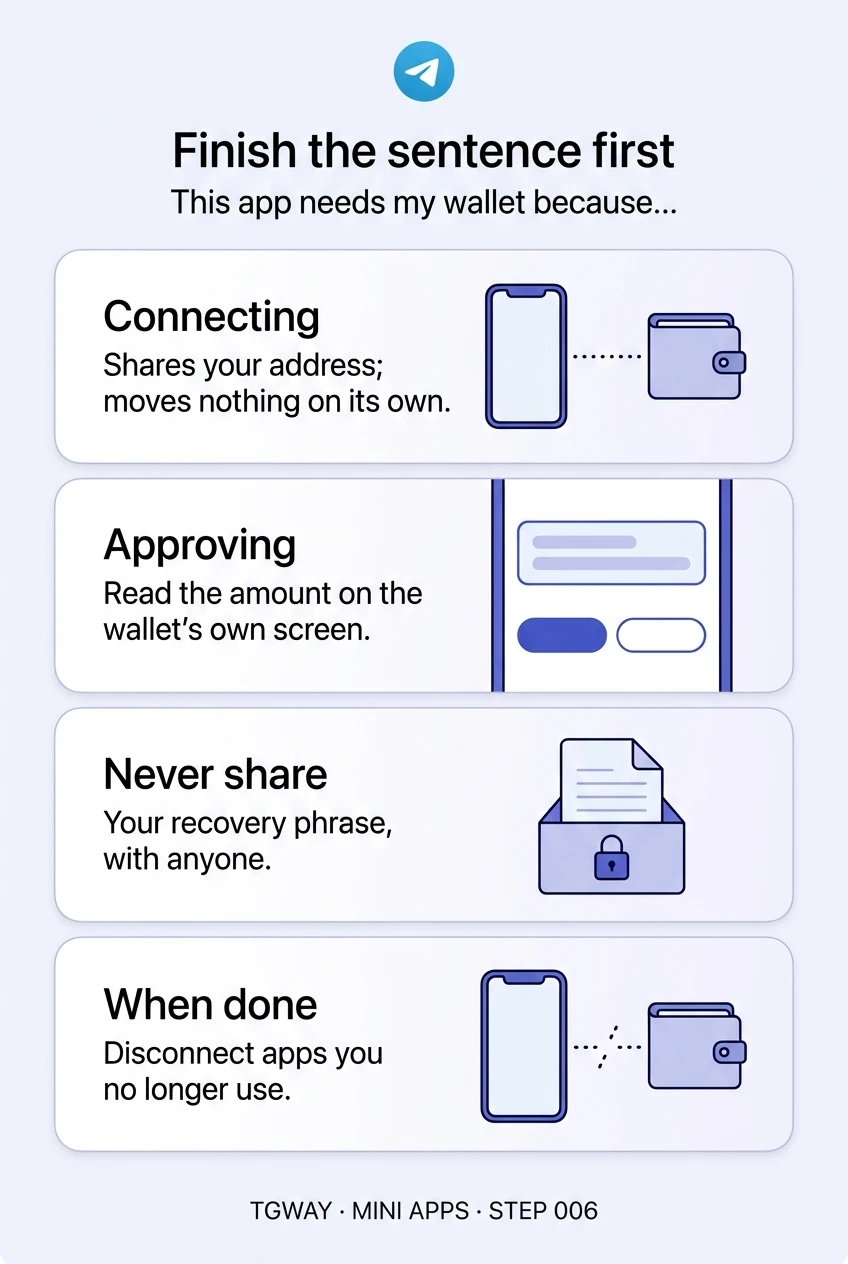
- Connecting shares your wallet's address with the app, after you confirm in your wallet. An address is public by nature: anyone who has it can look up its balance and history on the blockchain. Connecting alone does not let the app move anything.
- Approving is a separate request that appears in your wallet each time the app wants something done: a payment, a transfer of a token or a collectible, a signature. Nothing moves until you confirm it there. Once confirmed, a transfer is final; no one can reverse it.
So the connection is rarely the theft. It is the introduction. What matters is what the app asks you to approve next, and whether you read the wallet's own confirmation screen before you tap. Wallet apps, including the one built into Telegram's menu, show that screen themselves; it is the one part the mini app cannot draw.
"This app needs my wallet because…"
Reasons on the left describe something the app does with the wallet. Reasons on the right describe something it wants from you.
verified_user Sentences that finish
"…I am buying a collectible it sells, and it has to go to my address."
"…the price is in Gram, the coin formerly called Toncoin, and I chose to pay that way."
"…I own an item on the blockchain and the app shows or uses it."
"…I earned something it pays out on the blockchain, and I know how I earned it."
gpp_bad Sentences that do not
"…it said to verify my wallet before I can claim a reward."
"…it asked me to connect before showing me anything at all."
"…there is a small fee to activate, sync or unlock my balance."
"…everyone in the group is doing it and the airdrop ends today."
A good reason names what the app does. A bad one names what you must do, usually quickly.
block Requests that end the conversation
Some requests have no innocent version. If a mini app, a bot or a person asks for any of these, close the app. Do not argue with it and do not try the request "just to see".
- Your recovery phrase. The words that restore a wallet are the wallet. No app, support desk or airdrop ever needs them, and a field in a page asking for them is theft, however official it looks.
- An approval you did not expect. You tapped "check eligibility" and your wallet asks you to confirm a transfer or a signature. Reject it. What the page said the button would do does not matter; what the wallet screen says is what will happen.
- A fee to receive. Real payouts arrive without you paying anything first. "Pay a small network fee to release your reward" is the oldest version of this scam.
- A deadline. "Connect in the next ten minutes or lose your allocation" exists to stop you reading. Legitimate apps can wait for you to think.
quiz Connect, or decline?
A new tap game asks you to connect a wallet on its first screen, before you have played. What do you do?
It is true that connecting alone moves nothing, but it tells the app which address is yours and opens the door for the requests that can. Nothing about a game you have not played needs your wallet yet. If it ever does, you will know why.
You tap "Claim reward". Your wallet opens and asks you to confirm sending your tokens to an address you do not know. What is happening?
The wallet's confirmation screen describes what will actually happen, and here it describes money leaving. Receiving never requires you to send. The label on the page's button is just text the page wrote.
A marketplace mini app sells a collectible you want and asks you to connect so it can deliver it. What should you check first?
The sentence finishes, which is a good start, but a convincing copy of a real marketplace finishes it too. Where the app came from is the first check, as Step 002 explained, and the wallet's own screen is the last one. A padlock drawn in a page proves nothing.
task_alt
link_off Connections do not end on their own
Closing a mini app does not disconnect your wallet. The connection usually stays until you remove it in the wallet's list of connected apps. Most people never open that list, which means apps they tried once can still send requests months later.
Treat a connection like a key you lent: take it back when you are done. And if you use crypto regularly, consider keeping a separate wallet with a small balance for trying new apps, so an approval you regret can only reach what you put there.
touch_app Try it now — five minutes
- Open your wallet's connected apps Find the list of apps connected to your wallet. Disconnect any you do not use or do not recognise.
- Say your sentence out loud For each app that remains, finish "This app needs my wallet because…". If you cannot, disconnect it.
- Decide your rule for approvals You read the amount and the destination on the wallet's own screen every time, and you reject anything you did not start.
- Check where your recovery phrase lives On paper, somewhere safe, and nowhere else. Never in a chat, a photo or a note app.
Why connecting, signing and settling are three separate events, why a wallet saying "sent" does not mean "accepted", and why the wallet's confirmation screen is the only part the app does not write.
help Questions
Can a mini app take money just because I connected my wallet?
Not on its own. Every payment or transfer has to be approved in your wallet. The danger is approving something without reading it, which is why the wallet's confirmation screen, not the page, is what you read before tapping.
Is it safe to connect Telegram's built-in wallet?
The same rules apply whichever wallet you use. The wallet in Telegram's menu is run by a separate company and shows its own confirmation screens. Connecting it tells the app your address; approving a request is still the moment that counts.
I approved something I should not have. What now?
A completed transfer cannot be reversed. Move whatever is left to a new wallet you create from scratch, disconnect the app, and report it in Telegram. If you also typed your recovery phrase anywhere, treat the old wallet as permanently lost and never use it again.
Why does the app need to see my address at all?
To send you something, or to see what you already own. That is a normal reason, but remember that your address and its history are public. Connecting links that history to whatever the app knows about your Telegram account.
Finish the sentence first
What connecting a wallet shares, what approving does, the one-sentence test, and why connections have to be removed by hand. Tap to open it at full resolution.