How to Pay Safely Inside a Telegram Mini App

Mini apps sell things: game items, subscriptions, tickets, food, clothes. Sooner or later one of them asks you to pay, and the moment it does, the difference between a web page and Telegram itself starts to matter a great deal.
A mini app is a web page that someone else wrote. It can draw anything, including something that looks exactly like a checkout. A genuine payment in a mini app opens Telegram's own payment screen over the app. Card details typed into the page itself go wherever the page's author wants them to go. This step explains the routes a mini app can use to take your money, what each one means for you, and how to tell a real checkout from a painted one.
What you will be able to do after this step
- check_circle Recognise the four ways a mini app can ask you to pay.
- check_circle Tell Telegram's payment screen from a form drawn by the page.
- check_circle Know who to contact when something goes wrong with a purchase.
How a mini app can take payment
Most apps use one or two of these. Pick the one in front of you.
Digital items, paid from your Stars balance
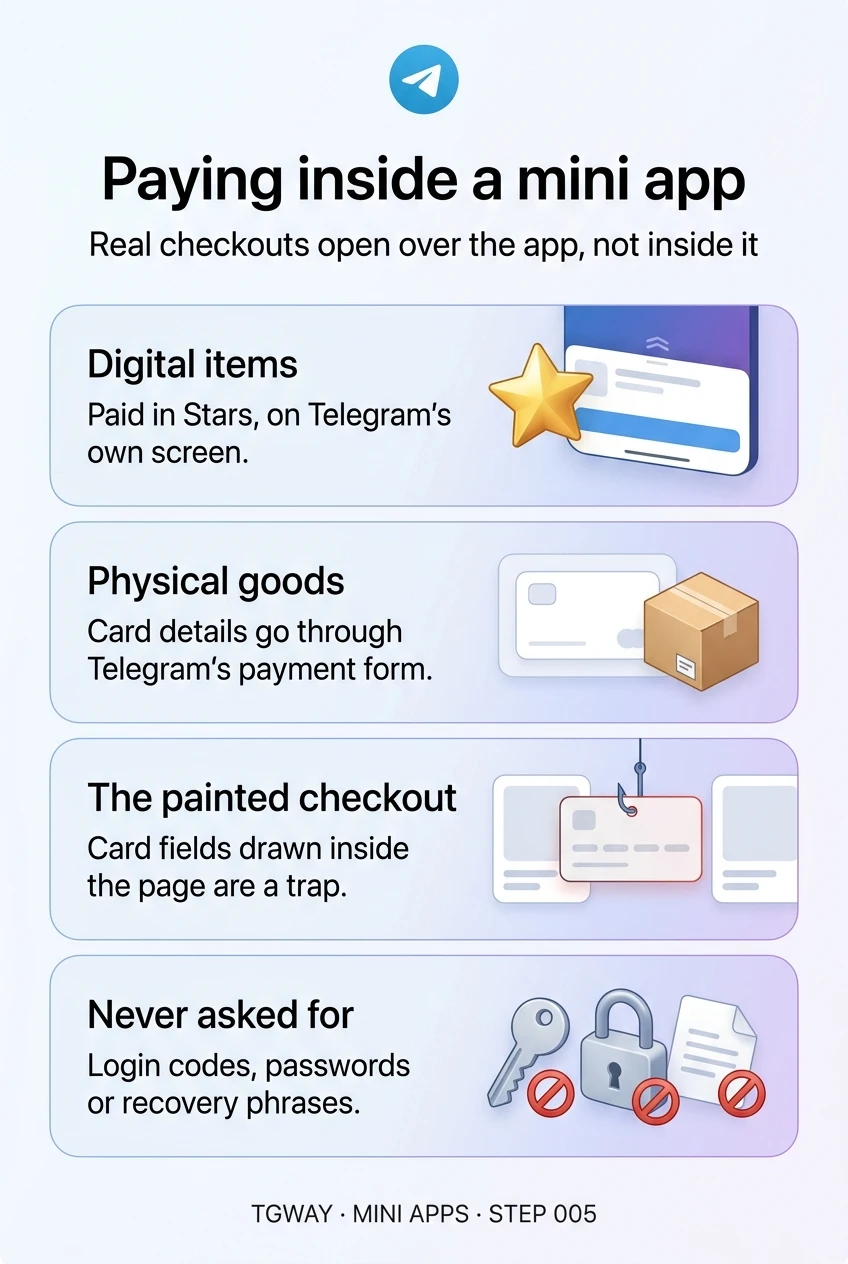
For digital goods and services, such as game items, premium features or access to content, mini apps are expected to charge in Stars. Telegram opens its own confirmation screen showing the item and the number of Stars, and the Stars leave your balance when you confirm.
This is the most contained route: you never type a card number, and the app never sees your payment details. The trade-off is the one from the Stars track: purchases are generally final, so the decision belongs before you confirm.
A digital purchase that does not use Stars deserves a second look.
Physical goods, paid by card in Telegram's payment form
For physical goods and services, such as food, clothes or a haircut, the app can open Telegram's payment form. It shows the seller, the items, the total and a payment method, and your card details go to the payment provider the seller uses, not to the page.
Telegram draws the form, but it is not the shop. If an order never arrives, the seller is the first place to go, then your card issuer. Telegram does not act as the buyer's protection scheme here, which is why who you are buying from still matters.
The form is safe for your card details; it says nothing about the seller.
A button that opens the shop's own website
Some apps send you to a checkout on their own website, opened in a browser. That can be entirely legitimate; plenty of real shops take payment this way. It also means you are now judging a website, not Telegram.
Treat it like any online shop: check the address in the browser bar, and prefer a browser where your password manager and saved card details would recognise the real site. If the address is unfamiliar, or looks like a well-known name with small changes, stop.
Once you are on a website, the address bar is what you are trusting.
A request to connect or pay from a crypto wallet
Some apps ask you to connect a TON wallet and approve a payment. The approval happens in your wallet, not in the page, and a completed transfer cannot be reversed by anyone.
This route has its own rules and its own traps, which Step 006 covers. The short version: if you cannot say in one sentence why this app needs your wallet, decline.
Wallet payments are final; read the amount in the wallet before you approve.
gpp_bad The painted checkout
The attack is simple. A mini app draws card fields, or a field for a wallet recovery phrase, inside its own page and styles it to look official, sometimes with Telegram's colours and a padlock icon. Whatever you type goes straight to whoever runs the page.
Three things give it away:
- It is part of the page. Telegram's payment screen opens over the mini app as a separate panel, the same one you would see paying a bot in a chat. A form that scrolls with the page, sits between the page's own buttons, or appears halfway down a product listing was drawn by the page.
- It asks for too much. A real card payment asks for card details and, for delivery, an address. It never asks for your Telegram login code, your cloud password or a wallet recovery phrase.
- It asks you to go around the system. "Pay by bank transfer to this account", "send the card number in chat for a discount", "our payment button is broken, type it here". Every one of these is a request to leave the protected route.
checklist Before you confirm any payment
| Check | What you are looking for | If it is wrong |
|---|---|---|
| Where the screen came from | Telegram's own panel over the app, or a browser with an address you recognise | Close the app; do not type anything into the page |
| Who the seller is | The seller's name on the payment screen matches the app and the bot you opened | Find the business another way before paying |
| What it costs | The total on the payment screen, not the price the page advertised | Cancel; a mismatch is either a mistake or a trick |
| What it asks for | Card details or Stars, and an address for delivery | Anything more, such as codes, passwords or recovery phrases, is theft |
| How you would get help | A way to contact the seller outside the app | If there is none, buy something smaller first or not at all |
The last row is the one people skip. When a mini app purchase goes wrong, the seller is the first place to turn. An app whose only contact is the app itself leaves you with nowhere to go if it disappears.
touch_app Try it now — five minutes
- See the real screen once Next time a bot or app you trust offers a small Stars purchase, open the payment step and look at how the screen appears, without paying. That is the shape to remember.
- Decide your rule for card numbers You never type a card number into a page inside a mini app, and never into a chat. Only into Telegram's payment form or a website you recognise.
- Look at your Stars history Your Stars balance screen lists what you have spent and where. Check it for anything you do not recognise.
Which payment route a seller must use for digital and physical goods, how the checkout works behind the scenes, and why the seller, not Telegram, is responsible for delivery.
help Questions
Does the mini app see my card number when I pay through Telegram's form?
The form sends your card details to the payment provider the seller uses. The mini app learns that a payment happened and what was ordered; it does not need, and should not receive, your full card number. That is the reason to insist on the form rather than a page.
Can I get a refund for something I bought in a mini app?
For card payments, ask the seller first, then your card issuer if the seller does not help. Purchases made with Stars are generally final, with narrow exceptions covered in the Stars track. In both cases, Telegram delivers the payment but is not the shop.
Is it safe to save my card in Telegram for payments?
Saving a card is a convenience offered by the payment form and provider, not by the mini app. It makes future purchases faster, which is also the risk: fewer steps means fewer moments to notice a purchase you did not intend. If you save one, protect the app with a passcode.
A game offers items cheaper if I pay by bank transfer. Should I?
No. Leaving the payment routes Telegram provides removes every protection you had, and a discount for doing so is a common way to make the request feel reasonable. Legitimate apps sell digital items through Stars.
Paying inside a mini app
The four ways a mini app can take payment, how Telegram's own payment screen differs from a form drawn by the page, and what no real checkout asks for. Tap to open it at full resolution.