Why Your Phone Number Controls Your Telegram Account

Telegram does not have a username-and-password login the way most websites do. Your account is your phone number. To sign in on a new device, you type the number and prove you can receive a code sent to it. Telegram's own FAQ puts the consequence in one line: "whoever has the number, has the account."
That makes the number the root of everything else in this track. Anyone who can receive your codes is standing at your front door, and the only thing between them and your whole chat history is whether you added a second lock. This step explains what the number unlocks, the four ordinary ways people lose control of it, and the small set of settings that change the answer.
What you will be able to do after this step
- check_circle Explain what a person holding your number can and cannot do, with and without Two-Step Verification.
- check_circle Recognise the four everyday ways a number slips out of your hands.
- check_circle Set up the protections that keep the number from being the only key.
key How a login actually works
Every new sign-in follows the same short path. You enter your number in international format. Telegram sends a one-time code. You type the code, and the new device is in.
Where that code arrives depends on what you already have. If you are signed in somewhere else, Telegram usually sends it as a message from its verified service account, the chat named Telegram with a blue check, instead of by SMS. Some accounts are set up to receive codes by email instead, through a Login Email. And if you have created a passkey, you can sign in the way you unlock your phone, with a fingerprint, your face or a PIN, instead of a code.
Those alternatives change how the code travels. They do not change what the number is. It is still the identity the account is filed under, and Telegram warns that receiving codes inside the app is no substitute for keeping a number you control. If the SMS route ever becomes the only route left, the number decides.
lock_open Someone holds your number. What can they do?
The answer depends almost entirely on one setting. Read the two columns as the same person, with the same stolen SIM, on the same afternoon.
| What they try | No Two-Step Verification | With Two-Step Verification |
|---|---|---|
| Sign in on their own device | Yes, with one code | Stopped at the password screen |
| Read your chats, groups and channels | All of it, back to the first message | No |
| Read your Secret Chats | No — those live only on your own devices | No |
| Message your contacts as you | Yes, and they will believe it | No |
| Lock you out | Yes: they set their own password, so your number alone no longer gets you back in | Only by asking Telegram to delete the account and start an empty one |
That last row is the part most guides leave out. Even with the password in place, a person who can receive your codes can choose to wipe the account instead of opening it. They get an empty account on your number; your history is gone rather than stolen. If your password has been in place for more than a week and you have used the account recently, Telegram delays that deletion by a week and sends a notice with a link to stop it, and stopping it signs the other person out. So the password protects your messages, but only keeping the number protects the account itself.
How a number slips out of your hands
None of these involve anyone breaking encryption. Pick the one closest to you.
The handset is gone, the SIM with it
This is the most common case and usually the least dangerous. Ordinary thieves tend to throw the SIM away and wipe the phone for resale. The risk is the rare one who keeps the SIM, because that SIM still receives your codes.
Two things happen in parallel. Ask your carrier to block the old SIM and issue a replacement with the same number. Meanwhile, from any other device where you are signed in, open the device list and end the session of the lost phone. With Two-Step Verification on, whoever has the SIM cannot sign back in.
Block the SIM, end the lost phone's session, and the handset becomes a phone with nothing of yours on it.
Your phone still works, but the signal is gone
A SIM swap is someone convincing your carrier to move your number to a card they hold, usually with a few personal details and a convincing story. The first sign is that your phone suddenly shows no service while everything else seems normal.
This happens outside Telegram, so no Telegram setting prevents it. What Telegram settings decide is how much it costs you: with Two-Step Verification the swap gets them a password screen, and at worst a deletion request you have a week to cancel once your number is back. Call the carrier from another phone immediately; the week is how long you have to recover the number.
Treat "no service for no reason" as an emergency, and get the number back first. Step 037 covers the carrier-side locks that make this harder.
A number from a previous country, job or contract
When you stop paying for a number, the carrier eventually gives it to somebody else. That stranger now receives the codes for whatever is still attached to it, including a Telegram account you forgot to move.
This is the slowest of the four and the easiest to prevent. Inactive accounts also delete themselves after a period you choose, eighteen months by default, which is a reminder that an account parked on a dead number is already on a timer.
If a number is on its way out, move the account to your new number while both still work. Afterwards is too late.
New SIM, new country, new contract
Telegram has a built-in way to move your account to a new number. Your chats, groups, channels and contacts all stay where they are; only the number the account is filed under changes. Each phone number is a separate account, so signing up again on the new number would give you an empty one instead.
If you only need the new number for a short trip, do nothing. If you want to keep both numbers for work and personal life, keep one as your Telegram number and consider a second account on the other.
Use Change number on the account you already have, and do it before the old SIM stops working.
visibility Who can see the number
Controlling the number and hiding it are different problems. Nobody can sign in just because they have seen your number; they need to receive its codes. But a visible number connects your Telegram account to everything else it is used for, from your bank to your delivery apps, and it is the first thing a scammer or a stalker looks for.
Telegram splits this into two settings under Phone number. Who can see my phone number decides whether it appears on your profile. Who can find me by my number decides whether someone who already has it can type it in and land on you; on some apps it only appears once the first is set to Nobody, so people often never see it. People who already saved your number in their own contacts will always see it, whatever you choose.
touch_app Try it now — ten minutes
On Windows, Linux and Android, open the menu (☰) and choose Settings. On iPhone, tap Settings in the bottom bar. In the native macOS app, use Telegram > Settings or ⌘,.
- Turn on Two-Step Verification Privacy and Security > Two-Step Verification. Choose a password you will not reuse anywhere else. This single setting changes the table above from the left column to the right one.
- Add a recovery email you actually control Telegram offers it right after the password. It is how you recover a forgotten password when you are not signed in anywhere, so protect that mailbox with its own strong password and two-factor sign-in too.
- Look at your device list On a phone, Settings > Devices. On Telegram Desktop, Privacy and Security > Active Sessions. End anything you do not recognise or no longer use.
- Decide who sees the number Privacy and Security > Phone number. My Contacts suits most people; if you set it to Nobody, also check Who can find me by my number.
- Confirm the number on file is one you will keep On a phone, open Settings and look at the number under your name. If it is on its way out, tap it and use Change number now.
How the cloud password is set up, what the password hint shows to other people, and why turning it on does not sign out sessions that are already open.
help Questions
Can I use Telegram without a phone number?
Every account is tied to a mobile number, and landlines are not supported. The exception is an anonymous number bought on Fragment, which receives its codes there instead of by SMS; the Fragment track covers what that does and does not hide. A passkey or a Login Email changes how codes reach you, not the fact that a number sits at the root.
If someone sees my number, can they get into my account?
No. Seeing the number is not enough; they would need to receive the codes sent to it. That is why the attacks in this track aim at your SIM, your carrier or you, asking for the code, rather than at the number itself. Step 004 covers the code.
I got a login code I never asked for. Is my account in danger?
Not by itself. It means someone typed your number into a Telegram login screen, by mistake or on purpose, and the code alone lets nobody in unless it reaches them. Do not share it with anyone who asks. If codes keep arriving, somebody is trying, and if you have not turned on Two-Step Verification yet, this is the moment. Codes in the separate Verification Codes chat are for other services that use Telegram to sign you in, not for your Telegram account.
Does Two-Step Verification sign out a thief who is already logged in?
No. It protects future sign-ins. A session that is already open stays open until you end it from your device list, which is why turning the password on and reviewing sessions belong in the same five minutes.
My carrier recycled my old number. What happened to my account?
If you are still signed in on any device, you are fine for now: move the account to your current number from Settings. If you are not signed in anywhere and never set a password, the new owner of the number can sign in. With a password, they can at most delete the account and start an empty one. Account & Identity covers recovery in more depth.
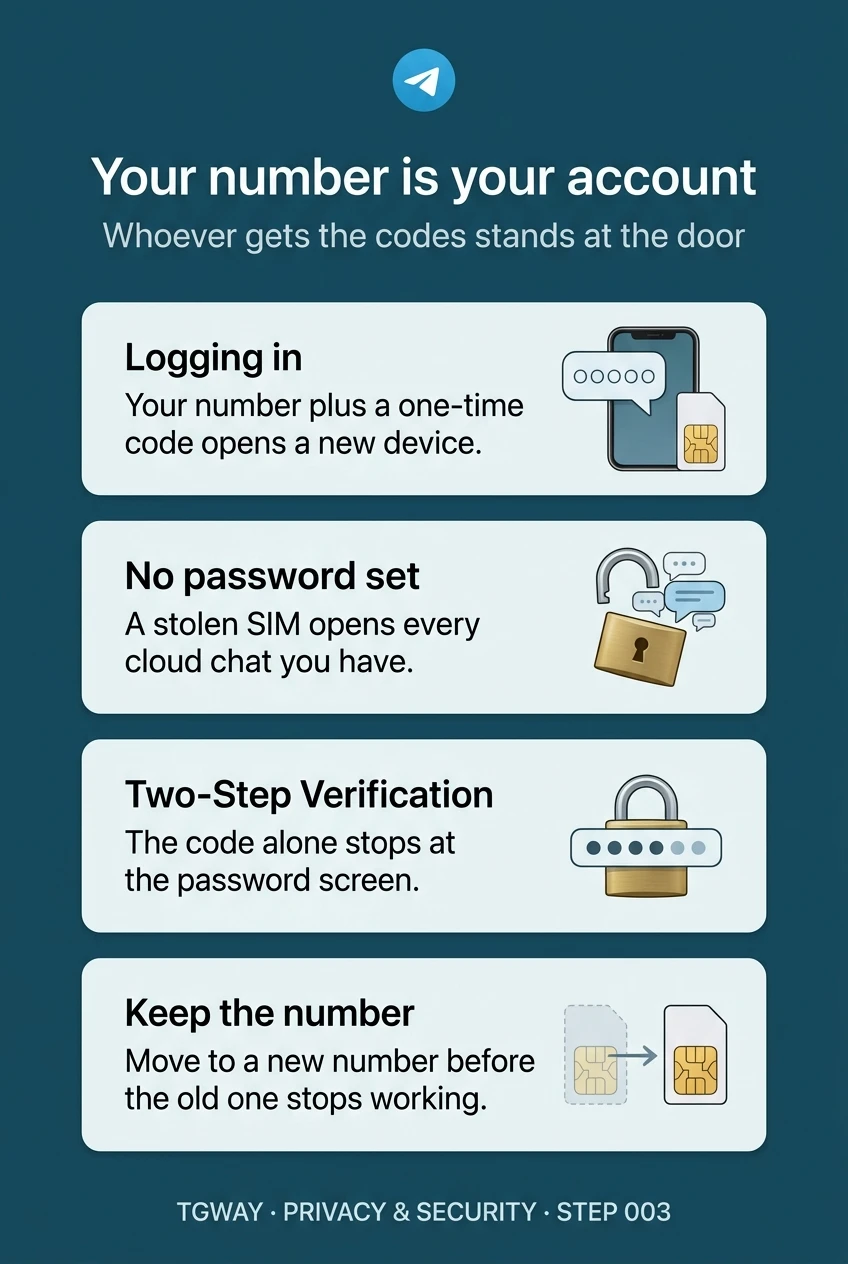
Your number is your account
How a login works, what a stolen SIM opens with and without a password, and the one habit that keeps the number yours. Tap to open it at full resolution.