Separating Work and Personal Chats on Telegram

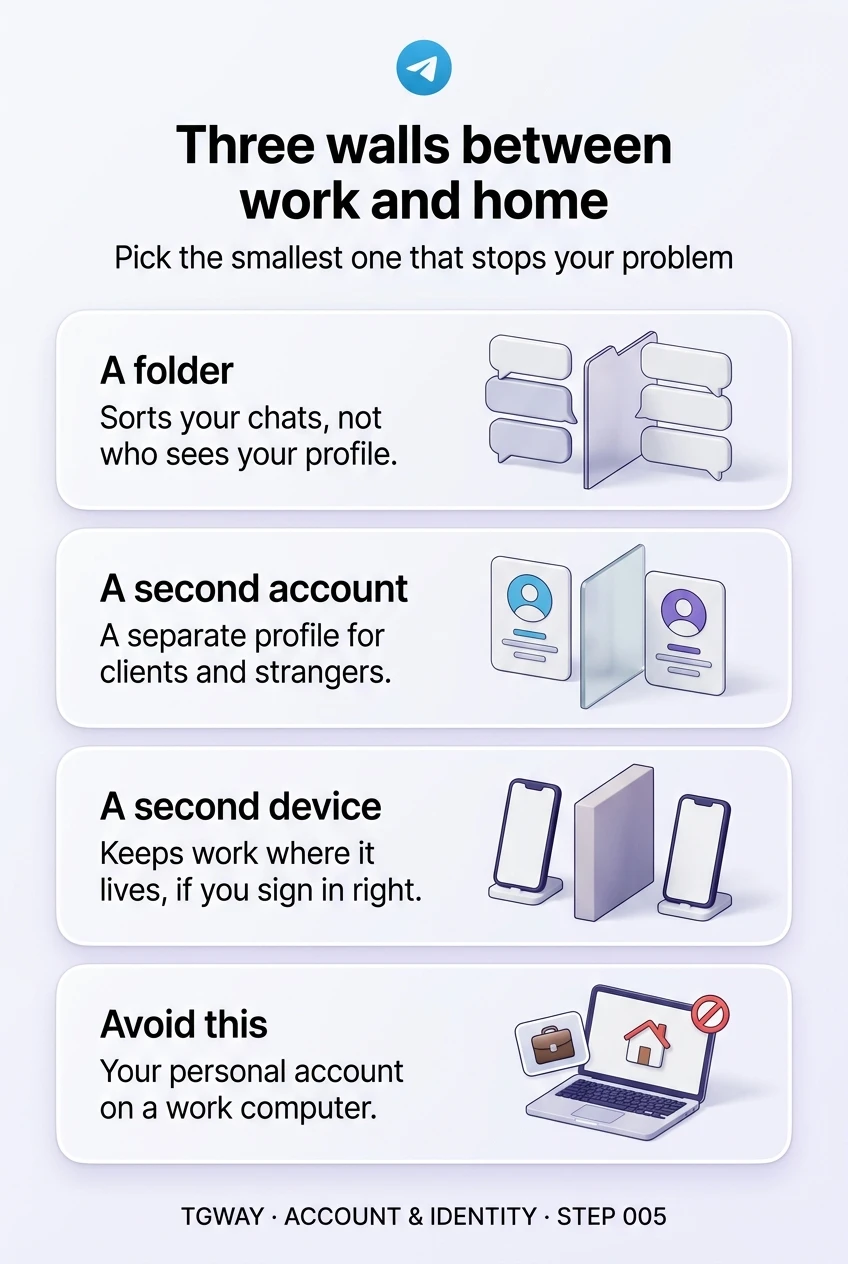
When work moves onto Telegram, it arrives in the same app as your family, your friends and the groups you read at night. There are three ways to put a wall between the two: a folder, a second account, or a second device. People usually pick one because a colleague did, and only discover later which problems it does not solve.
Step 004 decided whether you have one identity or two. This step lines the three tools up against the problems people actually run into, from a late-night ping to a colleague seeing your holiday photos. Each tool builds a different wall, and the right choice is the smallest one that stops your actual problem.
What you will be able to do after this step
- check_circle Name the problem you are trying to solve before choosing a tool.
- check_circle Say what a folder, a second account and a second device each keep apart, and what they do not.
- check_circle Avoid the one arrangement that quietly exposes your personal chats at work.
view_agenda The three walls
- A folder sorts one account's chats into tabs, so work chats sit in their own view. It changes what you see, not who you are. Colleagues and friends still reach the same profile, and everything still lives in one account on one phone.
- A second account is a separate identity with its own number, name, photo and chats, usually in the same app on the same phone. It changes who people reach. It does not change which device holds the conversations.
- A second device, such as a work phone or a work computer, puts the work side somewhere physically different. It changes where things live. What it protects depends heavily on which account you sign in to on it.
The tools can be combined, and often are: a work account signed in on a work phone, with folders inside it. But each layer has its own cost, so it is worth knowing which problem each one actually removes.
compare_arrows Which wall stops which problem
Find the row for the problem you actually have. A tool that says "no" on that row is not the answer, however popular it is.
| The problem | Folder | Second account | Second device |
|---|---|---|---|
| Work chats bury the people you care about | Yes, this is what folders are for | Yes, but with more to maintain | Yes, but with more to carry |
| Work messages ring in the evening | Partly: mute the work chats | Yes: quiet the whole work account | Yes: leave the device in a drawer |
| Clients or colleagues see your personal photo and bio | No, it is the same profile | Yes, a separate profile | Only if it holds a separate account |
| You reply to a client from the wrong chat | Somewhat less often | Less often, if the accounts look different | Least often: different hands, different screen |
| Someone at work sees your personal chats on a shared or managed device | No | No, if both accounts are on that device | Yes, if your personal account is never signed in there |
| You leave the job and hand the work side over | No, it is your account | Mostly: the chats and groups are all in one place | Only if the account on it belongs to the work side |
Two rows surprise people most. A folder does nothing about who sees your profile, because the profile belongs to the account, not the tab. And a second device only protects your privacy if you never sign your personal account in on it; once you do, it is just a second copy of everything.
work The arrangement to avoid
The riskiest common set-up is a work computer or a company-managed phone with your personal account signed in "just for convenience". Devices your employer manages can be monitored, backed up or wiped by their IT team, and a computer at work is the one most likely to be left unlocked while you step away. Your whole personal history is readable from that session, and on a computer, the copy of your account stored on disk can be read by anyone with access to the machine unless it is protected by a local passcode.
If you must use a work computer for Telegram, sign in only the work account there. Keep your personal account on devices you own. If a personal session is already on a work device, end it from your phone's device list: Settings > Devices on Android and iPhone, Settings > Privacy and Security > Active Sessions on Telegram Desktop.
alt_route Starting small
Most people need less than they think. A sensible order is to try the lightest wall first and add the next only when a specific problem remains:
- A work folder and muted work groups Enough for most people whose colleagues already know them, and it takes five minutes.
- A second account, when the audience is different Clients, customers or strangers who should not see your personal profile. Step 004 covers the running cost.
- A second device, when location matters When your job gives you a phone, when you want work to physically stay at work, or when a shared or managed computer is involved.
quiz Check your instincts
You built a Work folder, but a new client still found your beach photos on your profile. Why?
Folders only change your own view of your chats. Everyone who messages you still sees the one profile your account has. Keeping a profile away from clients takes a second account, or at least different privacy settings for your photos.
Your company gives you a laptop. You would like Telegram on it for work. What is the safest arrangement?
A work laptop may be managed, monitored or handed back, and it is often left unlocked. Anything signed in there should be something you are comfortable leaving there. A personal session on it exposes your whole history, whether or not it sits in a folder.
Your only problem is that work group chatter drowns out your family during the day. What is enough?
The problem is attention, not identity or location, and the lightest wall solves it. A second account or a second phone would also work, but each adds a number, a password and a device to look after for a problem folders already fix.
task_alt
touch_app Try it now — ten minutes
- Write down your one real problem Pick the row in the table above that bothers you most. That row decides the tool.
- If it is noise, build the folder Settings > Folders (Chat Folders on iPhone). Add your work chats to one folder, then mute the busiest groups inside it.
- Check every device you are signed in on Open your device list and look for work computers or shared machines. End any personal session that should not be there.
- If it is identity, go back to Step 004 Decide on the second number first. The account comes after the number, not before.
How to build a folder that fills itself by rule, the exclusion settings nobody touches, and why a folder is a filter rather than a box.
help Questions
Can I stop work notifications after hours without muting every chat?
With a separate work account, you can quiet that account's notifications as a whole and leave your personal account ringing. Within a single account, you mute individual chats, which is where a folder helps you find them. Step 008 covers keeping notifications straight across accounts.
Does my employer see my messages if I use Telegram on a work phone?
Telegram does not give your employer access to your chats. But a company-managed phone or computer can be monitored, backed up or reset by its IT team in ways that have nothing to do with Telegram, and it can be handed to someone else when you leave. Treat anything signed in there as visible to the organisation that owns the device.
If I have a work phone, do I still need a second account?
Only if you want clients or colleagues to reach a different profile from the one your friends know. A work phone signed in to your personal account gives you a second place to read the same chats. It keeps work physically separate, but not your identity.
What happens to work groups when I leave a job?
If the groups belong to your personal account, you leave them one by one, and anything you own must be handed over separately. If you ran work from a separate account, leaving is simpler: transfer ownership of what that account owns, then sign it out. The Channel & Group Ops track covers handing over ownership.
Is a folder visible to anyone else?
No. Folders are your private way of arranging your own chat list. Nobody is told which folder they are in. You can share a folder as a link if you choose to, which invites others to join the chats in it, but that only happens when you create the link.
Three walls between work and home
A folder, a second account and a second device, what each one keeps apart, and the one arrangement that exposes your personal chats at work. Tap to open it at full resolution.