Everything You Can Spend Telegram Stars On

Stars started as a way to pay for things inside bots. Today they turn up almost everywhere: under channel posts, in gift menus, in private messages, in live streams and in mini apps. Each place looks different, and it is easy to lose track of where a balance has actually been going.
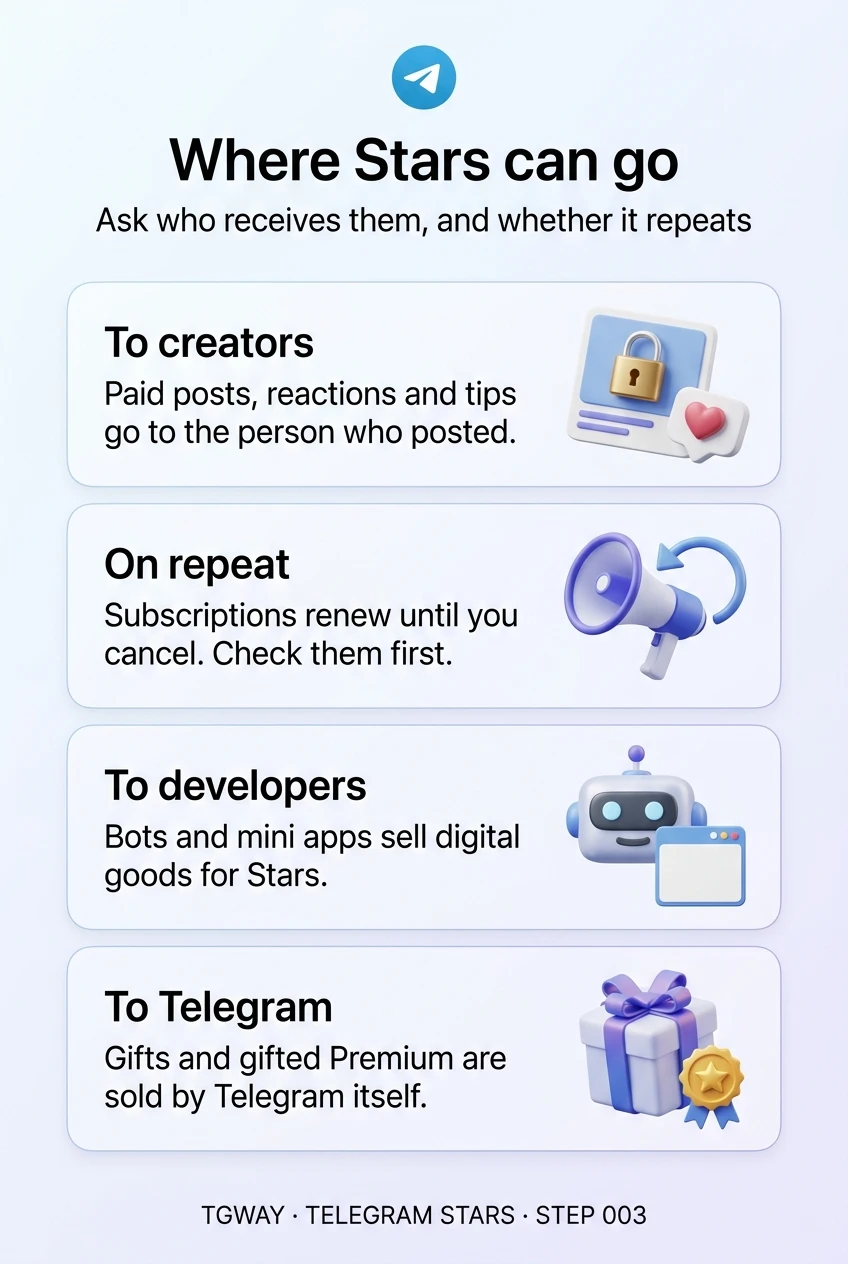
This step is one map of all of them. Two questions sort every item on it: who receives the Stars, and does the payment happen once or keep repeating? Answer those two before you tap, and almost every spending mistake with Stars becomes easy to avoid.
What you will be able to do after this step
- check_circle Name the places where Stars can be spent.
- check_circle Tell one-off payments from ones that repeat.
- check_circle Know who ends up with the Stars in each case.
explore The map
| What you pay for | Who receives the Stars | Once or repeating | Where to read more |
|---|---|---|---|
| Unlocking a paid post or photo | The channel or person who posted it | Once | Step 004 |
| A channel or group subscription | The channel's owner | Repeating, until you cancel | Step 005 |
| Star reactions on posts | The channel's owner | Once per reaction | Step 006 |
| Gifts for other people | Telegram sells the gift; the recipient can keep or convert it | Once | Step 007 |
| Digital goods in bots and mini apps | The bot's operator | Once, unless the bot sells a subscription | Step 008 |
| Messaging someone who charges for it | The person or channel you write to | Per message | Step 009 |
| Premium, as a gift | Telegram | Once, for a fixed period | Step 007 |
| Tips in live streams | The person streaming | Once per tip | Step 006 |
| Collectible gifts and their upgrades | Telegram or the seller | Once | The Fragment track |
Look down the third column. Only two rows can keep taking Stars without you tapping again: subscriptions, and the occasional bot that sells one. Everything else is a single payment you start each time. If your balance is shrinking faster than you expect, those two rows are where to look first.
person Who ends up with the Stars
In most rows, the Stars go to a person: a creator, a channel owner, a developer. That is the point of the system, and it is why paying in Stars is a way of supporting someone rather than paying Telegram. Those people can later withdraw what they earn, under rules the app shows them.
That also means the usual questions of any purchase apply to the person, not the app. Is this creator someone you have followed for a while? Does the bot say who runs it? Telegram carries the payment, but it does not check what is being sold. Steps 004 and 008 are about making that judgement.
The exceptions are the things Telegram itself sells, such as gifts and Premium. There, the question is only whether you want the thing, because the seller is known.
receipt_long Reading your spending
Everything on the map lands in the same list: Settings > My Stars, then Stars Transactions. Each entry names where the Stars went, which makes it easy to match against the table above.
Two patterns are worth catching early. A subscription you forgot about shows up as the same entry at regular intervals. A burst of small reactions or tips shows up as many entries close together, often from one evening. Neither is a problem if you meant it; both are easy to miss if you never look.
Once, or again and again?
Tap the right answer for each purchase.
You join a creator's private channel that costs Stars each month.
A channel subscription renews on its own. Cancelling stops the next payment, and the period you already paid for stays yours, as Step 005 explains.
You tap the Star reaction on a post five times.
Each tap is its own payment to the channel. It is a tip dressed as a reaction, which is why the counter shows an amount rather than a number of people.
You unlock a photo someone posted for Stars in a group.
Paid content goes to whoever posted it. You are buying from that person, which is why their track record matters more than the preview.
task_alt
savings Setting yourself a limit
Telegram does not ask you to set a spending limit on Stars, so the only limit is the one you build. The simplest is also the most effective: keep your balance close to zero. When you have to top up before each purchase, every purchase gets a moment of thought, and a forgotten subscription runs out instead of quietly using a large balance.
The second habit is to decide your categories in advance. Many people are comfortable paying for one creator's subscription and the occasional gift, and uncomfortable with reactions and tips, which are easy to tap repeatedly in the moment. Knowing which rows of the map you actually use makes it easier to notice when you have wandered into another.
If someone else shares your device, such as a child with a tablet, remember that purchases through the app store follow that store's own controls. Setting up purchase approval there covers Stars bought on that device too.
touch_app Try it now — three minutes
- Open Stars Transactions In Settings > My Stars. Scroll back as far as you have used Stars.
- Mark each entry on the map Paid post, subscription, reaction, gift, bot, message. Most people find they use only two or three rows.
- Look for anything repeating If a subscription appears that you no longer want, cancel it now. Step 005 shows where.
The four ways money moves with Stars, what each gives the reader, and why a paid post is buying something you have not seen.
help Questions
Can I pay for Telegram Premium with Stars?
Premium can be given as a gift using Stars, and your own subscription is usually bought the ordinary way in the app. The options you see depend on your platform and region.
Do the Stars I spend go to Telegram?
Mostly not. For paid posts, subscriptions, reactions, tips and bot purchases they go to the creator or developer, who can withdraw them later. Things Telegram sells itself, such as gifts and Premium, are the exception.
Can I send Stars directly to a friend?
You can gift Stars through the app, which puts them straight into the other person's balance. What you should never do is send Stars to someone who asks for them to "unlock" or "verify" something; that is always a scam.
Where are Stars not accepted?
Physical goods from a shop's bot are usually paid by card, and anything outside Telegram cannot be paid in Stars at all. Stars are for digital things inside the app.
Where Stars can go
Who receives your Stars in each place you can spend them, and which one keeps charging until you cancel. Tap to open it at full resolution.