How to Add a Collectible Username to Your Profile

Winning or buying a collectible username puts it in your wallet. It does not put it on your profile. Until you assign it and switch it on, nobody who types the name will find you, and the name simply sits in the wallet as something you own.
That gap is also the most useful thing about collectibles. A free username stops being yours the moment you remove it; a collectible stays yours whether or not it is shown anywhere. This step walks through assigning one to your account, a group or a channel, switching it on, moving it later, and what that permanence means for how you use it.
What you will be able to do after this step
- check_circle Assign a collectible username to your account or to a group or channel you own.
- check_circle Switch it on so it actually leads to that chat, and understand why that is a separate step.
- check_circle Decide when to move, hide or keep a name unassigned.
link Assigning, then switching on
Putting a collectible to work takes two actions, in two different places. People often do the first and wonder why the name still leads nowhere.
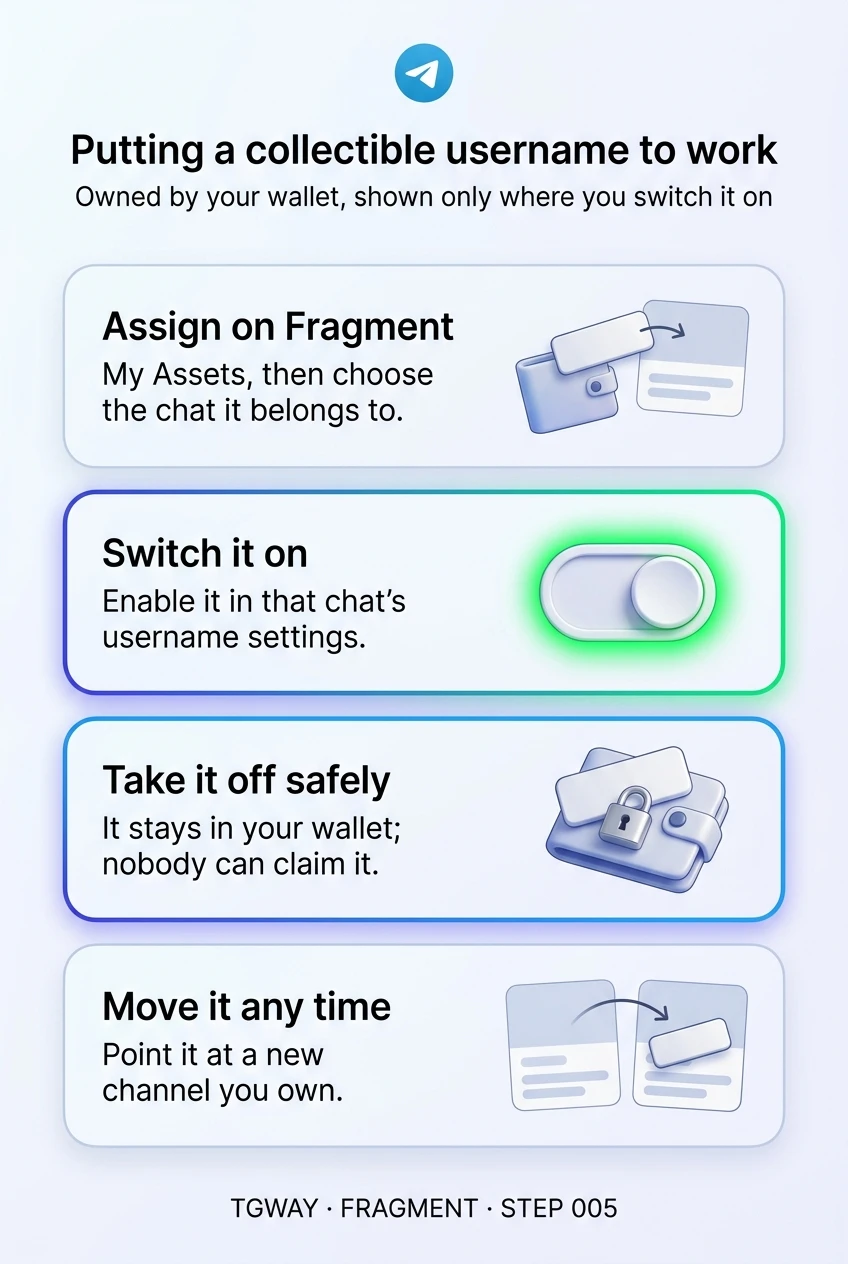
- Assign it on Fragment Sign in on fragment.com, open My Assets, choose the username and tap Assign to Telegram. Pick the chat it should belong to: your own account, or a group or channel you own. Step 002 covered signing in and connecting the wallet that holds the name.
- Switch it on in Telegram Assigning does not make the name live straight away. Open that account's or chat's username settings in Telegram, where the collectible now appears alongside any other usernames, and turn it on. Only then does it show on the public info page and lead people to that chat.
- Check it from outside Ask someone else to search for the name, or open the name's link in a browser where you are not signed in. If it lands on the right chat, it is working.
The two steps exist for a reason: the wallet decides who owns the name, and Telegram decides where it points and whether it is shown. Keeping them separate means a name can be owned without being displayed, and moved without being sold.
layers One free username, any number of collectibles
An account, a group or a channel can have at most one ordinary free username, but any number of collectible ones on top. That lets a channel keep its original handle and add a shorter collectible, or a business show both its full name and a short one.
More is not automatically better. Every active username is another address people can use, share and remember, and another one that must stay pointed at the right place. Most accounts are better served by one clear name, with any others kept for a specific reason, such as protecting a common misspelling of the main one.
What happens when you take a name off
The same action, with two kinds of username.
alternate_email A free username
Remove or change it, and it is released.
Anyone can claim it straight away, and every old link now leads to them.
Getting it back depends on nobody else wanting it.
sell A collectible username
Switch it off or unassign it, and it stays in your wallet.
Nobody else can take it; old links simply stop working until you point it somewhere again.
You can assign it to another chat you own at any time.
A collectible is owned, not displayed. Showing it is a choice you can make and remake.
alt_route When to move, hide or keep a name
- Moving to a new channel. When a community moves from one channel to another, assign the name to the new one and switch it on there. The address people know follows the community, instead of being left behind on an empty room.
- Pausing a project. If a project stops for a while, you can switch its name off without losing it. Nobody can claim it in the meantime, and it is ready when the project returns.
- Holding a name for later. A collectible can sit unassigned in your wallet indefinitely. That is the one situation where owning one makes sense without using it: reserving a name you know you will need.
- Before selling. A sale moves the name, not the chat. Take it off the chat and tell your audience your other address first. Step 006 covers selling.
One caution applies to all of these. The name follows the wallet, so if you lose access to the wallet, you can no longer assign or move it, even though it is still switched on where it is. Step 007 of the TON Wallet track covers keeping a recovery phrase safe.
quiz Check your instincts
You assigned a collectible to your channel on Fragment, but searching for it finds nothing. What is most likely missing?
Assigning tells Telegram which chat the name belongs to, but the name is only shown and linked once you enable it in that chat's username settings. It is a separate, deliberate step so a name can be owned without being displayed.
You switch off a collectible username on your profile. What happens to it?
That is the defining difference from a free username. Ownership sits with the wallet, so switching the name off only changes where it is displayed. Nobody else can take it while you hold it.
Your community is moving from an old channel to a new one. What keeps its address working for people who already know it?
A collectible can be moved to another chat you own at any time. Moving it means the address people have saved, printed and shared now leads to the community's new home, with no new name to learn.
task_alt
touch_app Try it now — if you already own a collectible
- Find where each name points On Fragment, open My Assets and note which chat each collectible is assigned to, if any.
- Check that each assigned name is switched on In Telegram, open that chat's username settings and confirm the name is enabled.
- Decide for each unused name Keep it reserved on purpose, assign it somewhere useful, or accept that it is sitting idle.
- Confirm you can still reach the wallet The name is only as movable as the wallet behind it. If you are not sure where its recovery phrase is, sort that out before anything else.
Why a public username behaves like a domain name, what breaks when you change it, and why a released free name can be taken by anyone.
help Questions
Can I assign a collectible to a group or channel I do not own?
No. You choose from chats you own. If you run a channel as an administrator but someone else owns it, the owner would need to assign it, or ownership of the channel would need to change first.
Does assigning a collectible change my free username?
No. A chat can keep its one free username and add collectibles alongside it. Removing the free one is a separate decision, and it releases that name for anyone to claim.
If I delete a channel that has my collectible on it, is the name lost?
Ownership belongs to the wallet, not the channel. The safe order is still to move or unassign the name before deleting anything, and to check on Fragment that it appears in your assets afterwards.
Can people tell a name is a collectible?
Anyone can look a name up on Fragment and see that it is a collectible, along with its sale history. In Telegram itself, it works like any other username: people type it, tap it and land on your chat.
Putting a collectible username to work
Assigning a collectible on Fragment, switching it on in Telegram, taking it off without losing it, and moving it to another chat you own. Tap to open it at full resolution.