How to Write a Telegram Group Description

Most room descriptions are written like a welcome sign: a friendly line, maybe a slogan, sometimes a row of hashtags. They are read once by the person who wrote them and skimmed by everyone else. That is a waste of the one piece of text every newcomer sees before they decide to stay.
A better way to think about it: the description is a contract with the next person who arrives. It tells them what the room is for, who it is for and what is expected of them, before they have read a single message. Step 001 gave you three sentences about purpose, audience and keepers; Step 004 gave you one line about what makes your room different. This step turns those into the text people actually see.
What you will be able to do after this step
- check_circle Know where your description is shown, and which part of it people actually read.
- check_circle Write a description that makes a promise a newcomer can check.
- check_circle Keep it true as the room changes, so it never becomes a broken promise.
visibility Where people read it
The description sits on the room's info page, under the name and photo. People reach it at the moment they are deciding: after tapping an invite link, before pressing Join, while waiting for a join request to be approved, or when they come back weeks later to check what the room is meant for. For public rooms, it also travels with the link when it is shared, as part of the preview.
In most of those places, only the first line or two are visible before the text is cut off. So the order matters more than the length. Whatever you put first is the description, for most readers. The rest is for the few who tap to read more.
edit_note The four lines that make it a contract
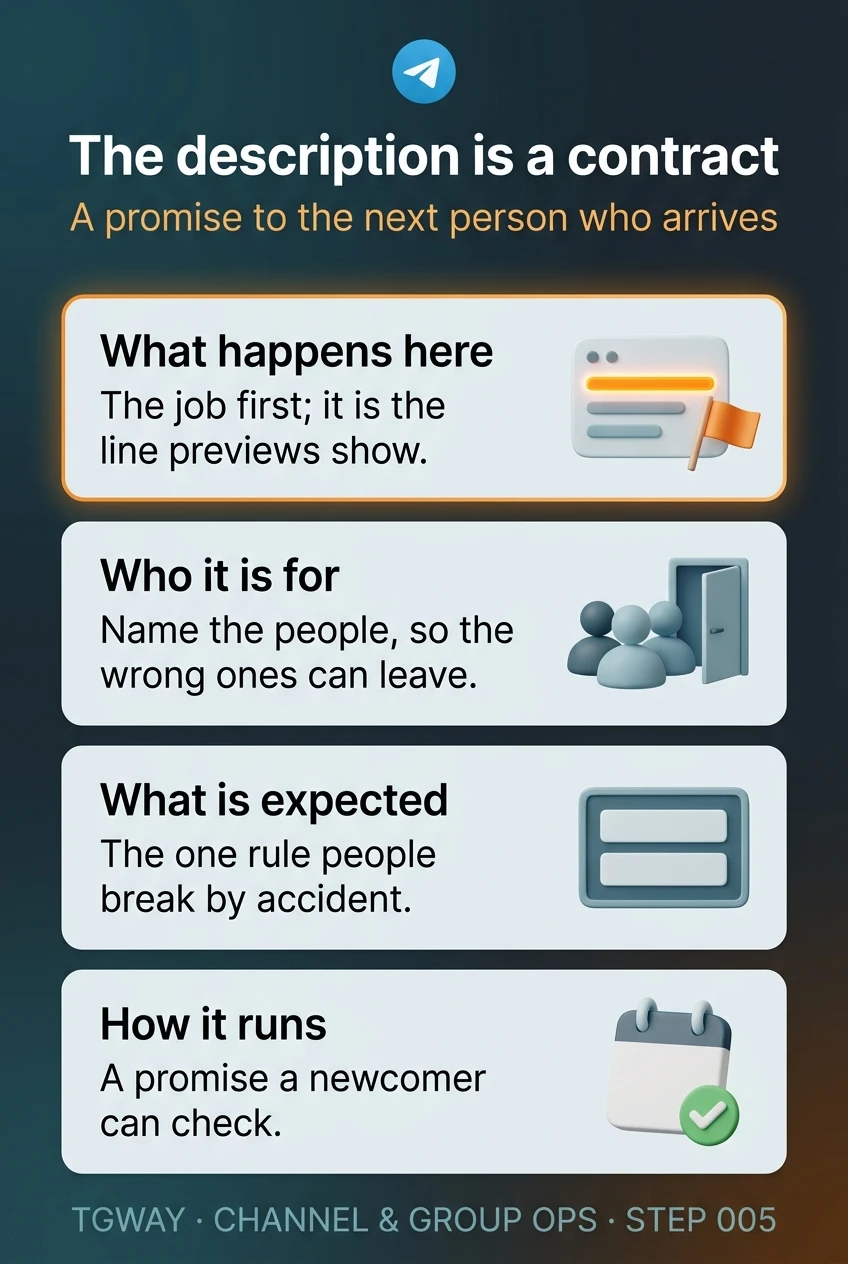
A description that works answers four questions, in this order. You rarely need more, and each line is short.
- What happens here The job from Step 001, starting with a verb: "Weekly photo critique", "Where parents of Class 4B share homework and trip dates", "Answers about the app, from the team that builds it". This is the line people see in previews, so it carries the most weight.
- Who it is for Name the people, so the wrong ones can leave before they post: "Beginners welcome", "For customers who bought the tool", "English only".
- What is expected The one rule people most often break by accident, not a list. "Questions in the Help topic", "No selling", "Photos need a caption with the location". Step 006 is about choosing it.
- How it runs Something a newcomer can check: "Moderated daily", "New posts every Monday", "The team replies on weekdays". A promise like this is what makes a room feel looked after.
A description that decorates, and one that promises
Both are for the same neighbourhood cycling group.
cancel A welcome sign
"Welcome to the best cycling community!" The first line, the one previews show, says nothing about what happens.
A row of hashtags that nobody searches for inside the room.
"Be respectful. Have fun." Rules nobody disagrees with and nobody can apply.
No hint of when anything happens or who looks after the room.
task_alt A contract
"Saturday rides around the north of the city, planned here." The job, first.
"All levels; routes are marked easy or hard." Who it is for.
"Post new routes in the Routes topic." The one rule people actually break.
"Next ride is pinned every Thursday." A promise anyone can check.
A newcomer should be able to tell, from the description alone, whether they belong and what to do first.
block What to leave out
- Links to other places in the first line. They push the purpose out of the preview, and in many rooms they look like the spam you are trying to keep out. Put links in a pinned message instead.
- Promises you will not keep. "24/7 support" in a room with one volunteer moderator is the fastest way to lose trust. Promise what you actually do.
- Long rule lists. A description is not the place for twelve rules. If the room needs them, pin them and point to the pin.
- Anything that changes weekly. Dates, prices and this week's event belong in pinned messages, which people expect to change. A description full of stale dates makes the whole room look abandoned.
autorenew Keeping the contract true
Rooms drift. The weekly critique becomes a general chat, the team that replied on weekdays gets smaller, the English-only group now has a Spanish topic. The description rarely keeps up, and a newcomer reads the old promise as a present one.
Two habits keep it honest. Reread the description whenever you change how the room runs, and edit it the same day. And once every few months, read it as a stranger would, then scroll the last week of messages. If the two describe different rooms, one of them needs to change, and it is usually the description, because the room is what people actually chose.
quiz Check your instincts
Which first line gives a newcomer the most to go on?
It says what happens, who answers and when, in the space a preview actually shows. A greeting says nothing about the room, and a row of hashtags pushes the purpose out of view while looking like spam.
Your description says "Moderated 24/7". You moderate alone, in the evenings. What should change?
The first unanswered spam message at 3 a.m. breaks a 24/7 promise in public. "Moderated every evening" is true, still reassuring, and something members can rely on. If you need round-the-clock cover, that is a staffing question for Step 008, not a wording one.
Where should the date of next month's meetup go?
Dates go stale, and a stale date in the description makes the whole room look forgotten. The description says what the room is for; pinned messages say what is happening now. The description can point to the pin.
task_alt
touch_app Try it now — ten minutes
To edit a description, open the room, tap its name at the top to open its info page, then choose Edit (the pencil on phones, or Manage group / Manage channel on Telegram Desktop). You need to be an admin with permission to change the room's info.
- Write the four lines What happens here, who it is for, what is expected, how it runs. Use your sentences from Steps 001 and 004.
- Check the first line alone Cover everything after the first line. Would a stranger know whether to join? If not, rewrite the first line.
- Move anything that changes into a pin Dates, links and this month's event go into a pinned message.
- Put a reminder in your calendar Every few months, reread the description against the last week of messages.
Why a public room's address behaves like a domain name, what happens to links when you change it, and why names should not carry dates or versions.
help Questions
Should a channel description be different from a group's?
The same four lines work, with one change. In a channel, "what is expected" is about the reader, not a rule: how often posts arrive and what kind. "One long post every Sunday about local history" tells a reader exactly what they are subscribing to, which is the promise a channel is judged by.
Do members get notified when I change the description?
Editing the description does not send members a message. That is why a real change in how the room runs deserves a short post as well: the description informs newcomers, and the post informs everyone already inside.
Can I use emoji or formatting in the description?
You can use emoji, and a single one can help a line stand out. Rows of them work against you: they take up the visible part of the preview and make the room look like the promotional groups people have learned to ignore. The words should carry the meaning on their own.
Does the description help people find the room in search?
For public rooms, the name and description are part of what people see when they find you, so plain words that match what members would type help. Step 022 covers being found in detail. For private rooms, the description is only ever read by people who already have the link.
The description is a contract
The four lines that turn a room description into a promise newcomers can check, and what to leave out. Tap to open it at full resolution.