What to Automate in Telegram and What to Keep Human

Once customers start writing, the same questions arrive again and again. What time do you open? Do you deliver? How much is the small one? Telegram gives a business several ways to answer faster, from saved replies you send with two taps to a bot that answers in your name while you sleep. It is tempting to switch everything on.
The better question is not how much to automate but which messages. Facts can be automated. Judgement, sympathy and prices that depend on the situation should stay with a person. Customers forgive a machine for telling them your opening hours. They do not forgive one for handling their complaint. This step sorts the messages you receive into those two piles and shows the lightest tool that handles each.
What you will be able to do after this step
- check_circle Sort your common messages into ones a machine can answer and ones a person should.
- check_circle Pick the lightest tool for each: quick replies, greeting and away messages, or a bot.
- check_circle Design the moment automation hands a customer to a person.
layers Three levels of help, lightest first
These are Telegram Business features, included with a Premium subscription. Each level hands over more of your voice, so start at the bottom and only climb when the lower level runs out.
- Quick replies. Answers you wrote once and send yourself with a shortcut. You still read every message and press send, so nothing goes out that you did not see. The quick replies tip covers writing them.
- Greeting and away messages. Sent automatically, once, at a moment you chose: when a new customer first writes, or when you are closed. They do not try to answer the question, only to set expectations.
- A connected bot. A program that reads the chats you give it and replies in your name. It is the only level that decides what to say, and whoever runs it can see those conversations.
For most small businesses, the first two levels handle the load. A bot starts to make sense when the same question with the same answer arrives dozens of times a day.
Which messages a machine can handle
Look at the last twenty messages customers sent you. Almost every one fits one of these. Pick a kind.
"What time do you close on Saturday?"
The answer is the same for everyone and does not change between messages: hours, address, parking, delivery areas, what you do and do not sell. These are the best candidates for automation, starting with a quick reply and, if they flood in, a bot.
Keep the automated answer exactly as true as your profile. If the hours change for a holiday, the saved answer has to change too, or the machine will confidently repeat an old promise.
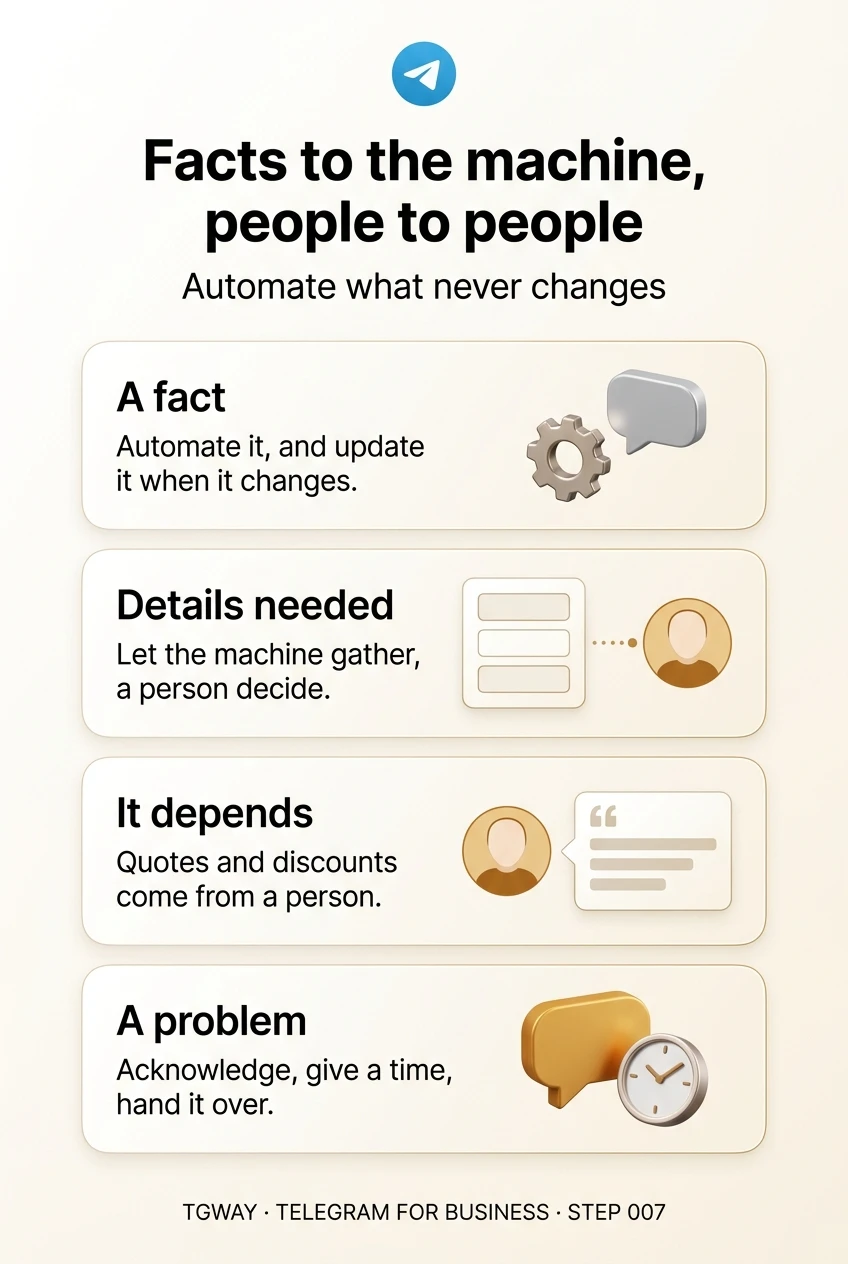
Automate it, and update it whenever the fact changes.
"I want to book a repair."
A person will handle this in the end, but first they need details: which model, what went wrong, which day suits you. Collecting those is repetitive, and automation does it well. A greeting message can ask for them up front; a bot can ask one question at a time.
The automation's job ends when the details are in. From there a person confirms, because only a person knows whether Thursday is really free.
Let the machine gather; let a person decide.
"How much would it cost to do all four rooms?"
Custom quotes, discounts, bundles, anything where the honest answer is "it depends". A machine that answers these either gives a vague range that helps nobody or a number you then have to honour.
Automation can tell the customer that a person will prepare the quote and when, and ask for what that person will need. The number itself should come from someone who understood the job.
A price that depends is a promise, and promises come from people.
"My order arrived broken."
Complaints, refunds, late deliveries, anything where the customer is unhappy or worried. This is where automation does the most damage. A cheerful scripted reply to an angry message reads as not listening, and a bot that tries to resolve it on its own may promise or refuse something you would not.
The right automated response to a problem is to get out of the way: acknowledge that a person will look at it, say when, and then make sure a person does.
When a customer is upset, the fastest human reply beats the best automated one.
handshake Designing the handover
Most of the harm from automation happens at the edge, when a customer needs a person and cannot tell whether they have reached one. Three habits make that edge clean:
- Say when it is automatic. An automated message should read as one. "This is an automatic reply; a person reads every message within two hours" is honest and reassuring. A bot that pretends to be you is found out, and then everything it said is doubted.
- Give a way to reach a person. A clear line such as "write 'person' and we will take over" or simply "reply here and one of us will answer" stops a customer going round in circles.
- Take over visibly. When you step in, say so: "Hi, it is Maria here, I have read the above." The customer should know the machine has stopped talking.
quiz Machine or person?
Twenty times a day, people ask whether you deliver to their area. Your delivery areas never change. What handles it best?
A fixed fact asked often is exactly what automation is for. Typing it twenty times a day is effort that does not make the answer any warmer. Start with a quick reply; consider a bot only if the volume becomes the problem.
A customer writes that their order is a week late and they are upset. Your bot is connected. What should it do?
An upset customer needs to be heard by a person. A bot offering a discount you did not approve makes a promise in your name, and repeating the policy reads as not listening. Acknowledge, give a time, hand over.
You run a one-person studio and get about ten messages a day. What is the right starting point?
At ten messages a day, the light tools save real time without giving your voice or your customers' messages to anyone else. Being a person is one of the few things a small studio does better than a large company; keep it.
task_alt
touch_app Try it now — twenty minutes
- Read your last twenty customer messages Mark each as a fact, a request with details, a price that depends, or a problem.
- Turn the top three facts into quick replies Short, accurate, and matching your profile exactly.
- Make your greeting collect details For the most common request, ask for the two or three things you always need to know.
- Write one line for problems What you say when something went wrong: that a person will look at it, and by when. Keep it as a quick reply you send yourself, not an automatic one.
What a connected bot can read and say, how to limit which chats it can touch, why the operator matters, and why most small businesses do not need one yet.
help Questions
Will customers mind talking to a bot?
Most do not mind a bot answering a simple question quickly, as long as they know it is a bot and can reach a person. What they mind is a bot pretending to be human, or one standing between them and help when something has gone wrong.
Can an AI chatbot answer the complicated questions too?
It can write fluent answers, which is the risk. A confident, well-written reply that quotes the wrong price or promises the wrong date is still your promise. Keep anything that commits you, such as prices, refunds and dates, with a person, whatever tool writes the words.
Are quick replies really automation?
They are the safest kind. The words are prepared in advance, but you choose when to send them and you read the message first. You get most of the time saved with none of the risk of a machine answering the wrong question.
How do I know when to add a bot?
When the same factual questions take up a real part of your day, customers are waiting for answers you could have given instantly, and you have found an operator you trust with your customers' conversations. Until all three are true, the lighter tools are enough.
Facts to the machine, people to people
Sorting customer messages into facts, requests, prices that depend and problems, the lightest tool for each, and a clean handover to a person. Tap to open it at full resolution.