How to Store a Wallet Recovery Phrase Safely

Step 006 ended with a sheet of paper: the recovery phrase, written by hand, numbered, checked against the screen. Now that paper is the most valuable thing you own that fits in an envelope. Whoever holds it holds the wallet, and if it is lost along with your phone, nobody can give the wallet back.
Storing it well means protecting it from two opposite failures at once. It must be hard for anyone else to find, and easy for you to find in two years. Most mistakes solve one and forget the other: a phrase hidden so well that its owner loses it, or kept so handy that a visitor sees it. This step covers where to keep it, what to keep it away from, and what happens to it if you are not around.
What you will be able to do after this step
- check_circle Explain why a recovery phrase does not belong in a photo, a cloud note or a message.
- check_circle Choose a place that protects against theft, loss and damage together.
- check_circle Decide whether anyone else should be able to find it, and how.
block Where it does not go
Anything digital turns one secret into several copies, in places you do not fully control. Each of these is common, and each has been how wallets were emptied:
- A photo or screenshot. Photos are backed up to cloud accounts, synced to other devices and readable by apps with gallery access.
- A notes app, a document or an email to yourself. They sync, they are searchable, and they live inside accounts that can themselves be taken over.
- A message, including Saved Messages. A chat is stored in the cloud and is only as safe as the Telegram account around it.
- Anywhere you type it except a wallet app you installed yourself. A website or bot asking for it is theft, whatever it claims.
Password managers are encrypted and some people use them for this. They still put the phrase online, behind one master password. For a wallet you care about, this track recommends paper, kept offline.
What the paper has to survive
A good storage place handles all four. Pick one to see what it asks of you.
Someone who should not see it, sees it
A visitor, a flatmate, a repair worker, someone who takes your bag. The paper should not look like what it is. Do not label it "crypto" or "wallet", do not keep it in your phone case or wallet, and do not leave it in the drawer with the device it unlocks.
A plain envelope in a place with other ordinary papers, or somewhere lockable at home, is better than an obvious hiding place. Anyone who knows what they are looking for checks under the mattress first.
It should be boring to look at and away from the phone.
You cannot remember where you put it
This is the most common way people lose access, and it happens years later: after a move, a clear-out, or simply time. A place that is clever today may be meaningless in two years.
Choose one place you will not forget, and tell yourself where it is in a way only you understand, for example a note in your calendar that reminds you to check "the blue folder" once a year. Checking once a year also tells you the paper is still readable.
A phrase you cannot find is the same as no phrase.
Water, fire, fading ink
Paper tears, gets wet, and ink fades in sunlight. Write in pen, not pencil, keep the paper dry and out of light, and consider a second copy in another building you trust, so one fire or flood does not take both.
Some people engrave or stamp the words onto metal plates made for this, which survive fire and water. That can be worth it for larger amounts. Each extra copy is also one more thing to protect, so two copies are usually the sensible maximum.
One copy protects against theft; two copies protect against disaster.
Something happens to you
If you are ill, or worse, a self-custody wallet cannot be recovered by a company for your family. If nobody knows the paper exists, what is in the wallet is gone.
Decide whether someone you trust should be able to find it, and tell them where it is without showing them the words. Some people leave instructions with a will or in a sealed envelope. Whatever you choose, never split the words between people or keep half in each place: half a phrase is not safe, and it makes recovery far harder.
Make sure that someone could find it if they had to, and nobody can read it before then.
quiz Check your instincts
You want a backup in case the paper is lost. Which is the safer second copy?
Hidden albums and drafts are still digital, synced and inside accounts that can be broken into. A second paper copy somewhere else protects against loss and fire without putting the phrase online.
Someone suggests keeping the first twelve words at home and the other twelve at a friend's. Is that a good idea?
Splitting a phrase makes it harder to recover yourself, since you need both places, and leaves each half weaker than it looks. Keep whole copies in safe places instead.
A message from "wallet support" asks you to confirm your phrase to secure your account. What do you do?
The rule has no exceptions: the phrase is typed only into a wallet app you installed, to restore your own wallet. Even a few words help an attacker, and a support name proves nothing.
task_alt
touch_app Try it now — fifteen minutes, no coins needed
- Find every copy that exists Paper, photos, notes, messages, emails. Delete every digital copy, including from the recently deleted folder and any cloud backup.
- Choose the place for the paper Plain, dry, away from the phone, somewhere you will still remember in two years.
- Decide on a second copy If the wallet matters to you, a second handwritten copy in another trusted building.
- Set a yearly reminder Once a year, check the paper still exists and is readable. Only then add anything you would miss to the wallet.
The difference between holding the key yourself and trusting a company with it, why every transfer is final, and why no legitimate person ever asks for your recovery phrase.
help Questions
Is a bank safe deposit box a good idea?
It protects well against theft and fire, and it is a reasonable place for a second copy. The trade-off is access: you cannot reach it at night or on holidays, so it is best as a backup rather than the only copy.
Can I memorise the phrase instead?
Memory is not a backup. Twenty-four words in exact order are easy to forget partly, and one missing or swapped word is enough to lose access. Memorising it alongside a paper copy is fine; instead of one is not.
I already took a photo of my phrase. What now?
Delete it everywhere, including cloud backups. If the wallet holds anything significant, the safest step is to create a new wallet, store its phrase on paper, and move everything across, because you cannot know who saw the photo.
Does the wallet in Telegram's menu need this?
Only its self-custody part, if you use it, which shows you a phrase when you set it up. The custodial part is run by a company and recovered through your account instead, as Step 003 explained.
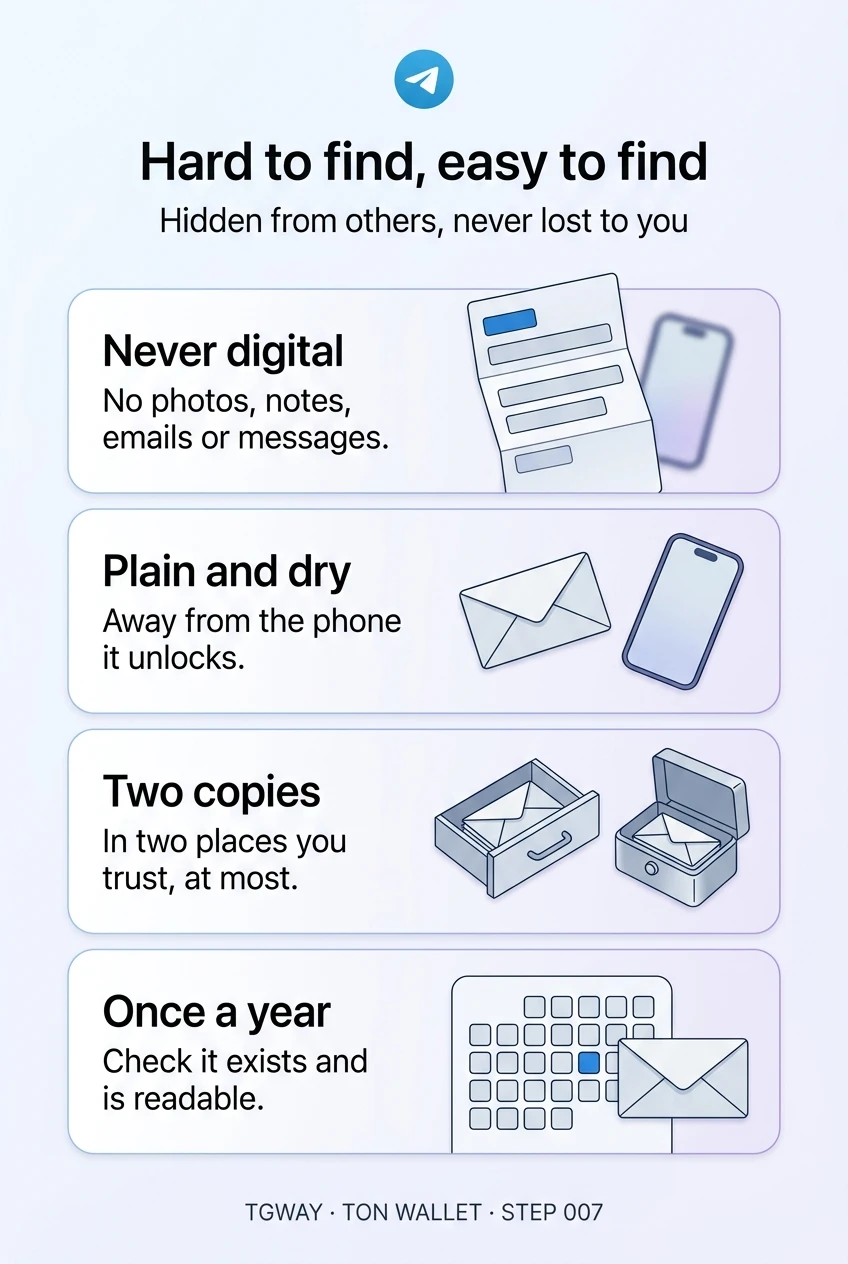
Hard to find, easy to find
Where a recovery phrase must never go, the four risks the paper has to survive, and whether anyone else should be able to find it. Tap to open it at full resolution.